
DolphinDB Order Book Engine: Build High-Frequency Order Books from Tick-by-Tick Data
An order book is a list of buy and sell orders organized by price level for specific instruments. An order book snapshot reflects market liquidity and trading interest at a given point in time. Actively traded instruments typically have deeper and more liquid order books. Order books are essential for quantitative trading strategy development, risk management, and market analysis.
Exchanges typically provide both real-time and historical market snapshots. In addition to the order book information, these snapshots also include trade information such as the latest traded price. For example, Shanghai Stock Exchange (SSE) and Shenzhen Stock Exchange (SZSE) provide 10-level Level-2 snapshots at a 3-second frequency. With the growth of high-frequency trading and real-time systems, 3-second snapshots are no longer sufficient for T+0 and other latency-sensitive trading strategies. Quantitative trading teams increasingly require higher-frequency and richer market snapshots to react more quickly to changing market conditions in live trading environments.
To meet the industry's demand for customizable high-frequency order books while reducing
development costs, DolphinDB has introduced a high-performance order book engine with
verified correctness, built on its expertise in high-performance stream computing and
its close collaboration with financial clients. You can create an order book engine
using the createOrderbookSnapshotEngine function, and build order books
by feeding the engine properly formatted tick-by-tick order and trade data.
The order book engine provides the following capabilities:
-
Multiple security types across exchanges, including SZSE stocks.
-
Generates order books at any depth and any frequency.
-
Derived metrics including trade details, order details, and cancellation details.
-
User-defined metrics.
For real-time processing, the order book engine also provides:
-
Unified stream and batch processing.
-
Multiple time semantics, such as event time and machine time.
-
Flexible triggering mechanisms, such as cross-instrument event triggers.
The order book engine is available as an add-on feature for the commercial edition. Please contact our support team or sales team to apply for a trial.
All examples in this article require DolphinDB Server version 2.00.12 or later.
1. How the Order Book Engine Works
The order book engine is a built-in computation component. It can be created using
the createOrderbookSnapshotEngine function. After initialization,
it performs computations on tick-by-tick trade and order data provided in the
specified format. The engine outputs structured market data, including multi-level
order book depth, tick-by-tick execution data, and user-defined metrics. All results
are written to a target table.
This chapter describes the internal design and implementation of the order book engine, including its aggregation logic, time window management, and out-of-order data handling, as well as its support for different trading rules. You can skip to Chapter 2 for implementation details if you are primarily interested in practical usage.
1.1 Order Book Building Logic
The order book engine employs an event-driven state update mechanism to build the limit order book from tick-by-tick order and trade data.
-
Within each channel, events are processed sequentially based on ApplSeqNum, the exchange-assigned message sequence identifier (also known as BizIndex), which is independently enumerated starting from 1 per channel.
-
The order book state is maintained through incremental updates: Upon receiving an order event, the corresponding price and volume are recorded in an internal state cache. Upon receiving trade or cancellation events, the matched quantities are decremented from the cached order state.
-
Through continuous event-driven updates, the engine maintains a real-time view of order quantities, order counts, and aggregated depth information at each price level.
This building logic is further adjusted according to exchange-specific trading rules before generating the final order book output, ensuring consistency with market regulations. For example, for SZSE stocks, the engine implements ChiNext price band constraints. Orders violating price limits may be excluded from the order book, and this behaviour can be configured via runtime parameters.
The correctness of the building process can be validated by comparing the generated order book with the exchange's 3-second snapshots. The validation methodology and implementation details are presented in Chapter 5.
1.2 Time Window Processing
An order book snapshot represents a cross-section of the order book at a specific point in time. The definition of the time window and the triggering of snapshot generation are fully managed by the engine. This section describes the underlying mechanism for time windowing and snapshot triggering.
When the order book engine is configured to generate snapshots at a 1-second interval, a snapshot with timestamp 10:00:00 represents the latest order book state constructed from all tick-by-tick data with timestamps less than or equal to 10:00:00. Window-based metrics, such as interval trade volume, are calculated over the interval (09:59:59, 10:00:00]. The snapshot at 14:57:00 follows slightly different semantics. Since the engine stops processing before the closing call auction session, the final snapshot excludes ticks at 14:57:00 itself and corresponds to the interval (14:56:59, 14:57:00).
In real-time processing, tick-by-tick data is ingested sequentially, and the engine must determine when a window is complete. Taking the 10:00:00 snapshot as an example, the triggering rule is as follows: once a tick with a timestamp greater than 10:00:00 is received (either order or trade), the engine finalizes and outputs the 10:00:00 snapshot. The triggering tick itself is excluded from the computation. This rule can be applied either per symbol or across all symbols. When applied per symbol, each symbol triggers computation and output of its own order book only after the engine receives a tick-by-tick record for that symbol with a timestamp greater than 10:00:00. When applied across all symbols, a tick-by-tick record from any symbol with a timestamp greater than 10:00:00 triggers computation and output of the order books for all symbols.
Additionally, if tick-by-tick data is missing for a given period, no output will be generated for that interval. For example, during the midday trading break, no snapshots are produced for the interval between 11:30:01 and 12:59:59 due to the absence of market data.
By strictly aligning snapshot generation with tick timestamps, the system ensures consistency between real-time and historical computations, achieving unified stream and batch processing. It is recommended to treat all symbols within a single channel as a whole and use event time (i.e., the trade timestamp in the data) to determine snapshot boundaries. This approach ensures both timeliness and accuracy of snapshot generation. In future releases, the engine will also support processing based on machine time, where the latest order book is output at fixed system time intervals.
1.3 Handle Out-of-Order Data
In live trading, tick-by-tick data ingested into the system may arrive out of order. Improper handling of such a disorder can compromise the correctness of order book building. Within exchange systems, each order and trade event in a given channel is assigned a sequential identifier, ApplSeqNum, which reflects the true execution order of events on the exchange side. Out-of-order data refers to cases where events do not arrive at the processing system in strict ApplSeqNum order, typically due to network latency or other transmission issues. As a result, incoming tick-by-tick data may need to be reordered to restore the original event sequence.
For example, if a trade event for Symbol A arrives before its corresponding order event, and the engine processes events strictly in arrival order, the resulting order book state will be incorrect. The order book engine supports ApplSeqNum-based ordering. The engine detects sequence gaps and temporarily buffers out-of-order data until the missing sequence entries arrive, after which computation and output are performed. You can choose whether to enable out-of-order data handling based on your business requirements and the quality of the data you receive.
The table below illustrates how events with different ApplSeqNum values are processed, where the sequence from left to right represents increasing event order, i.e., ApplSeqNum = 1 is processed first.
| Received ApplSeqNum | 1 | 2 | 5 | 6 | 9 | 3 | 4 |
|---|---|---|---|---|---|---|---|
| Current processing ApplSeqNum | Process 1 | Process 2 | No processing (buffer 5) | No processing (cache 5 and 6) | No processing (cache 5, 6, and 9) | Process 3 | Traverse and process 4, 5, and 6 (cache 9) |
1.4 Supported Security Types and Rules
Since version 2.00.12, the order book engine supports stocks, funds, and convertible bonds across both SSE and SZSE. The detailed rule coverage is as follows:
-
Support for ChiNext price band constraints can be enabled via configuration. For SZSE stocks, the default behaviour follows pre–full registration system rules, including ChiNext price band logic.
-
The engine implements handling for special order types, including market orders and best-bid/ask orders, ensuring they are correctly reflected in the built order book.
-
Convertible bonds in both SSE and SZSE are processed according to the new regulations introduced in August 2022.
-
Special rules applicable to ChiNext stocks during the first five trading days after listing are not included; therefore, order book correctness is not guaranteed for ChiNext instruments in this period.
-
Special rules for main board stocks on their listing day are not included; therefore, order book correctness is not guaranteed for main board instruments on the first trading day.
2. Prepare Input Data
The calculation correctness of the order book engine relies on the quality of input data. Therefore, strict requirements are imposed on the input data. This section describes these requirements and provides implementation guidance.
2.1 Data Processing Requirements
-
Merged trade and order input table
The engine accepts a single input table that contains both tick-by-tick trade and order data. Trade and order records must be normalized into a unified schema so they can be stored in the same table.
-
Required input fields
The input data must contain at least 10 mandatory fields. These fields are essential for engine computation. During engine initialization, the parameter inputColMap must be specified. It is a dictionary that maps required logical fields to actual column names in the input table. Additional fields may be included in the table, but are ignored by the engine.
| Key | Data Type of Column Specified by Value | Description |
|---|---|---|
| "codeColumn" | SYMBOL | Instrument symbol (e.g., 300010.SZ) |
| "timeColumn" | TIME | Trade time |
| "typeColumn" | INT |
Trade type:
|
| "priceColumn" | LONG | Price. The scale is determined by priceScale; by default, it is the actual price × 10000. |
| "qtyColumn" | LONG | Number of shares |
| "buyOrderColumn" | LONG |
|
| "sellOrderColumn" | LONG |
|
| "sideColumn" | INT |
Buy/sell:
Note:
|
| "msgTypeColumn" | INT |
Data type:
|
| "seqColumn" | LONG | The tick-by-tick data sequence number that starts from 1 and increments within each channel. For SZSE, use the appseqlnum field. If the index field is included, you can also use index. For SSE, use the bizIndex field. |
| "receiveTime" | NANOTIMESTAMP | The time when the tick-by-tick data was received |
-
Enum value constraints
The columns listed above are defined using predefined enum values. Input values must strictly follow the defined conventions to ensure correct results. For example, in the BSFlag field, 1 represents a buy order and 2 represents a sell order.
-
Notes on the seqColumn Column
-
For SZSE order data, the seqColumn represents the order identifier. It is required for correctly matching subsequent cancel and trade events to the original order, and therefore must be accurate.
-
Moreover, seqColumn can also be used to determine processing order: If you create the order book engine with orderBySeq=false, the engine processes input records one by one in the order they arrive. If you create the engine with orderBySeq=true, the engine processes data one record at a time in ascending order of the values in the seqColumn column. For details, see Section 1.3.
-
SZSE stocks, SZSE convertible bonds, SZSE funds, and SSE convertible bonds each use separate channels. SSE funds and stocks share the same channel. Within a channel, ApplSeqNum is numbered continuously starting from 1.
-
-
A single order book engine instance can process at most one full channel of instruments per trading day.
The engine maintains a cumulative order book state for each instrument and does not reset the state at day boundaries. Therefore, cross-day processing is not supported. When triggerType=”mutual”, processing multiple channels in a single engine is not recommended, as merging multiple channels by ApplSeqNum may break event ordering and lead to early snapshot triggers.
2.2 Batch Process Historical Input Data
Tick-by-tick trade and order data are typically stored in separate files or database tables with different schemas. This section provides examples of how to merge trade and order data into an input table for batch processing. Due to differences between SZSE and SSE data formats, the processing is described separately in the following subsections.
2.2.1 SZSE Stocks
Input Data
Tick-by-tick trade data: trans.zip
Tick-by-tick order data: orders.zip
The data contains complete tick-by-tick data for five SZSE stocks on 2022.06.01.
Note that the data files are compressed archives. Please extract them before use.
Example
/* Writes SZSE tick-by-tick trades and orders into the same table, OrderTrans*/
// Log in
login("admin", "123456")
// Create the merged table OrderTrans
name = `SecurityID`Date`Time`SourceType`Type`Price`Qty`BSFlag`BuyNo`SellNo`ApplSeqNum`ChannelNo
type = `SYMBOL`DATE`TIME`INT`INT`LONG`LONG`INT`LONG`LONG`LONG`INT
OrderTrans = table(1:0, name, type)
// Specify the file paths to load
orderPath = "./orders.csv"
transPath = "./trans.csv"
// Specify enum mappings
tradeTypeMap = dict([0, 1], [0, 1])
orderTypeMap = dict([1, 2, 3], [1, 2, 3])
BSFlagMap = dict([1, 2], [1, 2])
// Load the CSV file and transform the order into the target table schema
orderTemp = select
		SecurityID, MDDate, temporalParse(lpad(string(MDTime), 9, `0), "HHmmssSSS") as Time, 0 as SourceType, orderTypeMap[OrderType] as Type, OrderPrice*10000 as Price, OrderQty as Qty, BSFlagMap[OrderBSFlag] as BSFlag, 0 as BuyNo, 0 as SellNo, ApplSeqNum, ChannelNo
		from loadText(orderPath)
OrderTrans.append!(orderTemp)
// Load the CSV file and transform transaction data into the required table schema
tradeTemp = select
		SecurityID, MDDate, temporalParse(lpad(string(MDTime), 9, `0), "HHmmssSSS") as Time, 1 as SourceType, tradeTypeMap[TradeType] as Type, TradePrice*10000 as Price, TradeQty as Qty, BSFlagMap[TradeBSFlag] as BSFlag, TradeBuyNo as BuyNo, TradeSellNo as SellNo, ApplSeqNum, ChannelNo
		from loadText(transPath)
OrderTrans.append!(tradeTemp)
// Save the merged result
saveText(OrderTrans, "./orderTrans.csv")-
When processing SZSE order data, set both BuyNo and SellNo to 0, as they have no practical meaning. In the SZSE tick-by-tick order data, the ApplSeqNum field uniquely identifies an order. For each trade event, the fields TradeBuyNo and TradeSellNo correspond to the buyer’s and seller’s order identifiers, respectively, both mapped to ApplSeqNum.
-
Note that three dictionaries are used to define enum mappings, where the key represents the value in the source data file and the value represents the standardized enum value defined by the order book engine.
tradeTypeMap = dict([0, 1], [0, 1])
orderTypeMap = dict([1, 2, 3], [1, 2, 3])
BSFlagMap = dict([1, 2], [1, 2])
In this example, the source data values are already consistent with the engine’s conventions. If data from other vendors is used, the dictionary keys must be adjusted to match the corresponding source data values. For example, when using SZSE data from Tonglian, the mapping should be defined as follows:
tradeTypeMap = dict([70, 52] , [0 ,1])
orderTypeMap = dict([49, 50, 85], [1, 2, 3])
BSFlagMap = dict([49, 50] , [1, 2])
2.2.2 SSE Stocks
Input Data
Tick-by-tick trade data:SHtrans.zip
Tick-by-tick order data:SHorders.zip
The data contains complete tick-by-tick data for five SSE stocks on 2023.07.11.
Note that the data files are compressed archives. Please extract them before use.
Example
/* Writes SSE tick-by-tick trades and tick-by-tick orders into the same table, OrderTrans*/
// Log in
login("admin", "123456")
// Create the merged table OrderTrans
name = `SecurityID`Date`Time`SourceType`Type`Price`Qty`BSFlag`BuyNo`SellNo`ApplSeqNum`ChannelNo
type = `SYMBOL`DATE`TIME`INT`INT`LONG`LONG`INT`LONG`LONG`LONG`INT
OrderTrans = table(1:0, name, type)
// Specify the file paths to load
orderPath = "/home/ytxie/orderbookServer/vOrderbook/server//SHorders.csv"
transPath = "/home/ytxie/orderbookServer/vOrderbook/server/SHtrans.csv"
// Specify the enum value mappings
orderTypeMap = dict([2, 10], [2, 10])
BSFlagMap = dict([1, 2], [1, 2])
// Load the CSV file and transform the order into the target table schema
orderTemp = select
		SecurityID, MDDate, MDTime, 0 as SourceType, orderTypeMap[OrderType] as Type, OrderPrice*10000 as Price, OrderQty as Qty, BSFlagMap[OrderBSFlag] as BSFlag, OrderNo as BuyNo, OrderNo as SellNo, ApplSeqNum, ChannelNo
		from loadText(orderPath)
OrderTrans.append!(orderTemp)
// Load the CSV file and transform transaction data into the required table schema
tradeTemp = select
		SecurityID, MDDate, MDTime as Time, 1 as SourceType, 0 as Type, TradePrice*10000 as Price, TradeQty as Qty, BSFlagMap[TradeBSFlag] as BSFlag, TradeBuyNo as BuyNo, TradeSellNo as SellNo, ApplSeqNum, ChannelNo
		from loadText(transPath)
OrderTrans.append!(tradeTemp)
// Save the merged result
saveText(OrderTrans, "./SHorderTrans.csv")-
When processing SSE order data, set both BuyNo and SellNo to OrderNo. In the SSE tick-by-tick order data, the OrderNo field uniquely identifies each order. For each trade event, TradeBuyNo and TradeSellNo correspond to the buyer’s and seller’s OrderNo, respectively.
-
If the SSE tick-by-tick data includes the bizIndex field, it is equivalent to ApplSeqNum. In practice, only one of these fields is provided, representing a per-channel sequence number starting from 1.
-
In SSE tick-by-tick trade data, there is no trade-type field; therefore, the Type field is uniformly set to 0.
-
Note that two dictionaries are used for enum mapping, where the key represents the value in the source data file and the value represents the standardized enum defined by the order book engine. In this example, the source data values are already consistent with the engine’s conventions. If data from other vendors is used, the dictionary keys must be adjusted to match the corresponding source data values.
-
When specifying orderTypeMap, market orders are not present in SSE data; therefore, only order placement (type 2) and cancellation (type 10) need to be distinguished.
-
2.3 Process Real-Time Input Data
When ingesting real-time data into the order book engine, it is recommended to write tick-by-tick trade and order data into the DolphinDB stream tables in the exact order in which the exchange sends them. If the arrival order at the DolphinDB server is out of order with respect to ApplSeqNum, the engine can be configured with orderBySeq=true to enforce ordered processing based on the seqColumn field. The typical real-time ingestion pipeline is as follows:
-
First, create a stream table in DolphinDB, either as a shared stream table or a persisted stream table.
-
Next, subscribe to both tick-by-tick trade and order data via a market data SDK. In the SDK callback function, parse incoming messages and convert enum values as required.
-
Finally, write the tick-by-tick trades and tick-by-tick orders from the same channel into the same stream table.
There are two common approaches for integrating real-time market data into the DolphinDB server:
-
Approach 1: Market data plugins such as amdQuote and INSIGHT already support writing trade and order data into a single table and include built-in enum conversion. With the amdQuote or INSIGHT plugin, you can receive input data directly in the format expected by the order book engine.
-
Approach 2: DolphinDB API integration. Alternatively, external applications can be developed using the DolphinDB API. It is recommended to use the
MultithreadedTableWriterinterface for high-throughput real-time ingestion. Implementation details can follow the pipeline described above and reference the source code of existing plugins.
3. Build an Order Book
The order book engine presets the building logic along with a rich set of configurable parameters. You can use these parameters to customize the output frequency, order book depth, metric fields, and more. This chapter introduces, in a step-by-step manner, how to use the createOrderbookSnapshotEngine function to create an order book engine and generate customized order book outputs from input data.
The first section describes how to generate a 1-second order book snapshot using the engine’s default configuration. The output includes basic order book data and trade information, providing a foundation for understanding the engine’s core usage.
The second section describes how to build an order book that includes detailed tick-by-tick trade records. Using the outputColMap parameter, you can customize the required order book fields to obtain richer derived metrics than those available in standard snapshot data.
Finally, the third section describes how to build an order book with user-defined metrics. You will use the full set of metrics provided by the engine together with the userDefinedMetrics parameter to implement user-defined metrics, which the engine will calculate and output along with the order book.
3.1 Build a 1-Second Order Book
3.1.1 Create an Order Book Engine
First, create an order book engine. In the following example, the order book engine named “demo” outputs a 10-level order book for SZSE stocks every second.
// Define the engine parameter outputTable, which specifies the output table
suffix = string(1..10)
colNames = `SecurityID`timestamp`lastAppSeqNum`tradingPhaseCode`modified`turnover`volume`tradeNum`totalTurnover`totalVolume`totalTradeNum`lastPx`highPx`lowPx`ask`bid`askVol`bidVol`preClosePx`abnormal  join ("bids" + suffix) join ("bidVolumes" + suffix) join ("bidOrderNums" + suffix) join ("asks" + suffix)  join ("askVolumes" + suffix) join ("askOrderNums" + suffix)
colTypes = [SYMBOL,TIMESTAMP,LONG,INT,BOOL,DOUBLE,LONG,INT,DOUBLE,LONG,INT,DOUBLE,DOUBLE,DOUBLE,DOUBLE,DOUBLE,LONG,LONG,DOUBLE,BOOL] join take(DOUBLE, 10) join take(LONG, 10) join take(INT, 10) join take(DOUBLE, 10) join take(LONG, 10) join take(INT, 10)
outTable = table(1:0, colNames, colTypes)
// Define the engine parameter dummyTable, which specifies the schema of the input table
colNames = `SecurityID`Date`Time`SourceType`Type`Price`Qty`BSFlag`BuyNo`SellNo`ApplSeqNum`ChannelNo
colTypes = [SYMBOL, DATE, TIME, INT, INT, LONG, LONG, INT, LONG, LONG, LONG, INT]
dummyOrderTrans = table(1:0, colNames, colTypes)
// Define the engine parameter inputColMap, which specifies the meaning of each field in the input table
inputColMap = dict(`codeColumn`timeColumn`typeColumn`priceColumn`qtyColumn`buyOrderColumn`sellOrderColumn`sideColumn`msgTypeColumn`seqColumn, `SecurityID`Time`Type`Price`Qty`BuyNo`SellNo`BSFlag`SourceType`ApplSeqNum)
// Define the engine parameter prevClose, which specifies the previous closing price. prevClose does not affect any field in the final output except the previous closing price itself
prevClose = dict(`000400.SZ`300274.SZ`300288.SZ`300122.SZ`300918.SZ, [1.1, 2.2, 3.3, 4.4, 5.5])
// Create the engine to output a 10-level order book for SZSE stocks every second
engine = createOrderBookSnapshotEngine(name="demo", exchange="XSHE", orderbookDepth=10, intervalInMilli=1000, date=2022.01.10, startTime=09:30:00.000, prevClose=prevClose, dummyTable=dummyOrderTrans, inputColMap=inputColMap, outputTable=outTable, orderBySeq=false)-
exchange: Specifies the security type and determines which trading rules the engine uses. “XSHE” indicates Shenzhen Stock Exchange stocks
-
orderbookDepth: Specifies the order book depth.
-
intervalInMilli: Specifies the output interval in milliseconds, which determines the snapshot frequency.
-
date: Specifies the date component of the output timestamp column.
-
startTime: Specifies the timestamp at which snapshot generation begins.
-
prevClose: Specifies the previous close price. It cannot be derived from intraday tick-by-tick data and must therefore be provided as static input. In this example, a simulated previous close is used; in production scenarios, it can be retrieved from a database table.
-
dummyTable: Specifies the schema of the input table.
-
inputColMap: Specifies the mapping between required logical fields and columns in the input table. Only the fields specified in inputColMap are required by the engine. In this example, columns such as Date and ChannelNo in dummyTable are redundant and ignored by the engine.
-
outTable: Specifies the output table to which the results are written. Column names can be defined arbitrarily, but column types and ordering must remain consistent with the example schema. This is because the engine writes results according to a fixed internal table schema without referencing column names directly. In real-time scenarios, if the output table needs to support downstream subscriptions, outTable must be defined as a shared stream table, as shown below:
share(table(1:0, colNames, colTypes), "outTable")-
orderBySeq: Specifies whether the engine determines the processing order based on the seqColumn column in the tick-by-tick data. For details on how it works, see Section 1.3. In the following examples, only a small number of stocks are included, and the corresponding seqColumn values are not continuous. Therefore, we set orderBySeq=false so that the engine processes records directly in input order, and you must ensure that the input data stream preserves the correct business order.
The engine can be released using the following script:
dropStreamEngine("demo")3.1.2 Batch Process Data
DolphinDB’s streaming engines expose a table-based interface. Batch processing can be performed by inserting preprocessed data into the order book engine using tableInsert or append!.
(1) SZSE Stocks
Input Data
Processed SZSE tick-by-tick dataset from Section 2.2.1:orderTrans.zip. Note that the data file is compressed archive. Please extract it before use.
t = select * from loadText("./orderTrans.csv") order by ApplSeqNum
getStreamEngine("demo").append!(t)-
Before data is ingested into the engine, it must be strictly sorted by the ApplSeqNum field. Otherwise, the output results may be incorrect.
-
For a single engine, we recommend loading at most all tick-by-tick data for one channel on one trading day. For a single-engine instance, it is recommended to process at most one full channel of tick-by-tick data for a single trading day. Detailed explanations of these constraints are provided in Section 2.1 (Input Data Preparation Notes).
-
The input table t must strictly match the schema of dummyOrderTrans defined in Section 3.1.
-
Executing
getStreamEngine("demo").append!(t)in the client triggers single-threaded computation within the current session. The current session is blocked until the engine finishes processing all tick-by-tick data in table t. To enable parallel processing across multiple engines, jobs can be submitted usingsubmitjob, allowing concurrent data ingestion. A common practice is to group data by channel number and trading date for parallel execution.
The output table outTable is as follows:

(2) SSE Stocks
To generate the order books for SSE stocks, set exchange="XSHG" when creating the order book engine. The code in 3.1.1 should be modified accordingly.
engine = createOrderBookSnapshotEngine(name="demo", exchange="XSHG", orderbookDepth=10, intervalInMilli=1000, date=2022.01.10, startTime=09:30:00.000, prevClose=prevClose, dummyTable=dummyOrderTrans, inputColMap=inputColMap, outputTable=outTable, orderBySeq=false)Input Data
Processed SSE tick-by-tick dataset from Section 2.2.2:SHorderTrans.zip.
Note that the data file is compressed archive. Please extract it before use.
t = select * from loadText("./SHorderTrans.csv") order by ApplSeqNum
getStreamEngine("demo").append!(t)-
All notes and constraints are the same as those described for SZSE data.
3.1.3 Process Real-Time Data
Use the subscribeTable function to subscribe to the shared stream table orderTrans, and specify the order book engine directly as the handler.
subscribeTable(tableName="orderTrans", actionName="orderbookDemo", handler=getStreamEngine("demo"), msgAsTable=True)-
Make sure that orderTrans contains tick-by-tick data for only one channel at any given time.
-
To generate order books for both SSE and SZSE stocks, separate order book engine instances must be created.
-
Real-time data can be ingested into the orderTrans stream table via the plugin or API approaches described in Section 2.3.
3.2 Build an Order Book with Derived Metrics (e.g., Tick-Level Trade Details)
First, create an order book engine. In the following example, the engine named “demo” generates a 10-level order book for SZSE stocks at a 1-second frequency, with additional tick-level trade detail fields.
// Get the schema of the order book engine output table
depth = 10
orderBookAsArray =true
outputColMap, outputTableSch = genOutputColumnsForOBSnapshotEngine(basic=true, time=true, depth=(depth, orderBookAsArray), tradeDetail=true, orderDetail=false, withdrawDetail=false, orderBookDetailDepth=0, prevDetail=false)
// Define the engine parameter outputTable, which specifies the output table
outTable = table(1:0, outputTableSch.schema().colDefs.name, outputTableSch.schema().colDefs.typeString)
// Define the engine parameter dummyTable, which specifies the schema of the input table
colNames = `SecurityID`Date`Time`SourceType`Type`Price`Qty`BSFlag`BuyNo`SellNo`ApplSeqNum`ChannelNo`ReceiveTime
colTypes = [SYMBOL, DATE, TIME, INT, INT, LONG, LONG, INT, LONG, LONG, LONG, INT, NANOTIMESTAMP]
dummyOrderTrans = table(1:0, colNames, colTypes)
// Define the engine parameter inputColMap, which specifies the meaning of each field in the input table
inputColMap = dict(`codeColumn`timeColumn`typeColumn`priceColumn`qtyColumn`buyOrderColumn`sellOrderColumn`sideColumn`msgTypeColumn`seqColumn`receiveTime, `SecurityID`Time`Type`Price`Qty`BuyNo`SellNo`BSFlag`SourceType`ApplSeqNum`ReceiveTime)
// Define the engine parameter prevClose, which specifies the previous closing price. prevClose does not affect any field in the final output except the previous closing price itself
prevClose = dict(`000400.SZ`300274.SZ`300288.SZ`300122.SZ`300918.SZ, [1.1, 2.2, 3.3, 4.4, 5.5])
// Create the engine to calculate and output a 10-level order book for SZSE stocks every second
engine = createOrderBookSnapshotEngine(name="demo", exchange="XSHE", orderbookDepth=depth, intervalInMilli=1000, date=2022.01.10, startTime=09:30:00.000, prevClose=prevClose, dummyTable=dummyOrderTrans, inputColMap=inputColMap, outputTable=outTable, orderBySeq=false, outputColMap=outputColMap, orderBookAsArray=orderBookAsArray)-
Unlike the previous subsection, this example specifies the outputColMap parameter when calling
createOrderbookSnapshotEngine, which is used to select the required output fields. In Section 3.1, outputColMap was not specified, so the engine returned the default output schema. For details on the usage of EoutputColMapE and the default output format, t, please refer toCcreateOrderbookSnapshotEngine. -
To facilitate field selection, DolphinDB provides the function
genOutputColumnsForOBSnapshotEngine, which returns both the required output fields and the corresponding output table schema. The function accepts a configuration that specifies which categories of fields to include. In this section, basic, time, depth, and tradeDetail are set to true, and all others are set to false, which means only the basic trade information, time fields, order book fields, and trade detail fields are required. -
When time=true, the
genOutputColumnsForOBSnapshotEnginefunction returns multiple time fields, which are also supported by the engine as optional outputs. These fields are primarily used for performance analysis, including system timestamps at the moment of result generation and the original tick arrival time that triggered the computation. To support this, the inputColMap must include the key ReceiveTime, enabling the engine to capture the arrival time of each tick-by-tick record. -
In addition, orderBookAsArray is set to true, which means the multi-level price and volume data are output as array vectors. For example, the 10 bid prices are stored in a single field. Otherwise, each level would be stored in separate fields.
Next, load the historical data into the order book engine. Compared with the previous section, the input data in this example includes an additional column, ReceiveTime, which represents the arrival time of each tick-by-tick record.
t = select * from loadText("./orderTrans.csv") order by ApplSeqNum
update t set ReceiveTime = now(true) // Construct the receive time column
getStreamEngine("demo").append!(t)
The output table outTable is as follows:
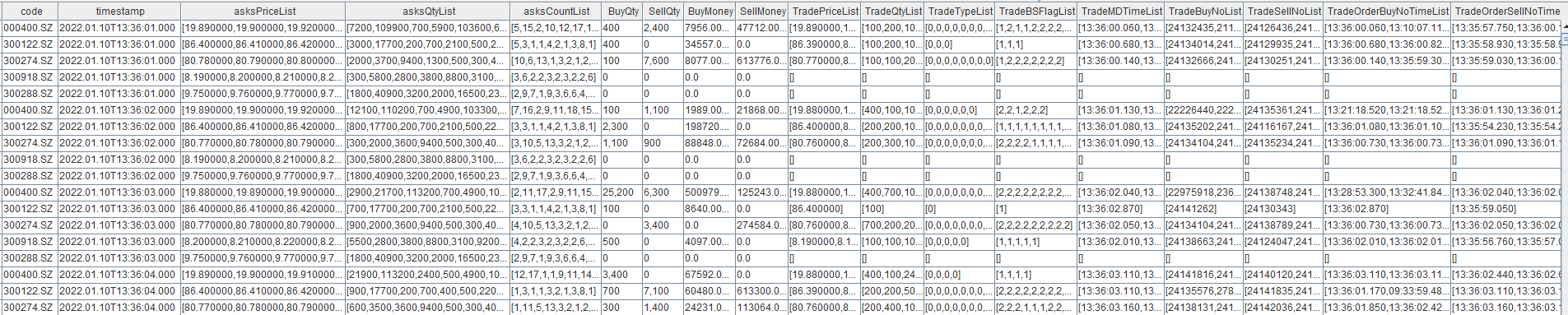
3.3 Build an Order Book with User-Defined Metrics
First, create an order book engine. In the following example, the order book engine named "demo" generates a 10-level order book for SZSE stocks at a 1-second frequency, with four additional user-defined metrics.
| Metric Name | Description |
|---|---|
| AvgBuyDuration | Average order duration of buy orders involved in trades over the past 1 second |
| AvgSellDuration | Average order duration of sell orders involved in trades over the past 1 second |
| BuyWithdrawQty | Total buy-side cancellation volume over the past 1 second |
| SellWithdrawQty | Total sell-side cancellation volume over the past 1 second |
// Define the order book depth and other parameters
depth = 10
orderBookAsArray =true
outputColMap = genOutputColumnsForOBSnapshotEngine(basic=true, time=false, depth=(depth, orderBookAsArray), tradeDetail=true, orderDetail=false, withdrawDetail=true, orderBookDetailDepth=0, prevDetail=false)[0]
// Define the engine parameter dummyTable, which specifies the schema of the input table
colNames = `SecurityID`Date`Time`SourceType`Type`Price`Qty`BSFlag`BuyNo`SellNo`ApplSeqNum`ChannelNo
colTypes = [SYMBOL, DATE, TIME, INT, INT, LONG, LONG, INT, LONG, LONG, LONG, INT]
dummyOrderTrans = table(1:0, colNames, colTypes)
// Define the engine parameter inputColMap, which specifies the meaning of each field in the input table
inputColMap = dict(`codeColumn`timeColumn`typeColumn`priceColumn`qtyColumn`buyOrderColumn`sellOrderColumn`sideColumn`msgTypeColumn`seqColumn, `SecurityID`Time`Type`Price`Qty`BuyNo`SellNo`BSFlag`SourceType`ApplSeqNum)
// Define the engine parameter prevClose, which is the previous day's closing price. prevClose does not affect any fields in the final output other than the previous day's closing price itself
prevClose = dict(STRING, DOUBLE)
//// Define user-defined factors
def userDefinedFunc(t){
        AvgBuyDuration = rowAvg(t.TradeMDTimeList-t.TradeOrderBuyNoTimeList).int()
        AvgSellDuration = rowAvg(t.TradeMDTimeList-t.TradeOrderSellNoTimeList).int()
        BuyWithdrawQty = rowSum(t.WithdrawBuyQtyList)
        SellWithdrawQty = rowSum(t.WithdrawSellQtyList)
        return (AvgBuyDuration, AvgSellDuration, BuyWithdrawQty, SellWithdrawQty)
}
// Define the output table for the order book engine
outputTableSch = genOutputColumnsForOBSnapshotEngine(basic=true, time=false, depth=(depth, orderBookAsArray), tradeDetail=false, orderDetail=false, withdrawDetail=false, orderBookDetailDepth=0, prevDetail=false)[1]
colNames = outputTableSch.schema().colDefs.name join (`AvgBuyDuration`AvgSellDuration`BuyWithdrawQty`SellWithdrawQty)
colTypes = outputTableSch.schema().colDefs.typeString join (`INT`INT`INT`INT)
outTable = table(1:0, colNames, colTypes)
// Create the engine to generate a 10-level order book output for SZSE stocks every second
try{dropStreamEngine(`demo)} catch(ex){}
engine = createOrderBookSnapshotEngine(name="demo", exchange="XSHE", orderbookDepth=depth, intervalInMilli=1000, date=2022.01.10, startTime=09:30:00.000, prevClose=prevClose, dummyTable=dummyOrderTrans, inputColMap=inputColMap, outputTable=outTable, outputColMap=outputColMap, orderBookAsArray=orderBookAsArray, userDefinedMetrics=userDefinedFunc)-
When creating the engine, the userDefinedMetricspara meter is specified. It is a unary function that defines the user-defined metrics. The input of this function must be a table, where each row represents a single instrument snapshot, and each column corresponds to an internal engine metric defined in outputColMap. You can use these built-in metrics to derive user-defined metrics. In this example, trade and cancellation details between two consecutive order book snapshots are used to derive metrics such as order duration and cancellation volume within the interval.
-
Note: Once userDefinedMetrics is specified, the output schema is no longer fully aligned withoutputColMap. Instead, the output consists of two parts:
-
Built-in metrics returned by the
genOutputColumnsForOBSnapshotEnginefunction, including basic and depth fields. -
User-defined metrics computed via userDefinedMetrics.
-
Finally, historical data is loaded into the order book engine.
t = select * from loadText("./orderTrans.csv") order by ApplSeqNum
getStreamEngine("demo").append!(t)
The output result table outTable is shown below, where the highlighted section represents user-defined metrics:

4. Performance Testing
Based on the order book created in 3.2 (which includes derived metrics such as tick-level trade details), we benchmarked the computational performance under both historical batch processing and real-time processing.
4.1 Batch Processing Performance
We directly ingested one full trading-day channel of SZSE data covering over 600 stocks into the order book engine and measured execution time using the timer statement. The results show that generating a 1-second order book requires approximately 1 minute and 57 seconds. Since the data volume of 10-millisecond snapshots is more than three times that of 1-second snapshots, the increased output overhead leads to higher total processing time for 10-millisecond resolution.
Test results:
| Security type | Number of stocks | Order book frequency | Order book depth | Parallelism | Total rows in the order book table | Total time to generate one day of order book output |
|---|---|---|---|---|---|---|
| SZSE stocks | 659 stocks (one channel) | 1 second | 10 | 1 | 5,044,166 | 1 minute and 57 seconds |
| SZSE stocks | 659 stocks (one channel) | 10 milliseconds | 10 | 1 | 17,363,953 | 5 minutes and 5 seconds |
Test environment:
DolphinDB: 2.00.12 2024.04.02
Hardware:
-
Kernel: Linux 3.10.0-1160.el7.x86_64 (x86_64)
-
CPU: Intel(R) Xeon(R) Silver 4216 CPU @ 2.10GHz
-
Memory: 503 GB
4.2 Real-Time Processing Performance
We tested the computation latency in live trading using the insight plugin to ingest full-market SZSE tick-by-tick data. Data was published via a pub-sub mechanism and written into the order book engine in real time. Because SZSE stocks are distributed across four channels, we created four separate order book engines and deployed them across four consumer threads. The result shows that the average latency of a 1-second order book snapshot is approximately 0.67 milliseconds, meaning the latest snapshot can be generated within 0.67 ms after receiving the tick-by-tick data.
Test results:
| Security type | Number of stocks | Order book frequency | Order book depth | Parallelism | Response time |
|---|---|---|---|---|---|
| SZSE stocks | 2,755 | 1 second | 10 | 4 | 0.67 milliseconds |
| SZSE stocks | 2,755 stocks | 10 milliseconds | 10 | 4 | 0.84 milliseconds |
Note: The reported latency includes both the engine's computation time and data ingestion latency from publishing to the engine. In live trading, response latency can be calculated as: UpdateTime2 - UpdateTime, where UpdateTime2 is the time when the engine finishes the computation, and UpdateTime1 is the time when the system receives the tick-by-tick data (the ReceiveTime field). For each snapshot, UpdateTime1 is set to the receive time of the tick-by-tick record that triggers the snapshot output.
Test environment:
DolphinDB: 2.00.12 2024.04.02
Hardware:
-
OS: CentOS Linux release 7.9.2009 (Core)
-
Kernel: Linux 3.10.0-1160.el7.x86_64 (x86_64)
-
CPU: Intel(R) Xeon(R) Silver 4216 CPU @ 2.10GHz
-
Memory: 503 GB
5. Validate the Order Book
The validation can be divided into two stages:
-
Verify that the input data contains no anomalies.
-
Verify that each metric in the synthesized results is calculated correctly.
This chapter covers validation only for basic trade information and order book data, and does not include validation of derived metrics.
5.1 Validate Input Data
Check that the values in the abnormal field of the output table are all false. This indicates that no unmatched order references occurred during building, i.e., no trades or cancellations were received without corresponding order records. A successful check implies that the input data contains neither missing records nor out-of-order events. The following script validates the results, where outTable is the output table generated by the order book engine.
outTable = loadText("./engineOutput.csv")
@testing: case = "abnormal"
assert (exec count(*) from outTable where bool(abnormal)=true)==0
After execution, no output indicates that the validation passed. If an abnormal is returned, the validation failed.
5.2 Validation Against Exchange Snapshot Rules
After passing the checks in Section 5.1, the results can be validated against the exchange-provided 3-second snapshots.
Direct timestamp joins should not be used for comparison, because exchange snapshots and tick-by-tick data are published asynchronously. As a result, their timestamps do not match. An order book snapshot represents the state of the order book at a particular instant. Given sufficiently dense generated snapshots, the exchange of 3-second snapshots should appear somewhere within the generated high-frequency snapshots. Therefore, correctness is evaluated based on whether the generated snapshots fully cover the exchange snapshots.
Using SZSE stocks as an example, the engine generates snapshots at 10 ms intervals. The accuracy is evaluated based on the coverage rate of exchange 3-second snapshots by the generated 10 ms snapshots. A 3-second snapshot is considered covered if a generated 10 ms snapshot can be found with identical bid and ask prices and sizes across all 10 levels, and the timestamps of all matched 10 ms snapshots are strictly increasing.
Input data
The following example uses SZSE data only:
Engine-generated snapshot:engineOutput10s.zip
Exchange 3-second snapshot:tick.zip
Note that the data files are compressed archives. Please extract them before use.
Comparison script
The following scripts validate the results for a single stock over one trading day.
First, join the two order book datasets:
// Log in
login("admin", "123456")
// Specify the stock code and trading date to be validated
id ="300274.SZ"
compareDate=2022.06.01
// Load the exchange-provided 3-second snapshot data file
orgTickPath = "./tick.csv"
originTick = select * from loadText(orgTickPath) where SecurityID=id and MDDate=compareDate and ((MDTime between 09:30:00.000:11:30:00.000) or (MDTime between 13:00:00.000:14:56:59.000)) order by MDTime
// Load the 10 ms snapshot data generated by the order book engine
genTickPath = "./engineOutput10s.csv"
generateTick = select * from loadText(genTickPath)  where SecurityID=id and date(timestamp)=compareDate order by timestamp
// Define the field names to be compared in the exchange snapshot data
orgColNames = `SecurityID`MDTime`LastPx`HighPx`LowPx`TotalBidQty`TotalOfferQty join ("BuyPrice" + string(1..10))  join ("BuyOrderQty" + string(1..10)) join ("BuyNumOrders" + string(1..10)) join ("SellPrice" + string(1..10)) join ("SellOrderQty" + string(1..10)) join ("SellNumOrders" + string(1..10))
// Define the field names corresponding to the snapshots generated by the order book engine.
genColNames = `SecurityID`timestamp`lastPx`highPx`lowPx`bidVol`askVol join ("bids" + string(1..10))  join ("bidVolumes" + string(1..10)) join ("bidOrderNums" + string(1..10)) join ("asks" + string(1..10)) join ("askVolumes" + string(1..10)) join ("askOrderNums" + string(1..10))
// Define a function to concatenate multiple numeric fields in a snapshot into a single string for comparison
def calContent(contentColNames, tickTable, format="0.00"){
	contentStr=concat("format(" +contentColNames[2:] +", \""+format+"\")", "+\",\"+")
	contentSql=parseExpr(contentStr)
           	return sql(select=(sqlCol(contentColNames[0]),sqlCol(contentColNames[1]),sqlColAlias(contentSql, "Content")), from=tickTable).eval()
}
// Generate the Content string for the exchange 3-second snapshot data
originContent=calContent(orgColNames, originTick, "0.00")
// Generate the Content string for the engine-generated 10 ms snapshot data
generateContent=calContent(genColNames, generateTick, "0.00")
// Perform a left semi-join to compare the two snapshot tables, using the exchange 3-second snapshots as the left table
jointable = select * from lsj(originContent as a ,generateContent as b, `Content, `Content)-
originTick is the exchange-provided 3-second snapshots, and generateTick is the 10 ms snapshots generated by the order book engine.
-
orgColNames and genColNames are vectors. The first two elements are the stock ID and date columns, and the remaining elements specify the metric fields used in comparison. Metrics associated with the current aggregation window, such as interval trade volume, should not be included because snapshots at different frequencies cannot match on such fields.
-
The
calContentfunction concatenates multiple metric fields into a single string field named content. The format parameter specifies data precision. For stocks, set it to ”0.00” for two decimal places. For convertible bonds, set it to “0.000” for three decimal places. -
Finally, use
lsjto perform a left semi join on the content fields of the two snapshot tables, with the 3-second snapshot table as the left table. The resulting jointable has the same row count as the 3-second snapshot table.
The following script counts and validates the joined result table:
-
Test case 1 checks whether the coverage rate of 3-second snapshots by generated 10 ms snapshots is at least 99%. If it fails, it returns “Not Covered”.
-
Test case 2 checks whether all generated 10 ms snapshots corresponding to each 3-second snapshot are ordered by timestamp. If it fails, it returns “Not In Order”.
// Assert that the coverage rate of 3-second snapshots by generated 10 ms snapshots is greater than or equal to 100, indicating the test passes
@testing: case = "Not Covered"
assert (exec count(b_SecurityID)\count(*)*100 as coverage from jointable ) >= 99
// Assert that all generated 10 ms snapshots for each 3-second snapshot are ordered by timestamp, indicating the test passes
flag = true
if(at(deltas(jointable.timestamp)[1:]<=0).size()==0) {
	break
}else {
	leftTime = 09:15:00.000
	for (row in originContent){
		genCon = exec Content from generateContent where time(timestamp)>= leftTime
		genTime = exec time(timestamp) from generateContent where time(timestamp)>= leftTime
		findGenTime = genTime[genCon.find(row.Content)]
		if (findGenTime==NULL){
			flag=false
			break
		} else {
			leftTime=findGenTime
		}
	}
}
@testing: case = "Not In Order"
assert flag
If validation fails, the number of compared fields can be reduced to identify problematic metrics.
Common causes of validation failure include:
-
Incorrect preprocessing of input data. Refer to Chapter 2 for the correct preprocessing procedure.
-
Precision differences between engine output and exchange snapshots. For example, the engine may output total turnover as a floating-point value, while some data vendors provide integer values.
-
Differences between null values and 0. In the sample script above, comparisons between null and 0 are treated as mismatches. The following script can be used to replace all null values with 0 before validation:
originTick = nullFill(originTick, 0)
generateTick = nullFill(generateTick, 0)
6. Additional Utilities
6.1 Batch Output with Time Offset
The optional engine parameter outputIntervalOffsetMap is a dictionary that specifies per-instrument time offsets for triggering snapshot outputs. The dictionary key is a string indicating the instrument ID, and the dictionary value is an integer indicating the offset in milliseconds. Using the 1-second order book as an example, assume three instruments: id1, id2, and id3. You can specify the outputIntervalOffsetMap parameter (dict(["id1","id2","id3"], [0, 50, 50])) to achieve the effect shown below.
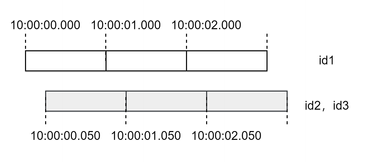
In this configuration, snapshots for different instruments are generated at different times. id1 produces output at hh:MM:ss.000, while id2 and id3 produce outputs at hh:MM:ss.050, i.e., 50 ms after each whole-second boundary.
Proper use of this parameter provides several benefits. First, reducing the number of simultaneous outputs decreases the processing time per batch of snapshots. More importantly, it smooths the output distribution across time, reducing pressure on downstream consumers and improving resource utilization. Without this mechanism, large volumes of data may be output at the same timestamp, causing bursts of heavy load followed by idle periods.
The following modifications are made to the code in Section 3.1:
outputIntervalOffsetMap =dict(`300288.SZ`300122.SZ`300918.SZ, [50, 50, 50])
engine = createOrderBookSnapshotEngine(name="demo", exchange="XSHE", orderbookDepth=10, intervalInMilli=1000, date=2022.06.01, startTime=09:15:00.000, prevClose=prevClose, dummyTable=dummyOrderTrans, inputColMap=inputColMap, outputTable=outTable, outputIntervalOffsetMap=outputIntervalOffsetMap)
The stocks 300288.SZ,300122.SZ, and 300918.SZare configured to output snapshots 50 ms after each whole-second boundary, while all other stocks, for which no offset is specified, continue to output at whole-second boundaries.
7. FAQ
7.1 Must the Input Table Schema Match the Example exactly ?
No. The required fields can be identified via the inputColMap parameter, which defines the mapping between logical fields and input columns.
7.2 Must the Output Table Schema Match the Example Exactly?
No. The output fields are specified through the outputColMap parameter. However, the schema of outputColMap must be consistent with the defined output schema.
7.3 Why is the Abnormal Field True in the Output?
When the engine processes trade or cancellation events, it attempts to locate the corresponding order in its internal order book. If no matching order is found, an exception is raised. In this case, two signals are generated: An error message is logged, and the abnormal field for the corresponding instrument in subsequent outputs is set to true. Example log:

If abnormal is true, it is recommended to check the following:
-
Whether tick-by-tick data is out of order or missing, which may cause trades or cancellations to arrive before the corresponding order data.
-
Whether columns defined in inputColMap contain invalid values, such as missing buy or sell order IDs. This may prevent trade records from matching their original orders.
7.4 Must the Input Data Include the BSFlag Field? How Should BSFlag = N (Unknown) Be Handled?
BSFlag is required for orders and cancellations, as correct order book building depends on it. For trades, it is optional, but still recommended.
If the source tick-by-tick data does not provide BSFlag for either cancellations or trades, it can be inferred as follows:
-
Cancellations: set BSFlag to 2 for sell-side cancellations and 1 for buy-side cancellations;
-
Trades: set BSFlag to 2 for sell-side aggressive trades and 1 for buy-side aggressive trade trades.
For SZSE data, if cancellation records contain BuyNo and SellNo, where one side is the order ID and the other is 0. Based on the input data preprocessing method in Section 2.2, the BSFlag can be derived as: This logic also applies when BSFlag is N (unknown).
iif(SellNo>BuyNo, 2, 1) as BSFlag7.5 Why Does the Engine Produce No Output or Very Few Outputs After Ingesting Data?
This issue typically has three possible causes:
-
Case 1: When exchange is "XSHG", "XSHGSTOCK", "XSHGFUND", "XSHGBOND", or "XSHEBOND", the engine applies internal symbol filtering rules:
-
If exchange= "XSHG" or "XSHGSTOCK", only symbols starting with “6” are output.
-
If exchange= "XSHGFUND", only symbols starting with “5” are output.
-
If exchange= "XSHGBOND" and securitySubType= "ConvertibleBond" (default), only symbols starting with “1” are output.
-
If exchange= "XSHEBOND" and securitySubType= "ConvertibleBond" (default), only symbols starting with “1” are output.
-
As a result, mismatched stocks will produce no output. For example, SZSE stocks (prefix “3”, “0”) will not be processed under exchange = "XSHG". Similarly, symbol formats like "SH.600800" may also be filtered out.
-
-
Case 2: If orderBySeq= true or orderBySeq= (true, ..., ...), missing or non-continuous seqColumn values may cause this issue. Note: For SSE stocks, this parameter defaults to true; for all others, it defaults to false.
-
When orderBySeq= true, no warning is shown in logs.
-
When orderBySeq= (true, ..., ...), abnormal sequence logs will be generated. A sample log is shown below.
expected seq num: ..., unordered buffer size: ..., the last seq num get: ... -
-
Case 3: If skipCrossedMarket= true (default in version ≥ 2.00.11.2), snapshots are suppressed when the best bid/ask is crossed (bidPrice1 ≥ askPrice1). From version 2.00.12 onward, corresponding warning logs are added to help with debugging. A sample log is shown below.
orderBook engine abnormal snapshot.symbol: ... ,ask price ... ,bids price: ... ,timestamp:...);
8. Summary
This article first introduces how the DolphinDB order book engine works, including supported security types and exchange-specific trading rules. It then provides a detailed explanation of the engine’s core capabilities, followed by practical examples in both historical and real-time scenarios to demonstrate its applicability across different scenarios. Finally, the article presents methods for validating order book building accuracy and analyzes common issues, helping you quickly understand how the order book engine works and use it effectively.