
DolphinDB 股票高频行情插件最佳实践
DolphinDB CSM 插件用于获取股票高频实时行情数据,并将回调数据异步写入 DolphinDB 流数据表,便于后续的流式计算、订阅转发和实时落库。目前插件支持获取如下类别的数据:
-
SSEL2_Quotation:上交所 Level2 十档快照数据。
-
SZSEL2_Quotation:深交所 Level2 十档快照数据。
-
SSEL2_Tick:上交所 Level2 逐笔数据。
-
SZSEL2_Tick:深交所 Level2 逐笔数据。
本文主要介绍如何通过 CSM 插件将实时行情数据写入分布式数据库,以及如何实现节点启动时自动订阅股票高频实时行情。本文全部代码需要运行在 3.00.4 及更高版本的 DolphinDB server 以及插件上,目前仅支持 Linux x86-64 系统。
1. 基本使用介绍
节点启动后,可以使用 GUI、VS Code、Web UI 等操作手册连接相应节点并执行示例代码。
1.1 安装插件
安装插件前,需要登录有创建库表权限的账号。执行如下代码登录默认的管理员账号:
login("admin", "123456")执行 listRemotePlugins 函数,即可查看当前 DolphinDB 所支持的插件版本信息。
listRemotePlugins();          // 所有插件的版本信息
listRemotePlugins("CSM");     // CSM 插件的版本信息
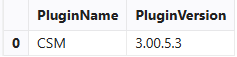
返回值为 1 行 2 列的表格,分别是插件名及其对应的版本信息,如图 1-1:
在联网环境下,执行 installPlugin 函数,则可以下载到与当前 server 版本适配的 CSM 插件文件,插件文件包括插件描述文件及插件的二进制文件;若执行 installPlugin 函数获取插件失败,可以登录 DolphinDB 插件市场,手动下载对应版本的 CSM 插件上传到服务器的 plugins 目录下,可通过 getPluginDir 函数查询目录。
installPlugin("CSM")installPlugin 函数若正常返回,则代表下载成功,其返回值为插件描述文件(PluginCSM.txt)的安装路径,如:
/path_to_dolphindb_server/server/plugins/CSM/PluginCSM.txtinstallPlugin 函数实际上是完成从远程文件服务器拉取插件文件到 DolphinDB server 所在的服务器,因此需要一定的时间,耐心等待安装完成即可。
1.2 加载插件
在脚本中调用插件相关的接口前,需要先加载插件。
在 GUI(或 VS Code、Web UI)等操作手册中执行 loadPlugin 函数加载插件。以下示例中直接使用了插件名,也可以使用相对路径 ./plugins/CSM/PluginCSM.txt
或 1.1 中返回的绝对路径 /path_to_dolphindb_server/server/plugins/CSM/PluginCSM.txt。
loadPlugin("CSM")loadPlugin 函数正常返回则插件加载成功,以 VS Code 为例,首次加载成功后返回的信息如下图,返回值是 CSM
插件提供的所有函数,至此插件安装与加载已全部完成。


此外,需要注意,如果重复执行 loadPlugin 加载插件,会抛出模块已经被使用的错误提示,因为节点启动后,只需加载一次 CSM 插件,即可在任意会话中调用该插件提供的函数。错误提示如下:
The module [CSM] is already in use.可以通过 try-catch 语句捕获这个错误,避免因为插件已加载而中断后续脚本代码的执行:
try{ loadPlugin("CSM") } catch(ex){print ex}此外,若节点重启,则需要重新加载插件。
2. 通过 CSM 行情插件将实时行情数据写入分布式数据库
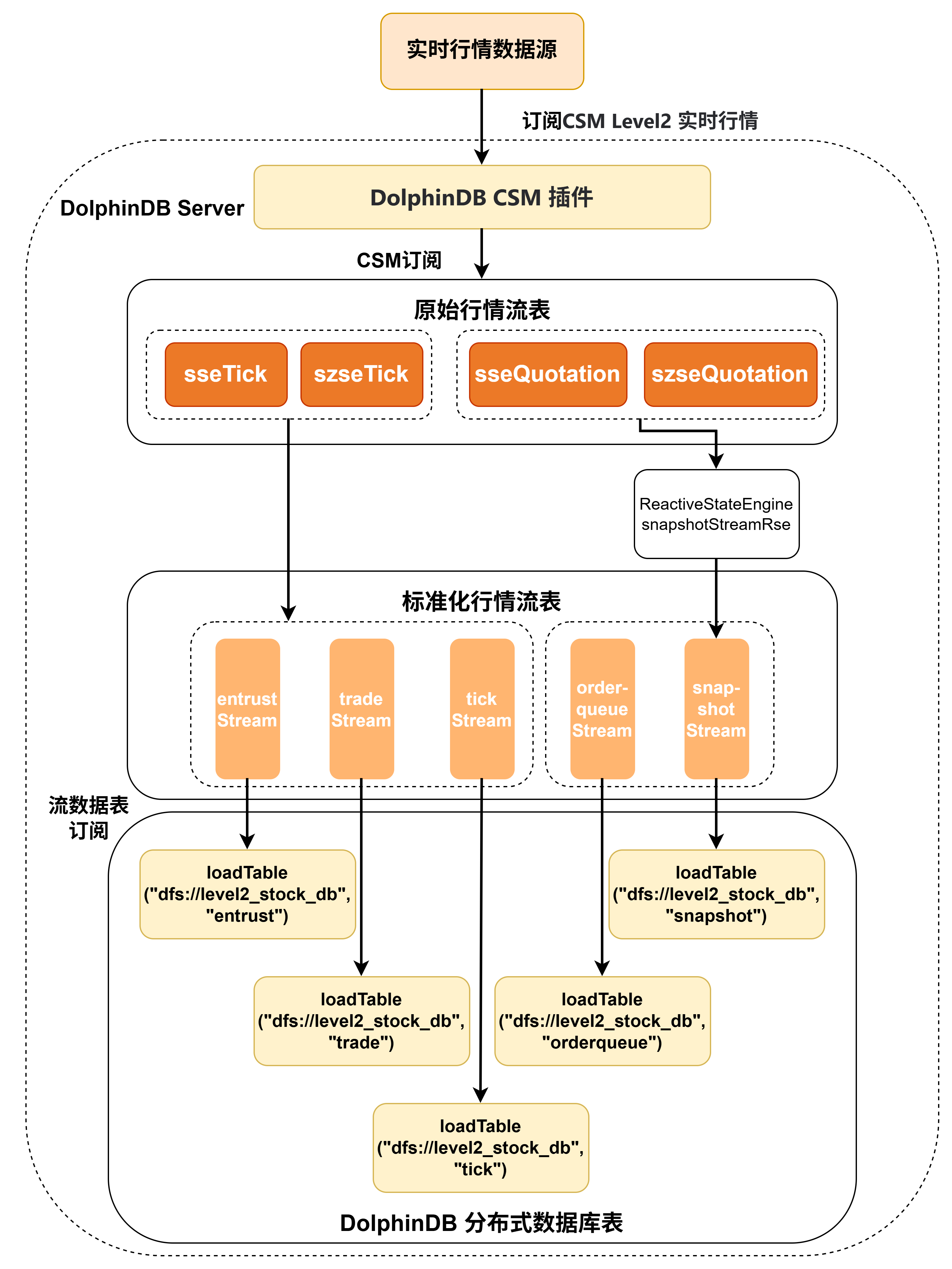
本章以订阅上海证券交易所、深圳证券交易所的十档快照数据和逐笔数据实时写入 DolphinDB 分布式数据库为例,对 CSM 插件的使用进行说明,大致的流程如图 2-1:
-
通过 CSM 插件订阅实时交易数据写入 DolphinDB sseTick、szseTick、sseQuotation、szseQuotation持久化流数据表中。流数据表是具备发布订阅功能的内存表。
-
订阅 sseTick、szseTick、sseQuotation、szseQuotation 后对原始数据进行一些自定义的标准化处理,主要包含以下操作:
-
Tick 数据分流:考虑到大多数厂商的历史数据中逐笔委托和逐笔成交是两张分开的表,为匹配历史库,本实践从原始 Tick 流中按委托/成交类型拆分,分别写入 entrustStream(逐笔委托)和 tradeStream(逐笔成交)。同时将原始 Tick 流输出到 tickStream(逐笔合并) 并附加 msg_type、data_type 分类标识,其中 msg_type 用于说明数据类型,0 表示逐笔委托,1 表示逐笔成交,-1 表示产品状态。data_type用于进一步说明交易类型,如果是逐笔委托单,则:1 表示市价;2 表示限价;3 表示本方最优;10 表示撤单(仅上交所);11 市场状态(仅上交所)。如果是逐笔成交单,则:0 表示成交;1 表示撤单(仅深交所)。
-
Quotation 数据拆分:考虑到很多厂商历史数据将快照行情和委托队列分开提供,本实践将原始Quotation 流拆分为委托队列数据和快照行情数据。具体操作为:从原始 Quotation 流中提取最优买卖盘前 50 笔委托队列字段,按买方/卖方拆分为两条记录写入 orderqueueStream(委托队列);快照行情由于部分字段(dif_price2、trade_num 等)需要通过计算加工得到,本实践通过 RSE 引擎做增量计算后写入 snapshotStream(快照行情),流程为原始 Quotation → RSE 引擎(增量计算)→ snapshotStreamRse(中间流表)→ snapshotStream。字段处理逻辑详见本文档 2.5 小节。
-
字段标准化:统一 security_id 格式——追加 .SH 或.SZ 后缀区分交易所,补全 exchange、trade_date、trade_time 等公共字段,将深交所字符型字段(如TickType、OrderCode)转为统一的数字编码。
-
-
将标准化交易数据写入 DolphinDB entrustStream、tradeStream、tickStream、orderqueueStream、snapshotStream 持久化流数据表中。
-
sseTick + szseTick 两个原始流表都写出到 entrustStream、tradeStream、tickStream(SH/SZ 数据合并);sseQuotation + szseQuotation 都写出到 orderqueueStream、snapshotStream。
-
订阅 entrustStream、tradeStream、tickStream、orderqueueStream、snapshotStream 持久化流数据表写入 DolphinDB 分布式数据库。分布式数据库将数据存储到磁盘上。
下面分步骤介绍关键的 DolphinDB 代码实现,完整脚本见附录。
2.1 参数配置
本小节介绍连接 CSM 以及创建流数据表和 DFS 数据库表的关键参数配置。
2.1.1 CSM 连接配置
用户需要根据实际情况配置 CSM 账户信息。
// 配置账户信息
USERNAME = "XXXX"
PASSWORD = "XXXX"
HOST = ["XXXX"]
PORT = [XXXX]
opt = dict(`ReceivedTime`OutputElapsed, [true, true])
变量说明:
-
USERNAME 参数为 STRING 类型标量,指定登录 CSM 服务器所需的用户名。
-
PASSWORD 参数为 STRING 类型标量,指定登录 CSM 服务器所需的密码。
-
HOST 参数为 STRING 类型向量,指定 CSM 服务器的主机地址。
-
PORT 参数为 INT 类型向量,指定 CSM 服务器的端口,向量长度必须与 HOST 一致。
-
opt(可选参数)字典,支持以下 key:
-
ReceivedTime:key 为字符串,value 为 BOOL 类型标量,默认为 false,指定是否记录数据进入插件的时间。
-
OutputElapsed:key 为字符串,value 为 BOOL 类型标量,默认为 false,指定是否记录从数据进入插件到写入流表前的时间间隔,单位为纳秒。
-
2.1.2 原始行情流数据表配置
rawStreamCapacity 参数是行情数据的流表预分配容量大小,表示流数据表在内存中最多保留多少行。可以根据机器的内存大小进行配置。
rawStreamCapacity = 2000000

// 原始数据进入的流数据表表名及类型
rawStreamNames = ["sseQuotation", "szseQuotation", "sseTick", "szseTick"]
csmSubTypes = ["SSEL2_Quotation", "SZSEL2_Quotation", "SSEL2_Tick", "SZSEL2_Tick"]

// 原始数据标准化后进入的流数据表表名
stdStreamNames = ["entrustStream", "tradeStream", "snapshotStream", "orderqueueStream", "tickStream"]

// RSE 输出流表名
rseOutputStreamName = "snapshotStreamRse"
2.1.3 原始行情入库配置
// 标准化数据入库的数据库名
stdDfsDbName = "dfs://level2_stock_db"

// 标准化数据入库的数据表名
stdDfsTbNames = ["entrust", "trade", "snapshot", "orderqueue", "tick"]
2.2 清理环境(可选)
为保证本文的示例脚本能够反复执行,特提供了以下流环境清理脚本。
由于相同的流数据表名和订阅无法进行重复定义,因此先取消相关订阅并清除需要用到的流数据表。
use ops

//清理环境(循环进行多张流表批量清理,含持久化文件)
allStreamNames = rawStreamNames.append!(stdStreamNames).append!(rseOutputStreamName)
for(tbName in allStreamNames){
    try{ unsubscribeTable(tableName=tbName) } catch(ex){}  // 移除该表所有订阅
    try{ dropStreamTable(tbName, force=true) }catch(ex){}  //删除流表
}
2.3 建立 CSM 连接
用户配置 CSM 账户信息后,使用 CSM::connect 函数创建一个和 CSM 行情服务器之间的连接。
//清理可能存在的旧连接,确保环境恢复到初始状态
try{
    h = CSM::getHandle()
    CSM::close(h)
}catch(ex){}
go

//创建连接
handler = CSM::connect(USERNAME, PASSWORD, HOST, PORT, opt)
2.4 创建库表
本小节演示如何创建原始行情流数据表、标准化行情流数据表以及标准化行情分布式表。
2.4.1 创建原始行情流数据表
首先调用 CSM::getSchema 函数获取 CSM 原始行情数据表的表结构,再调用 enableTableShareAndPersistence 函数将流数据表共享,创建持久化流数据表。
-
CSM::getSchema的参数 dataType 为 STRING 类型标量,指定要订阅的数据类别。该参数的有效值如下:-
SSEL2_Quotation:上交所 Level2 十档快照数据
-
SZSEL2_Quotation:深交所 Level2 十档快照数据
-
SSEL2_Tick:上交所 Level2 逐笔数据
-
SZSEL2_Tick:深交所 Level2 逐笔数据
-
-
建议始终使用
getSchema动态获取 schema,避免通过硬编码指定输出表的 schema。数据类别的 schema 依赖创建连接句柄时设置的 opt 参数,因此必须先调用connect,再调用getSchema。
for(i in 0..(size(csmSubTypes)-1)){
    schema = CSM::getSchema(csmSubTypes[i])   //查询表结构
    enableTableShareAndPersistence(
        table=streamTable(rawStreamCapacity:0, schema[`name], schema[`type]),
        tableName=rawStreamNames[i],
        cacheSize=rawStreamCapacity,
        preCache=0)
    print(">>> 创建原始流表: " + rawStreamNames[i])
}-
为保证
enableTableShareAndPersistence函数能够正常执行,需要节点启动之前在配置文件中(单节点:dolohindb.cfg,集群:cluster.cfg)指定配置参数 persistenceDir,配置参考功能配置。 -
函数中的 cacheSize 变量控制了在建表时预分配内存的大小以及流数据表在内存里的最大行数。设置较大的 cacheSize 可以降低出现峰值时延的频率。此处引用了在 2.1 中配置好的参数rawStreamCapacity,具体大小可以根据实际的可使用的内存大小决定。具体优化原理可参考流计算时延统计与性能优化。
2.4.2 创建标准化行情流数据表
标准化行情流表作为流式处理中的中间层,通过 enableTableShareAndPersistence 实现共享与持久化。每个流表采用"存在则跳过"的幂等创建方式,统一沪深两市的字段定义,并通过 setStreamTableTimestamp 指定时间戳列。6张流表(entrust/trade/snapshot/orderqueue/tick+ RSE 输出)分别对应后续写入分布式库的5类标准化数据。下面以 entrustStream 流表为例展示代码:
// entrustStream
if(!existsStreamTable("entrustStream")){
    schema_tb = table(
        array(SYMBOL, 0) as security_id,
        array(SYMBOL, 0) as exchange,
        array(DATE, 0) as trade_date,
        array(TIME, 0) as trade_time,
        array(INT, 0) as channel_no,
        array(LONG, 0) as appl_seq,
        array(DOUBLE, 0) as order_price,
        array(DOUBLE, 0) as order_qty,
        array(SYMBOL, 0) as order_type,
        array(SYMBOL, 0) as side,
        array(LONG, 0) as order_no,
        array(LONG, 0) as rec_id,
        array(DOUBLE, 0) as trade_qty,
        array(NANOTIMESTAMP, 0) as received_time,
        array(LONG, 0) as per_penetration_time,
        array(TIMESTAMP, 0) as reveied_time1
    )
    colDefs = schema(schema_tb).colDefs
    enableTableShareAndPersistence(
        table=streamTable(10000:0, colDefs.name, colDefs.typeString),
        tableName="entrustStream",
        cacheSize=5000000,
        preCache=0)
    print(">>> 创建标准化流表: entrustStream")
}
go
setStreamTableTimestamp(entrustStream, "reveied_time1")
2.4.3 创建标准化行情分布式表
分布式表是标准化行情的最终存储层,以 COMPO 分区方式(VALUE 日期 + HASH 代码,50个桶)建库,TSDB 引擎存储,具体分区规则参考自存储金融数据的分区方案最佳实践。
采用"库表均存在则跳过"的幂等创建方式,5 张表分别对应 entrust/trade/snapshot/orderqueue/tick 五类标准化数据,按 trade_date + security_id 分区,security_id + trade_time 排序,适配时序场景的查询模式。同样,以 entrust 表为例展示代码:
//创建标准化 DFS 库
if(!existsDatabase(stdDfsDbName)){
    dbDate = database(, partitionType=VALUE, partitionScheme=2026.01.01..2026.07.31)
    dbCode = database(, partitionType=HASH, partitionScheme=[SYMBOL, 50])
    dbStd = database(directory=stdDfsDbName, partitionType=COMPO, partitionScheme=[dbDate, dbCode], engine='TSDB', atomic='CHUNK')
    print(">>> 创建标准化 DFS 库: " + stdDfsDbName)
} else {
    dbStd = database(stdDfsDbName)
}

// entrust
if(!existsTable(stdDfsDbName, "entrust")){
    schema_tb = table(
        array(SYMBOL, 0) as security_id,
        array(SYMBOL, 0) as exchange,
        array(DATE, 0) as trade_date,
        array(TIME, 0) as trade_time,
        array(INT, 0) as channel_no,
        array(LONG, 0) as appl_seq,
        array(DOUBLE, 0) as order_price,
        array(DOUBLE, 0) as order_qty,
        array(SYMBOL, 0) as order_type,
        array(SYMBOL, 0) as side,
        array(LONG, 0) as order_no,
        array(LONG, 0) as rec_id,
        array(DOUBLE, 0) as trade_qty,
        array(TIMESTAMP, 0) as update_time
    )
    dbStd.createPartitionedTable(
        table=schema_tb,
        tableName="entrust",
        partitionColumns=`trade_date`security_id,
        sortColumns=`security_id`trade_time
    )
    print(">>> 创建标准化DFS表: entrust")
}
2.5 订阅流数据表并写入分布式数据库
首先,针对快照数据的增量计算需求,创建两个 ReactiveStateEngine(sse_snapshot_deal_engine / szse_snapshot_deal_engine),都以 Symbol 为 key 维护每只股票的状态,统一输出到 snapshotStreamRse 中间流表。
RSE 引擎的核心机制是 prev 函数——它能访问当前 key 上一笔输入的某个字段值。基于此,引擎主要处理了两类计算:
1. 涨跌价格(沪深逻辑不同)
-
上交所的原始 Quotation 快照不提供现成涨跌字段,需要通过 RSE 手动计算 dif_price1 和 dif_price2。dif_price1 字段需要在09:25 集合竞价结束后,用 LastPrice(当前最新价/开盘价)减去 PreClosePrice(昨收价),得到开盘价差。dif_price2 在 09:25——09:30 连续竞价开始前用 dif_price1(开盘价差)表示,09:30 后用
LastPrice - prev(LastPrice)计算相邻两次快照之间的最新价变化量。核心计算代码展示如下:double(NULL) as price_up, // 上交所不提供涨停价,填NULL double(NULL) as price_down, // 上交所不提供跌停价,填NULL iif(time(Time)>=09:25:00, LastPrice - PreClosePrice, 0) as dif_price1, iif(time(Time)<09:25:00, 0, iif((time(Time)<09:30:00 and LastPrice!=0), LastPrice - PreClosePrice, LastPrice-prev(LastPrice))) as dif_price2, -
深交所的 Quotation 快照自带涨跌字段,RSE 只需直接映射,核心代码展示如下:
PriceUpLimit as price_up,             // 深交所提供涨停价
PriceDownLimit as price_down,         // 深交所提供跌停价
PriceUpdown1 as dif_price1,           // 深交所直接提供涨跌价差1
PriceUpdown2 as dif_price2,           // 深交所直接提供涨跌价差2
2. 累计量增量(沪深逻辑相同)
在原始字段中,TotalNO(成交笔数)、TotalVolume(成交量)、TotalAmount(成交金额)是开市以来的累计值,每笔快照都包含从 09:30 到当前时刻的总和。为计算"本周期内新增了多少",使用 prev 做差值,核心代码展示如下:
iif(isNull(prev(TotalNO)), TotalNO, TotalNO - prev(TotalNO)) as trade_num,
iif(isNull(prev(TotalVolume)), TotalVolume, TotalVolume - prev(TotalVolume)) as trade_qty,
iif(isNull(prev(TotalAmount)), TotalAmount, TotalAmount - prev(TotalAmount)) as trade_amt,-
prev(TotalNO)返回该股票上一笔快照的 TotalNO 值。如果是该股票的第一笔快照(isNull(prev(TotalNO))为 true),直接取当前值作为增量起点。 -
否则
TotalNO - prev(TotalNO)就是本周期内的新增成交笔数。 -
成交量和成交额同理。
创建 RSE 引擎完整代码如下:
//创建RSE引擎 (处理沪深快照)
metrics_sse = <[
    'SH' as exchange,
    today() as trade_date,
    time(Time) as trade_time,
    PreClosePrice as pre_close,
    OpenPrice as open_price,
    HighPrice as high_price,
    LowPrice as low_price,
    LastPrice as last_price,
    double(NULL) as price_up,
    double(NULL) as price_down,
    iif(time(Time)>=09:25:00, LastPrice - PreClosePrice, 0) as dif_price1,
    iif(time(Time)<09:25:00, 0, iif((time(Time)<09:30:00 and LastPrice!=0), LastPrice - PreClosePrice, LastPrice-prev(LastPrice))) as dif_price2,
    ClosePrice as close_price,
    TotalNO as total_num,
    TotalVolume as total_qty,
    TotalAmount as total_amt,
    double(NULL) as peratio1,
    double(NULL) as peratio2,
    SellLevelNo as sell_level_num,
    TotalSellOrderVolume as total_sell_qty,
    WtAvgSellPrice as wtavg_sell_price,
    SellPrice as sell_price,
    SellVolume as sell_qty,
    TotalSellOrderNo as sell_num,
    BuyLevelNo as buy_level_num,
    TotalBuyOrderVolume as total_buy_qty,
    WtAvgBuyPrice as wtavg_buy_price,
    BuyPrice as buy_price,
    BuyVolume as buy_qty,
    TotalBuyOrderNo as buy_num,
    TradeStatus as phase_code,
    double(NULL) as nav,
    IOPV as iopv,
    double(NULL) as premium_rate,
    iif(isNull(prev(TotalNO)), TotalNO, TotalNO - prev(TotalNO)) as trade_num,
    iif(isNull(prev(TotalVolume)), TotalVolume, TotalVolume - prev(TotalVolume)) as trade_qty,
    iif(isNull(prev(TotalAmount)), TotalAmount, TotalAmount - prev(TotalAmount)) as trade_amt,
    ETFBuyNo as etf_buy_num,
    ETFBuyVolume as etf_buy_qty,
    ETFBuyAmount as etf_buy_amt,
    ETFSellNo as etf_sell_num,
    ETFSellVolume as etf_sell_qty,
    ETFSellAmount as etf_sell_amt,
    YTM as ytm,
    TotalBuyNo as total_buy_num,
    TotalSellNo as total_sell_num,
    WithdrawBuyNo as withdraw_buy_num,
    WithdrawBuyVolume as withdraw_buy_qty,
    WithdrawBuyAmount as withdraw_buy_amt,
    WithdrawSellNo as withdraw_sell_num,
    WithdrawSellVolume as withdraw_sell_qty,
    WithdrawSellAmount as withdraw_sell_amt,
    MaxBuyDuration as max_buy_duration,
    MaxSellDuration as max_sell_duration,
    BuyOrderNo as buy_order_num,
    SellOrderNo as sell_order_num,
    TotalWarrantExecVol as total_warrant_exec_vol,
    WarrantDownLimit as warrant_down_limit,
    WarrantUpLimit as warrant_up_limit,
    ReceivedTime as received_time,
    perPenetrationTime as per_penetration_time]>

try{dropStreamEngine("sse_snapshot_deal_engine")} catch(ex){}
createReactiveStateEngine(name="sse_snapshot_deal_engine",
    metrics=metrics_sse,
    dummyTable=sseQuotation,
    outputTable=snapshotStreamRse,
    keyColumn="Symbol")

metrics_szse = <[
    "SZ" as exchange,
    today() as trade_date,
    time(Time) as trade_time,
    PreClosePrice as pre_close,
    OpenPrice as open_price,
    HighPrice as high_price,
    LowPrice as low_price,
    LastPrice as last_price,
    PriceUpLimit as price_up,
    PriceDownLimit as price_down,
    PriceUpdown1 as dif_price1,
    PriceUpdown2 as dif_price2,
    ClosePrice as close_price,
    TotalNo as total_num,
    TotalVolume as total_qty,
    TotalAmount as total_amt,
    PERatio1 as peratio1,
    PERatio2 as peratio2,
    SellLevelNo as sell_level_num,
    TotalSellOrderVolume as total_sell_qty,
    WtAvgSellPrice as wtavg_sell_price,
    SellPrice as sell_price,
    SellVolume as sell_qty,
    TotalSellOrderNo as sell_num,
    BuyLevelNo as buy_level_num,
    TotalBuyOrderVolume as total_buy_qty,
    WtAvgBuyPrice as wtavg_buy_price,
    BuyPrice as buy_price,
    BuyVolume as buy_qty,
    TotalBuyOrderNo as buy_num,
    SecurityPhaseTag as phase_code,
    NAV as nav,
    IOPV as iopv,
    PremiumRate as premium_rate,
    iif(isNull(prev(TotalNO)), TotalNO, TotalNO - prev(TotalNO)) as trade_num,
    iif(isNull(prev(TotalVolume)), TotalVolume, TotalVolume - prev(TotalVolume)) as trade_qty,
    iif(isNull(prev(TotalAmount)), TotalAmount, TotalAmount - prev(TotalAmount)) as trade_amt,
    int(NULL) as etf_buy_num,
    double(NULL) as etf_buy_qty,
    double(NULL) as etf_buy_amt,
    int(NULL) as etf_sell_num,
    double(NULL) as etf_sell_qty,
    double(NULL) as etf_sell_amt,
    double(NULL) as ytm,
    long(NULL) as total_buy_num,
    long(NULL) as total_sell_num,
    int(NULL) as withdraw_buy_num,
    double(NULL) as withdraw_buy_qty,
    double(NULL) as withdraw_buy_amt,
    int(NULL) as withdraw_sell_num,
    double(NULL) as withdraw_sell_qty,
    double(NULL) as withdraw_sell_amt,
    double(NULL) as max_buy_duration,
    double(NULL) as max_sell_duration,
    int(NULL) as buy_order_num,
    int(NULL) as sell_order_num,
    long(NULL) as total_warrant_exec_vol,
    double(NULL) as warrant_down_limit,
    double(NULL) as warrant_up_limit,
    ReceivedTime as received_time,
    perPenetrationTime as per_penetration_time]>

try{dropStreamEngine("szse_snapshot_deal_engine")} catch(ex){}
createReactiveStateEngine(name="szse_snapshot_deal_engine",
    metrics=metrics_szse,
    dummyTable=szseQuotation,
    outputTable=snapshotStreamRse,
keyColumn="Symbol")再通过 7 条订阅将 4 张原始流表的分发到 6 张标准化流表:Tick 类数据由 SSE/SZSE 三合一 handler 拆分为 entrust/trade/tick 三路写入,Quotation 类数据一路经订单队列 handler 写入 orderqueueStream,另一路经 RSE 引擎加 .SH/.SZ 后缀 handler 写入 snapshotStream,完成沪深两市数据合并与字段统一。
// 先取消旧订阅
try{unsubscribeTable(tableName="sseTick", actionName="sse_tick_deal")} catch(ex){}
try{unsubscribeTable(tableName="sseQuotation", actionName="sse_orderqueue_deal")} catch(ex){}
try{unsubscribeTable(tableName="sseQuotation", actionName="sse_snapshot_deal")} catch(ex){}
try{unsubscribeTable(tableName="szseTick", actionName="szse_tick_deal")} catch(ex){}
try{unsubscribeTable(tableName="szseQuotation", actionName="szse_orderqueue_deal")} catch(ex){}
try{unsubscribeTable(tableName="szseQuotation", actionName="szse_snapshot_deal")} catch(ex){}
try{unsubscribeTable(tableName="snapshotStreamRse", actionName="snapshot_rse_deal")} catch(ex){}

//标准化订阅
// SSE Tick → entrust + trade + tick
subscribeTable(tableName="sseTick", actionName="sse_tick_deal", offset=-1,
    handler=sse_tickall_handler{"entrustStream", "tradeStream", "tickStream"},
    msgAsTable=true, batchSize=10000, throttle=0.01)

// SSE Quotation → orderqueue
subscribeTable(tableName="sseQuotation", actionName="sse_orderqueue_deal",
    handler=sse_orderqueue_handler{"orderqueueStream"},
    msgAsTable=true, batchSize=10000, throttle=0.01)

// SSE Quotation → RSE → snapshotStreamRse
subscribeTable(tableName="sseQuotation", actionName="sse_snapshot_deal", offset=-1,
    handler=append!{getStreamEngine("sse_snapshot_deal_engine")},
    msgAsTable=true, batchSize=10000, throttle=0.01)

// SZSE Tick → entrust + trade + tick
subscribeTable(tableName="szseTick", actionName="szse_tick_deal", offset=-1,
    handler=szse_tickall_handler{"entrustStream", "tradeStream", "tickStream"},
    msgAsTable=true, batchSize=10000, throttle=0.01)

// SZSE Quotation → orderqueue
subscribeTable(tableName="szseQuotation", actionName="szse_orderqueue_deal",
    handler=szse_orderqueue_handler{"orderqueueStream"},
    msgAsTable=true, batchSize=10000, throttle=0.01)

// SZSE Quotation → RSE → snapshotStreamRse
subscribeTable(tableName="szseQuotation", actionName="szse_snapshot_deal",
    handler=append!{getStreamEngine("szse_snapshot_deal_engine")},
    msgAsTable=true, batchSize=10000, throttle=0.01)

// snapshotStreamRse → snapshotStream (加.SH后缀)
subscribeTable(tableName="snapshotStreamRse", actionName="snapshot_rse_deal",
    handler=snapshotRse_handler{"snapshotStream"},
    msgAsTable=true, batchSize=10000, throttle=0.01)
这里仅以 SSE 逐笔委托 handler 为例展示标准化 handler 函数定义代码:
// SSE 逐笔委托 handler
def sse_entrust_handler(mutable entrustStream, msg){
    data =
        select
            Symbol+".SH" as security_id,
            "SH" as exchange,
            today() as trade_date,
            time(TickTime) as trade_time,
            Channel as channel_no,
            RecID as appl_seq,
            TickPrice as order_price,
            TickVolume as order_qty,
            string(TickType) as order_type,
            TickBSFlag as side,
            long(NULL) as order_no,
            RecID as rec_id,
            TradeAmount as trade_qty,
            ReceivedTime as received_time,
            perPenetrationTime as per_penetration_time
        from msg
        where string(TickType) in [`A, `S, `D]
        objByName(entrustStream).append!(data)
}最后,5 张标准化流表各自绑定 InsertHandler,在写入前丢弃 received_time 等元数据字段并追加 update_time,以 batchSize=50000、throttle=0.01s 的批量方式写入对应的 DFS 分区表。
// 定义5个落库handler
def entrustInsertHandler(tb, mutable msg){
    data = select security_id, exchange, trade_date, trade_time, channel_no, appl_seq,
        order_price, order_qty, order_type, side, order_no, rec_id, trade_qty,
        now() as update_time from msg
    tableInsert(tb, data)
}
def tradeInsertHandler(tb, mutable msg){
    data = select security_id, exchange, trade_date, trade_time, channel_no, appl_seq,
        trade_price, trade_qty, trade_amt, buy_no, sell_no, side, trade_type, trade_no,
        now() as update_time from msg
    tableInsert(tb, data)
}
def snapshotInsertHandler(tb, mutable msg){
    data = select security_id, exchange, trade_date, trade_time, pre_close, open_price, high_price,
        low_price, last_price, price_up, price_down, dif_price1, dif_price2, close_price,
        total_num, total_qty, total_amt, peratio1, peratio2, sell_level_num, total_sell_qty,
        wtavg_sell_price, sell_price, sell_qty, sell_num, buy_level_num, total_buy_qty,
        wtavg_buy_price, buy_price, buy_qty, buy_num, phase_code, nav, iopv, premium_rate,
        trade_num, trade_qty, trade_amt, etf_buy_num, etf_buy_qty, etf_buy_amt,
        etf_sell_num, etf_sell_qty, etf_sell_amt, ytm, total_buy_num, total_sell_num,
        withdraw_buy_num, withdraw_buy_qty, withdraw_buy_amt, withdraw_sell_num,
        withdraw_sell_qty, withdraw_sell_amt, max_buy_duration, max_sell_duration,
        buy_order_num, sell_order_num, total_warrant_exec_vol, warrant_down_limit,
        warrant_up_limit,
        now() as update_time from msg
    tableInsert(tb, data)
}
def orderqueueInsertHandler(tb, mutable msg){
    data = select security_id, exchange, trade_date, trade_time, last_price, side, order_price,
        order_qty1, order_num, order_no, order_qtys, level_num,
        now() as update_time from msg
    tableInsert(tb, data)
}
def tickInsertHandler(tb, mutable msg){
    data = select security_id, exchange, trade_date, trade_time, msg_type, data_type, channel_no,
        appl_seq, price, qty, buy_order, sell_order, side,
        now() as update_time from msg
    tableInsert(tb, data)
}

// 订阅 entrustStream → DFS entrust
try{unsubscribeTable(tableName="entrustStream", actionName="entrustStream_2dfs")} catch(ex){}
subscribeTable(tableName="entrustStream", actionName="entrustStream_2dfs", offset=-1,
    handler=entrustInsertHandler{loadTable(stdDfsDbName, "entrust")},
    msgAsTable=true, batchSize=50000, throttle=0.01, reconnect=true)

// 订阅 tradeStream → DFS trade
try{unsubscribeTable(tableName="tradeStream", actionName="tradeStream_2dfs")} catch(ex){}
subscribeTable(tableName="tradeStream", actionName="tradeStream_2dfs", offset=-1,
    handler=tradeInsertHandler{loadTable(stdDfsDbName, "trade")},
    msgAsTable=true, batchSize=50000, throttle=0.01, reconnect=true)

// 订阅 snapshotStream → DFS snapshot
try{unsubscribeTable(tableName="snapshotStream", actionName="snapshotStream_2dfs")} catch(ex){}
subscribeTable(tableName="snapshotStream", actionName="snapshotStream_2dfs", offset=-1,
    handler=snapshotInsertHandler{loadTable(stdDfsDbName, "snapshot")},
    msgAsTable=true, batchSize=50000, throttle=0.01, reconnect=true)

// 订阅 orderqueueStream → DFS orderqueue
try{unsubscribeTable(tableName="orderqueueStream", actionName="orderqueueStream_2dfs")} catch(ex){}
subscribeTable(tableName="orderqueueStream", actionName="orderqueueStream_2dfs", offset=-1,
    handler=orderqueueInsertHandler{loadTable(stdDfsDbName, "orderqueue")},
    msgAsTable=true, batchSize=50000, throttle=0.01, reconnect=true)

// 订阅 tickStream → DFS tick
try{unsubscribeTable(tableName="tickStream", actionName="tickStream_2dfs")} catch(ex){}
subscribeTable(tableName="tickStream", actionName="tickStream_2dfs", offset=-1,
    handler=tickInsertHandler{loadTable(stdDfsDbName, "tick")},
    msgAsTable=true, batchSize=50000, throttle=0.01, reconnect=true)
参数说明:
-
handler 参数为必选参数,是一元函数,用于处理订阅的数据。
-
offset 参数为可选参数,是一个整数。若为正数,表示从历史消息的第 offset 条开始订阅,0 表示从头开始,-1 表示从最新消息开始。若未指定或为负数,默认从当前最新位置开始订阅。
-
msgAsTable 参数为可选参数,是一个布尔值。为 true 时,handler 接收到的 msg 参数以表(table)形式传入;为 false 时以字典(字典/向量)形式传入。若未指定,默认为 true。
-
batchSize 参数为可选参数,是一个整数。若为正数,表示未处理消息的数量达到 batchSize 时,handler 才会处理消息。若未指定或为非正数,每一批次的消息到达之后,handler 就会马上处理。
-
throttle 参数为可选参数,是一个浮点数,单位为秒,默认值为 1。表示继上次 handler 处理消息之后,若 batchSize 条件一直未达到,多久后再次处理消息。如果没有指定 batchSize,throttle 即使指定也无效。 因此,达到 batchSize 设置的条件或者达到 throttle 设置的条件,才会向分布式数据库写入一次。
-
reconnect 参数为可选参数,是一个布尔值。为 true 时,订阅因网络等原因断开后自动尝试重连;为 false 时断开后不再重连。若未指定,默认为 false。
2.6 订阅 CSM 行情并写入流数据表
使用 CSM::subscribe函数订阅指定类别的数据,行情数据将进入流数据表。
for(i in 0..(size(csmSubTypes)-1)){
    try {
        CSM::subscribe(handler, csmSubTypes[i], objByName(rawStreamNames[i]))
        print(">>> CSM订阅成功: " + csmSubTypes[i] + " → " + rawStreamNames[i])
    } catch(ex) {
        print("[ERROR] CSM订阅失败 " + csmSubTypes[i] + ": " + ex)
    }
}
2.7 查询 CSM 行情接收情况
运行过程中,可以调用 CSM::getStatus 函数查询 CSM 行情的接收情况。
CSM::getStatus(handler)返回结果如图 2-2:

当在盘中启动时,可以看到 firstMsgTime 与 lastMsgTime 均不为空,lastMsgTime 表示当前收到最后一条数据的系统时刻。processedMsgCount 表示已处理的数据量。
3. 节点启动时自动订阅 CSM 实时行情数据入库
DolphinDB 系统的启动流程如图 3-1 所示:
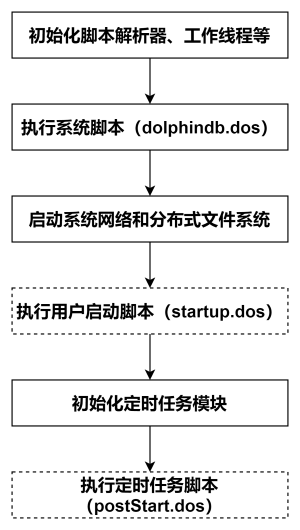
用户启动脚本(startup.dos)
用户启动脚本是通过配置参数 startup 后才会执行,单节点模式在 dolphindb.cfg 中配置,集群模式在 cluster.cfg 中配置,可配置绝对路径或相对路径。若配置了相对路径或者没有指定目录,系统会依次搜索本地节点的 home 目录、工作目录和可执行文件所在目录。
配置举例如下:
startup=/DolphinDB/server/startup.dos将上述业务代码添加到 /DolphinDB/server 目录的 startup.dos 文件中,并在对应的配置文件中配置参数 startup,即可完成节点启动时的自动订阅部署。
注意:CSM 的账户信息(
startup.dos
文件 1109-1112 行)需要用户自行修改。
4. 常见问题解答(FAQ)
4.1 如何设置定时任务?
由于长时间维持 CSM 插件连接状态可能导致内存占用量持续增长,用户可以调用定时作业函数设定 CSM 连接和关闭的定时任务,参考代码如下。运行前需要将
/执行启动脚本的完整路径/startup.dos
替换为本地保存启动脚本(startup.dos)和关闭脚本(closeCSM.dos)的绝对路径。
// 盘前初始化
scheduleJob(jobId=`daily_create_csm_connection, jobDesc="daily_create_csm_connection", jobFunc=run{"/执行启动脚本的完整路径/startup.dos"}, scheduleTime=08:30m, startDate=today(), endDate=2099.12.31, frequency='D')

// 盘后关闭连接
scheduleJob(jobId=`daily_close_csm_connection, jobDesc="daily_close_csm_connection", jobFunc=run{"/执行启动脚本的完整路径/closeCSM.dos"}, scheduleTime=17:30m, startDate=today(), endDate=2099.12.31, frequency='D')注意事项:
因为定时任务初始化时,会用到 CSM 插件里的函数,所以需要在启动时自动加载 CSM 插件。
可以通过配置参数 preloadModules=plugins::CSM 让节点启动时自动加载 CSM 插件。对于单节点,在 dolphindb.cfg 中配置 preloadModules 参数。对集群,在 controller.cfg 和 cluster.cfg 中配置 preloadModules 参数。
5. 附录
-
详细启动脚本配置可以参考官网文档教程:启动脚本。
-
关于节点启动时自动订阅处理业务的部署可以参考官网文档教程:节点启动时的流计算自动订阅。
-
startup.dos 启动脚本(账户信息需要根据用户实际情况进行修改)
-
closeCSM.dos 关闭脚本