
Snapshot Join Engine
The snapshot join engine uses a bidirectional lookup join mechanism: when data enters either the left or right table, it can trigger the join. By default, the engine performs an inner join. Whenever a record from the left table (or right table) successfully matches a record in the right table (or left table), the engine outputs the latest result. You can configure the engine to use either an inner join or an outer join, and to join against all matching records or only the latest matching record.
Unlike the lookup join engine, the left and right tables in a snapshot join engine must both be data streams, not datasets. Unlike the equi join engine, the snapshot join engine can retain cached records indefinitely.
The figure below shows the result of feeding data with the schema (join column, time column, metric) into the snapshot join engine under the default settings.
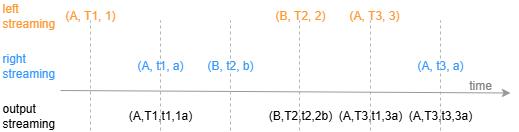
You create the snapshot join engine with thecreateSnapshotJoinEnginefunction. Its syntax is as follows:
createSnapshotJoinEngine(name, leftTable, rightTable, outputTable, metrics, matchingColumn, [timeColumn], [outputElapsedMicroseconds=false], [keepLeftDuplicates=false], [keepRightDuplicates=false], [isInnerJoin=true], [snapshotDir], [snapshotIntervalInMsgCount])
For detailed parameter description, see createSnapshotJoinEngine.
Example 1: Join Account Trade Data with Snapshot Data to Calculate Account Position P&L
In scenarios where you need to calculate account position P&L, both account trade data and snapshot data are often sourced from real-time updated data feeds. By joining the two tables, you can obtain the latest market prices and account position information needed to calculate P&L.
This scenario has the following characteristic: when an account trade record for an asset is updated, the system must immediately join it with the asset's latest market price data from the snapshot data. Conversely, when a snapshot record for an asset is updated, the system must immediately join it with the asset's latest trade data from the account data. The following script uses the snapshot join engine to implement this scenario.
// Create stream tables
colNames = `SecurityID`Time`LastPrice
colTypes = [SYMBOL, TIMESTAMP, DOUBLE]
share streamTable(1:0, colNames, colTypes) as snapshot
colNames = `ACCT_ID`ORDER_NO`TRADE_TIME`SecurityID`Net`LONG_AVG_PRICE`SHORT_AVG_PRICE
colTypes = `SYMBOL`STRING`TIMESTAMP`SYMBOL`INT`DOUBLE`DOUBLE
share streamTable(1:0, colNames, colTypes) as trades
output=table(100:0, ["SecurityID", "TRADE_TIME", "Time", "ACCT_ID", "ORDER_NO", "PNL"],
[SYMBOL, TIMESTAMP, TIMESTAMP, SYMBOL, STRING, DOUBLE])
// Create the engine
metrics = [<ACCT_ID>, <ORDER_NO>, <round(Net*(LastPrice-iif((Net>0), LONG_AVG_PRICE, SHORT_AVG_PRICE))) as PNL>]
snapshot_engine = createSnapshotJoinEngine(name = "SJE", leftTable=trades, rightTable=snapshot, outputTable=output, metrics=metrics,
                    matchingColumn = `SecurityID, timeColumn = `TRADE_TIME`Time, isInnerJoin=true, keepLeftDuplicates=false,
                    keepRightDuplicates=false)
// Subscribe to the stream tables
subscribeTable(tableName="trades", actionName="joinLeft", offset=0, handler=appendForJoin{snapshot_engine, true}, msgAsTable=true)
subscribeTable(tableName="snapshot", actionName="joinRight", offset=0, handler=appendForJoin{snapshot_engine, false}, msgAsTable=true)
The stream table named snapshot stores snapshot data. The stream table named trades stores account trade data. Here, Net indicates the account's net position quantity for the asset, LONG_AVG_PRICE indicates the average execution price of long positions for the asset, and SHORT_AVG_PRICE indicates the average execution price of short positions for the asset.
Account trade data from the trades table is fed into the engine's left table, and snapshot data from the snapshot table is fed into the engine's right table. In the snapshot join engine, setting isInnerJoin to true makes the engine perform an inner join between the two tables. Setting keepLeftDuplicates and keepRightDuplicates to false ensures that when trades (or snapshot) data enters the engine, it joins only with the latest record in the snapshot (or trades) table.
In this example, the asset position P&L is calculated as follows: when the net position quantity is positive, multiply it by the difference between the asset's latest price and its average execution price of long positions; when the net position quantity is negative, multiply it by the difference between the asset's latest price and its average execution price of short positions.
Use the following code to insert sample data into the trades and snapshot tables to simulate real-time updates to account trade data and snapshot data.
insert into trades values(`a, `1, 2024.10.10T10:00:02.784,`111111, 100, 19.03, 17.71)
sleep(10)
insert into snapshot values(`111111, 2024.10.10T10:00:03.000, 18.79)
insert into snapshot values(`222222, 2024.10.10T10:00:03.000, 5.54)
sleep(10)
insert into trades values(`a, `2, 2024.10.10T10:00:04.447,`222222, 300, 5.43, 11.63)
sleep(10)
insert into snapshot values(`111111, 2024.10.10T10:00:06.000, 17.71)
insert into snapshot values(`222222, 2024.10.10T10:00:06.000, 14.99)
sleep(10)
insert into trades values(`a, `3, 2024.10.10T10:00:06.637,`111111, -200, 13.2, 7.47)
sleep(10)
insert into trades values(`a, `4, 2024.10.10T10:00:08.380,`222222, 200, 15.62, 13.19)
sleep(10)
insert into snapshot values(`111111, 2024.10.10T10:00:09.000, 19.81)
insert into snapshot values(`222222, 2024.10.10T10:00:09.000, 13.49)
sleep(10)
insert into trades values(`a, `5, 2024.10.10T10:00:10.680,`111111, -100, 11.09, 3.69)
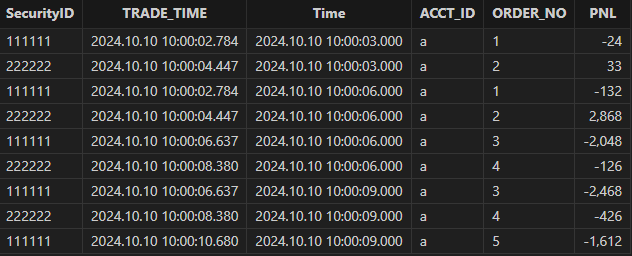
The join result is as follows:
Example 2
If you set isInnerJoin to false, the engine joins the left and right tables as an outer join.
share streamTable(1:0, `time`sym`price, [TIMESTAMP, SYMBOL, DOUBLE]) as leftTable
share streamTable(1:0, `time`sym`val, [TIMESTAMP, SYMBOL, INT]) as rightTable
output=table(100:0, `sym`time1`time2`price`val`total, [SYMBOL, TIMESTAMP, TIMESTAMP, DOUBLE, INT, DOUBLE])
engine=createSnapshotJoinEngine(name = "engine1", leftTable=leftTable,
                        rightTable=rightTable, outputTable=output,
                        metrics=[<price>, <val>, <price*val>], matchingColumn=`sym,
                        timeColumn=`time, isInnerJoin=false)
subscribeTable(tableName="leftTable", actionName="joinLeft", offset=0, handler=appendForJoin{engine, true}, msgAsTable=true)
subscribeTable(tableName="rightTable", actionName="joinRight", offset=0, handler=appendForJoin{engine, false}, msgAsTable=true)
n = 6
tem1 = table( (2018.10.08T01:01:01.001 + 1..n) as time,take(`A`B`C, n) as sym,take(1..4,n) as val)
rightTable.append!(tem1)
n = 5
tem2 = table( 2019.10.08T01:01:01.001 + 1..n as time,take(`A`B`C, n) as sym,take(0.1+10..13,n) as price)
leftTable.append!(tem2)| sym | time1 | time2 | price | val | total |
|---|---|---|---|---|---|
| A | 2018.10.08 01:01:01.002 | 1 | |||
| B | 2018.10.08 01:01:01.003 | 2 | |||
| C | 2018.10.08 01:01:01.004 | 3 | |||
| A | 2018.10.08 01:01:01.005 | 4 | |||
| B | 2018.10.08 01:01:01.006 | 1 | |||
| C | 2018.10.08 01:01:01.007 | 2 | |||
| A | 2019.10.08 01:01:01.002 | 2018.10.08 01:01:01.005 | 10.1 | 4 | 40.4 |
| B | 2019.10.08 01:01:01.003 | 2018.10.08 01:01:01.006 | 11.1 | 1 | 11.1 |
| C | 2019.10.08 01:01:01.004 | 2018.10.08 01:01:01.007 | 12.1 | 2 | 24.2 |
| A | 2019.10.08 01:01:01.005 | 2018.10.08 01:01:01.005 | 13.1 | 4 | 52.4 |
| B | 2019.10.08 01:01:01.006 | 2018.10.08 01:01:01.006 | 10.1 | 1 | 10.1 |
Use the following code to clear the environment:
dropStreamEngine("engine1")
unsubscribeTable(tableName="leftTable", actionName="joinLeft")
unsubscribeTable(tableName="rightTable", actionName="joinRight")
undef(`leftTable, SHARED)
undef(`rightTable, SHARED)
If you set keepLeftDuplicates and keepRightDuplicates to true, then when the left table (or right table) is updated, it joins with all matching records in the right table (or left table).
share streamTable(1:0, `time`sym`price, [TIMESTAMP, SYMBOL, DOUBLE]) as leftTable
share streamTable(1:0, `time`sym`val, [TIMESTAMP, SYMBOL, INT]) as rightTable
output=table(100:0, `sym`time1`time2`price`val`total, [SYMBOL, TIMESTAMP, TIMESTAMP, DOUBLE, INT, DOUBLE])
engine=createSnapshotJoinEngine(name = "engine1", leftTable=leftTable,
                    rightTable=rightTable, outputTable=output,
                    metrics=[<price>, <val>, <price*val>], matchingColumn=`sym,
                    timeColumn=`time, keepLeftDuplicates=true,
                    keepRightDuplicates=true)
subscribeTable(tableName="leftTable", actionName="joinLeft", offset=0, handler=appendForJoin{engine, true}, msgAsTable=true)
subscribeTable(tableName="rightTable", actionName="joinRight", offset=0, handler=appendForJoin{engine, false}, msgAsTable=true)
n = 6
tem1 = table( (2018.10.08T01:01:01.001 + 1..n) as time,take(`A`B`C, n) as sym,take(1..4,n) as val)
rightTable.append!(tem1)
n = 5
tem2 = table( 2019.10.08T01:01:01.001 + 1..n as time,take(`A`B`C, n) as sym,take(0.1+10..13,n) as price)
leftTable.append!(tem2)| sym | time1 | time2 | price | val | total |
|---|---|---|---|---|---|
| A | 2019.10.08 01:01:01.002 | 2018.10.08 01:01:01.002 | 10.1 | 1 | 10.1 |
| A | 2019.10.08 01:01:01.002 | 2018.10.08 01:01:01.005 | 10.1 | 4 | 40.4 |
| B | 2019.10.08 01:01:01.003 | 2018.10.08 01:01:01.003 | 11.1 | 2 | 22.2 |
| B | 2019.10.08 01:01:01.003 | 2018.10.08 01:01:01.006 | 11.1 | 1 | 11.1 |
| C | 2019.10.08 01:01:01.004 | 2018.10.08 01:01:01.004 | 12.1 | 3 | 36.3 |
| C | 2019.10.08 01:01:01.004 | 2018.10.08 01:01:01.007 | 12.1 | 2 | 24.2 |
| A | 2019.10.08 01:01:01.005 | 2018.10.08 01:01:01.002 | 13.1 | 1 | 13.1 |
| A | 2019.10.08 01:01:01.005 | 2018.10.08 01:01:01.005 | 13.1 | 4 | 52.4 |
| B | 2019.10.08 01:01:01.006 | 2018.10.08 01:01:01.003 | 10.1 | 2 | 20.2 |
| B | 2019.10.08 01:01:01.006 | 2018.10.08 01:01:01.006 | 10.1 | 1 | 10.1 |
If you set outputElapsedMicroseconds to true, the output table records the processing time for each response and the number of records in each response. In this case, you must append the execTime column and the batchSize column to the end of the output table.
dropStreamEngine("engine1")
unsubscribeTable(tableName="leftTable", actionName="joinLeft")
unsubscribeTable(tableName="rightTable", actionName="joinRight")
undef(`leftTable, SHARED)
undef(`rightTable, SHARED)
share streamTable(1:0, `time`sym`price, [TIMESTAMP, SYMBOL, DOUBLE]) as leftTable
share streamTable(1:0, `time`sym`val, [TIMESTAMP, SYMBOL, INT]) as rightTable
output=table(100:0, `sym`time1`time2`price`val`total`execTime`batchSize, [SYMBOL, TIMESTAMP, TIMESTAMP, DOUBLE, INT, DOUBLE, LONG, INT])
engine=createSnapshotJoinEngine(name = "engine1", leftTable=leftTable,
                      rightTable=rightTable, outputTable=output,
                      metrics=[<price>, <val>, <price*val>], matchingColumn=`sym,
                      timeColumn=`time, outputElapsedMicroseconds=true)
subscribeTable(tableName="leftTable", actionName="joinLeft", offset=0, handler=appendForJoin{engine, true}, msgAsTable=true)
subscribeTable(tableName="rightTable", actionName="joinRight", offset=0, handler=appendForJoin{engine, false}, msgAsTable=true)
n = 6
tem1 = table( (2018.10.08T01:01:01.001 + 1..n) as time,take(`A`B`C, n) as sym,take(1..4,n) as val)
rightTable.append!(tem1)
n  = 5
tem2 = table( 2019.10.08T01:01:01.001 + 1..n as time,take(`A`B`C, n) as sym,take(0.1+10..13,n) as price)
leftTable.append!(tem2)| sym | time1 | time2 | price | val | total | execTime | batchSize |
|---|---|---|---|---|---|---|---|
| A | 2019.10.08 01:01:01.002 | 2018.10.08 01:01:01.005 | 10.1 | 4 | 40.4 | 112 | 5 |
| B | 2019.10.08 01:01:01.003 | 2018.10.08 01:01:01.006 | 11.1 | 1 | 11.1 | 112 | 5 |
| C | 2019.10.08 01:01:01.004 | 2018.10.08 01:01:01.007 | 12.1 | 2 | 24.2 | 112 | 5 |
| A | 2019.10.08 01:01:01.005 | 2018.10.08 01:01:01.005 | 13.1 | 4 | 52.4 | 112 | 5 |
| B | 2019.10.08 01:01:01.006 | 2018.10.08 01:01:01.006 | 10.1 | 1 | 10.1 | 112 | 5 |
Related Functions