
Nearest-Neighbor Join Engine
Overview
The nearest-neighbor join engine is created using the
createNearestJoinEngine function. It is a window-based data
join engine, similar to a window join engine. By default, data in the left and right
tables is considered ordered by the nearest-neighbor join engine. The engine groups
data from both tables by the join column. Within each group, each left-table record
is joined with the most recent k right-table records that occurred before it. The
specified calculations are then performed on the join results for output.
When creating a nearest-neighbor join engine, you can use the useSystemTime parameter to specify whether system time or event time is used to determine the most recent k right-table records whose time is not later than that of the left-table record:
-
Use system time: If system time at insertion is used, each left-table record triggers the join and output immediately upon entering the engine.
-
Use event time: If event time (indicated by the time column) is used, a left-table record triggers the join and output only after the latest timestamp in the right table exceeds the timestamp of the left-table record.
When using event time, you can specify the maxDelayedTime parameter to force the join if the condition is not met within the specified time window.
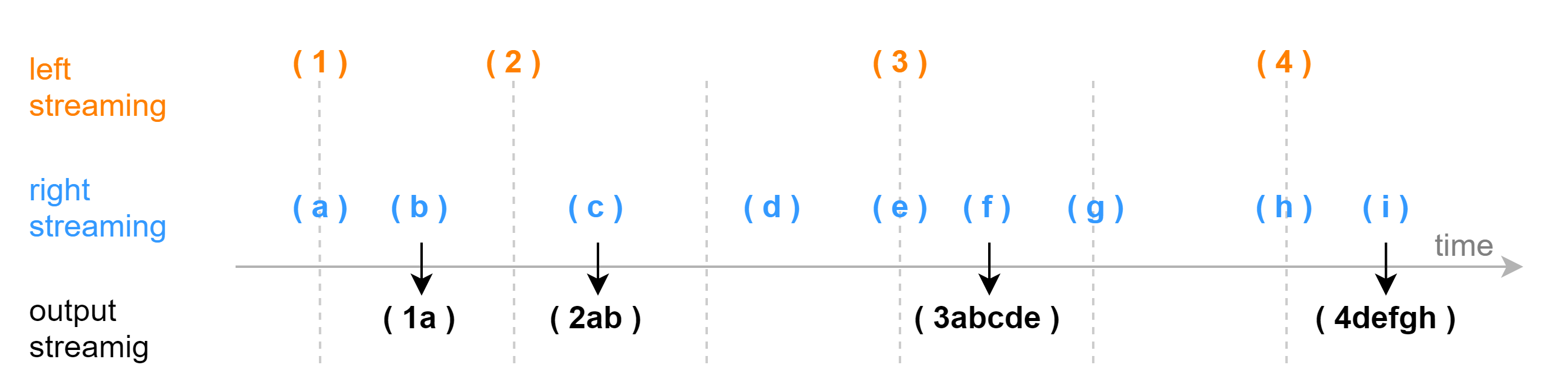
The following figure illustrates how the join is triggered based on event time within a single group. The parameter kNearest is set to 5, meaning each left-table record is joined with the latest five right-table records whose timestamps are not later than that of the left record. The output is triggered by the first right-table record whose timestamp exceeds that of the left record. This triggering record is not included in the join result.
The syntax of the createNearestJoinEngine function is as follows:
createNearestJoinEngine(
    name, leftTable, rightTable, outputTable, kNearest, metrics, matchingColumn,
    [timeColumn], [useSystemTime=false], [garbageSize=5000], [maxDelayedTime],
    [nullFill], [cachedTableCapacity=1024], [snapshotDir], [snapshotIntervalInMsgCount]
)
For parameter description, see createNearestJoinEngine.
Example: Rolling Tick-Based Factor Calculation at Snapshot Frequency
Market snapshots and tick trade data describe market conditions from different perspectives. The computation of many high-frequency factors requires effectively combining these two types of data. The nearest-neighbor join engine provides an efficient approach to join each snapshot record with the most recent N trade records that occurred before it, enabling precise integration of snapshot and trade data. This joined dataset fully captures the latest market microstructure characteristics and provides rich input for high-frequency factor computation.
The core characteristic of this scenario is that each snapshot record is matched with a fixed number of the most recent trade records. The output corresponds one-to-one with the original snapshot records. The following script uses the nearest-neighbor join engine to join each snapshot with the 10 most recent trades that occurred before it and computes the corresponding factor:
// Create table
share streamTable(1:0, `Sym`Time`BidPrice`AskPrice, [SYMBOL, TIME, DOUBLE[], DOUBLE[]]) as snapshotStream
share streamTable(1:0, `Sym`TradeTime`TradePrice`TradeQty, [SYMBOL, TIME, DOUBLE, LONG]) as tradeStream
colNames = [`Time, `Sym, `TradePriceList, `TradeQtyList, `factor1, `factor2]
colTypes = ["TIME", "SYMBOL", "DOUBLE[]", "LONG[]", "DOUBLE", "DOUBLE"]
share streamTable(10000:0, colNames, colTypes) as outputStream
// Create engine
defg myWavg(x){
	weight = 1..size(x)
	return wavg(x, weight)
}
defg withdrawsVolume(Prices, Volumes){
	prevPrices = prev(Prices)
	prevVolumes = prev(Volumes)
    withdraws = iif(prevPrices == Prices, prevVolumes - Volumes, 0)
    withdraws = withdraws[withdraws > 0]
	return sum(withdraws)
}
metrics = [
    <toArray(tradeStream.TradePrice)>,
    <toArray(tradeStream.TradeQty)>,
    <myWavg(tradeStream.TradePrice)>,
    <withdrawsVolume(tradeStream.TradePrice, tradeStream.TradeQty)>
]
njEngine=createNearestJoinEngine(
    name="njEngine",
    leftTable=snapshotStream,
    rightTable=tradeStream,
    outputTable=outputStream,
    kNearest=10,
    metrics=metrics,
    matchingColumn=`Sym,
    timeColumn=`Time`TradeTime,
    maxDelayedTime=1500
)
// Subscribe to topic
subscribeTable(tableName="snapshotStream",
    actionName="joinLeft",
    offset=-1,
    handler=appendForJoin{njEngine, true},
    msgAsTable=true)
subscribeTable(tableName="tradeStream",
    actionName="joinRight",
    offset=-1,
    handler=appendForJoin{njEngine, false},
msgAsTable=true)-
The snapshot data (snapshotStream) is inserted into the left table of the engine, and the tick trade data (tradeStream) is inserted into the right table.
-
The
useSystemTime=falsesetting specifies that the time columns in the data are used for joins (the Time column in the left table and the TradeTime column in the right table). -
The
kNearest=10setting specifies that each record in the left table (snapshotStream) is joined with the 10 most recent records in the right table (tradeStream). -
The metrics parameter specifies the calculation metrics. For example,
toArray(TradeQty)aggregates the TradeQty column from the right table into an array vector. Note that TradeQty refers to a column in the right table (tradeStream), and there is no column with the same name in the left table. If the metrics parameter specifies columns that exist in both the left and right tables with the same name, the column from the left table is used by default. You can explicitly specify the source table using"tableName.columnName", such astradeStream.TradeQty. -
The maxDelayedTime parameter supplements the default triggering mechanism. It forces pending left-table records to be joined and output based on the latest received data from any group in the right table. The default value is 3, in seconds. If maxDelayedTime is not specified, a left-table record will only trigger the join after a record from the same group in the right table arrives with a timestamp later than that of the left-table record. However, in real-world scenarios, right-table records for a particular group may be significantly delayed, or there may never be a right-table record with a timestamp later than a given left-table record in that group. To ensure that every left-table record is eventually joined and output, we recommend that you set maxDelayedTime to an appropriate value so that newly arrived records from other groups in the right table can force the join to proceed.
Construct data and write it into the two input stream tables (i.e., the left table and the right table):
// Generate data: snapshot
t1 = table(`A`B`A`B as Sym, 10:00:00.000+(5 5 6 6)*1000 as Time, array(DOUBLE[]).append!([3.5 7.6, 3.5 7.6, 4.3 5.6, 4.3 5.6]) as BidPrice, array(DOUBLE[]).append!([3.5 7.6, 3.5 7.6, 4.3 5.6, 4.3 5.6]) as AskPrice)
// Generate data: trade
n = 70
t2 = table(take(`A`B, n) as Sym, 10:00:00.000+(1..n)* 100 as TradeTime,  take(3.5 3.5 3.5 3.5 7.5 7.5 7.5 7.5, n) as TradePrice, take(1000 1000 900 900, n) as TradeQty)
// Input data
snapshotStream.append!(t1)
tradeStream.append!(t2)
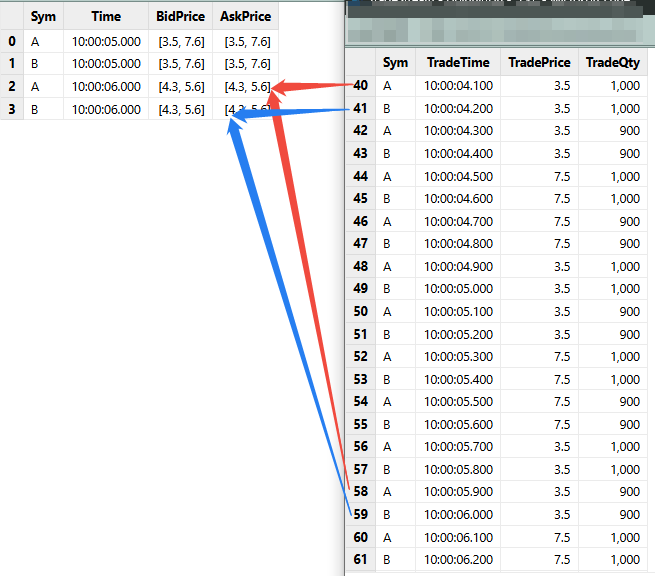
The join relationship between the input left and right tables is as follows:
The output table is shown below. The columns TradePriceList and TradeQtyList are of array vector type, storing all TradePrice and TradeQty values from the trade records within the time window.