
CEP Engine Applications: Basic Tutorial on Implementing an Algorithmic Order-Splitting System
In financial markets, executing a large order in a single transaction can have a significant impact on market prices and increase transaction costs. For example, a large buy order may quickly drive prices upward, increasing the cost of subsequent purchases, while a large sell order may depress prices and cause the asset to be sold at an unfavorable price. Order-splitting algorithms divide a large order into multiple child orders and execute them at different points within a specified time period, mitigating the impact that a single large order can have on market prices.
This tutorial guides you through the full process of building an order-splitting system based on DolphinDB's Complex Event Processing (CEP) engine, with implementations of the TWAP and VWAP order-splitting algorithms. This tutorial covers:
-
CEP basics.
-
How to implement the TWAP order splitting algorithm using the CEP engine.
-
How to implement the VWAP order splitting algorithm using the CEP engine.
1. Introduction to the CEP Engine
The CEP engine is designed to process and analyze complex events in event streams in real time. Its main features include receiving real-time data streams, defining events and detecting specific events in event streams, and then executing predefined actions on events that meet specified rules. The CEP engine enables you to:
-
Specify the patterns that you want to detect and act upon in your stream;
-
Monitor streams of events to find particular events or patterns of interest;
-
Perform actions such as aggregation and transformation based on particular events or patterns;
-
Extract information from event streams and find out relationships between them.
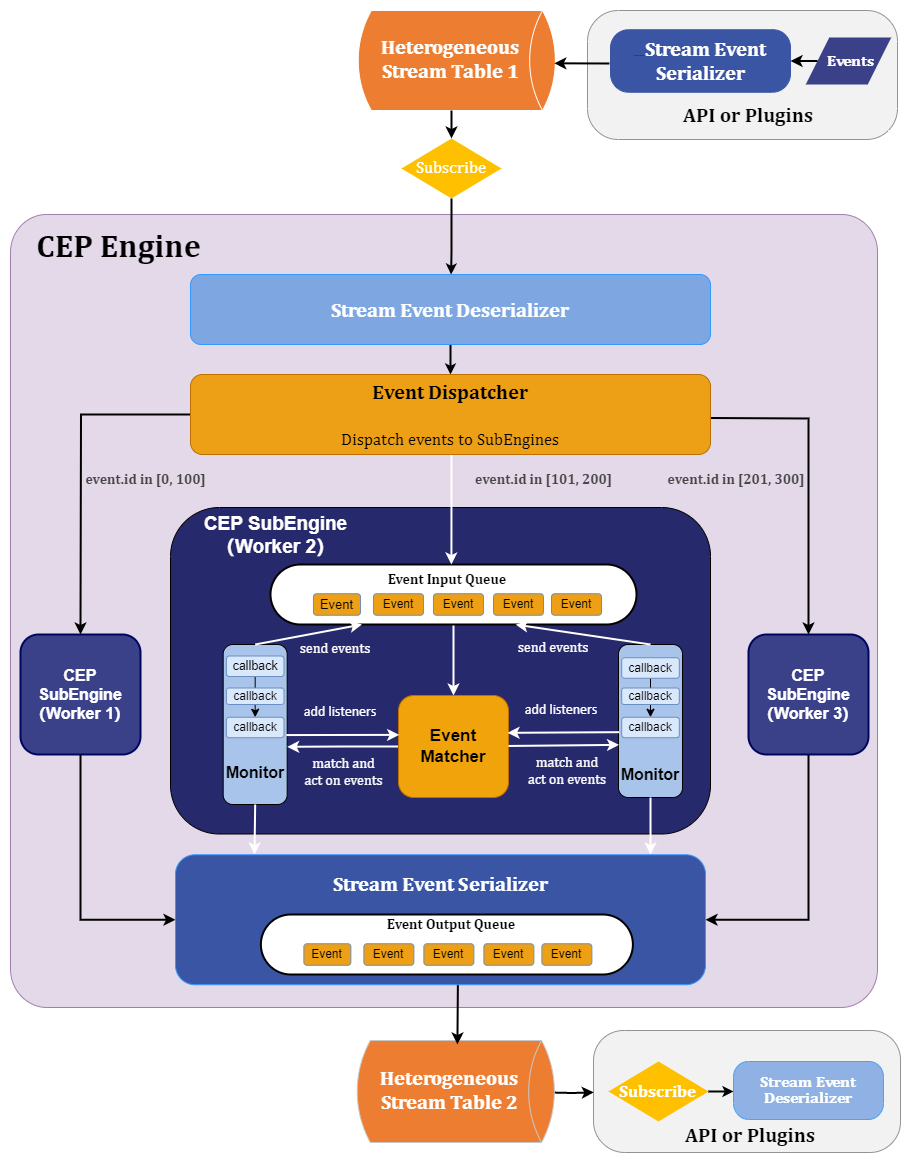
As shown in Figure 1-1, a complete CEP application consists of the following main components: the stream event serializer, the stream event deserializer, the event dispatcher, and sub-engines. Event is the fundamental element that flows through these components. For more information, see Complex Event Processing.
2. TWAP Algorithm
This chapter introduces how to use the CEP engine to implement the TWAP order-splitting algorithm.
2.1 What Is the TWAP Algorithm
Time-Weighted Average Price (TWAP) is one of the simplest order-splitting algorithms. It is suitable for highly liquid markets and relatively small orders. This algorithm divides the trading period into equal intervals and submits equal portions of the order at each interval boundary. For example, the trading hours of a trading day can be divided evenly into n intervals. The TWAP algorithm then distributes the orders to be executed on that trading day evenly across these n intervals, so that the average execution price tracks TWAP. The TWAP algorithm aims to reduce the market impact of trades while achieving a lower average execution price, thereby reducing transaction costs. The formula of the TWAP algorithm is as follows:
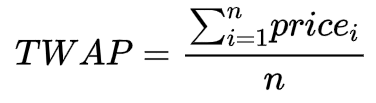
In this formula, n is the number of time intervals, and pricei is the price of the split order at the interval boundary. However, using the TWAP algorithm for order splitting has the following issues:
-
When the order size is exceptionally large, the order quantity allocated to each interval may still be sizeable. As a result, it may still impact the market under thin liquidity conditions.
-
The traditional TWAP algorithm splits both the trading period and the order size uniformly, generating a predictable trading pattern that other traders can easily detect and predict. Once other traders identify this pattern, they can position themselves in advance based on it, leading to higher transaction costs.
To address these issues, this tutorial improves the traditional TWAP algorithm as follows:
-
It randomizes child order sizes and order placement intervals within specific ranges, making the trading pattern less transparent and mitigating the risk of detection.
-
It implements the management of the order-splitting status in real time, including pausing, resuming, and terminating order placement. You can manage the status of parent orders based on real-time market conditions, thereby enhancing resilience to risks.
2.2 Functional Modules
The algorithm consists of the following functional modules:
-
CEP engine: The core component. It treats all streaming data, including market data and orders, as event streams, and defines rules for processing these event streams.
-
Data replay: Simulates writing real-time snapshot data.
-
Stream table publish-subscribe: Decouples parent order placement from order splitting.
The TWAP algorithm implementation is shown as follows:
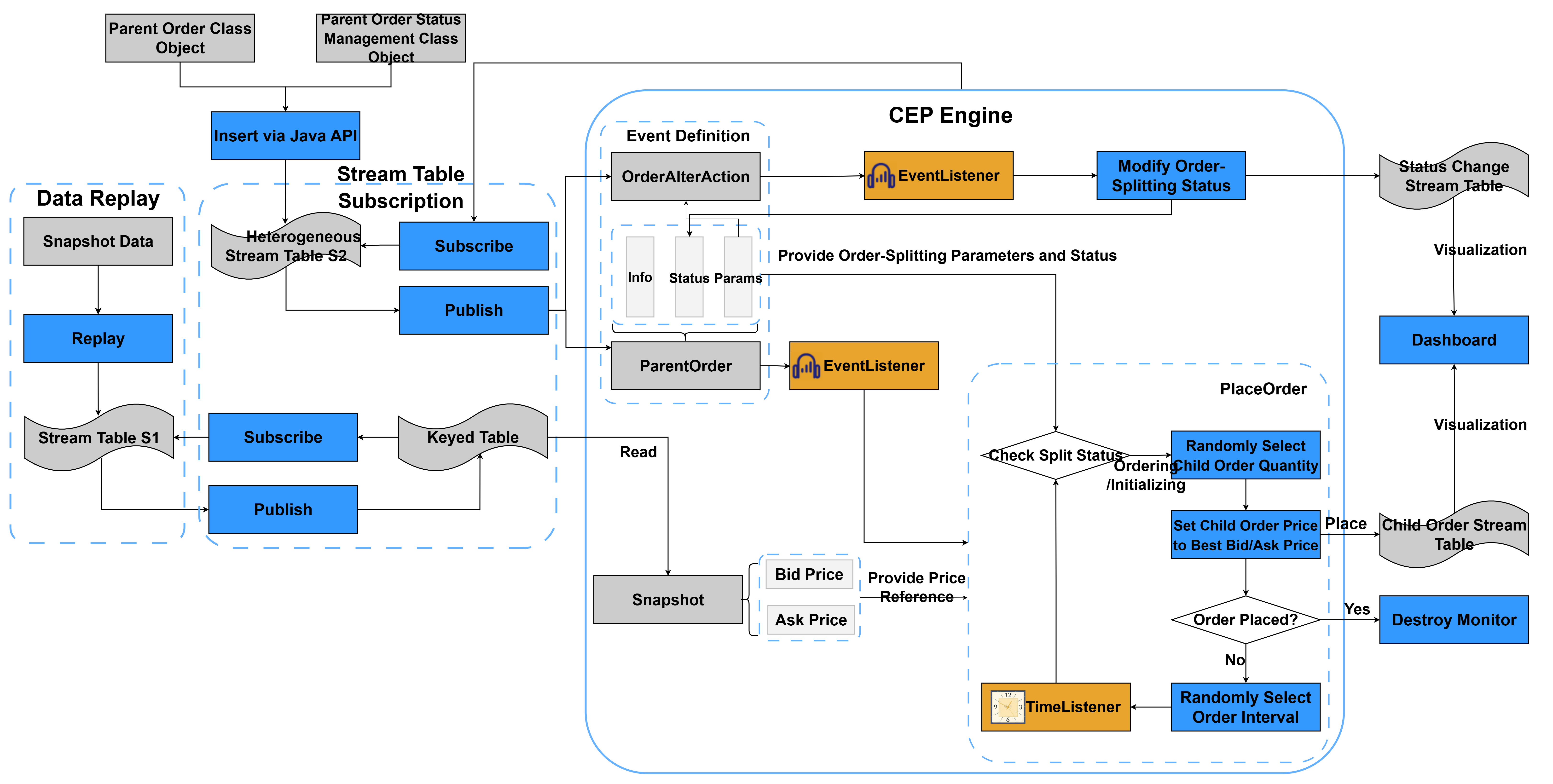
In this example, the strategy start event for the CEP engine is the parent order event ParentOrder. After the parent order event enters the engine, it starts listening for the parent order status management event OrderAlterAction. After snapshot data enters the keyed table through the replay feature, the core order-splitting function PlaceOrder reads it to determine the child order placement prices. The following sections introduce each module in detail.
2.2.1 Data Replay
Data replay is a common method in DolphinDB for backtesting high-frequency strategies. Based on the specified replay mode, it replays data from one or more data tables to a target data table or engine in chronological order, simulating real-time data writes. Exchanges push snapshot data at fixed time intervals. Therefore, replay can easily sort this data by timestamp and output it to a stream table.
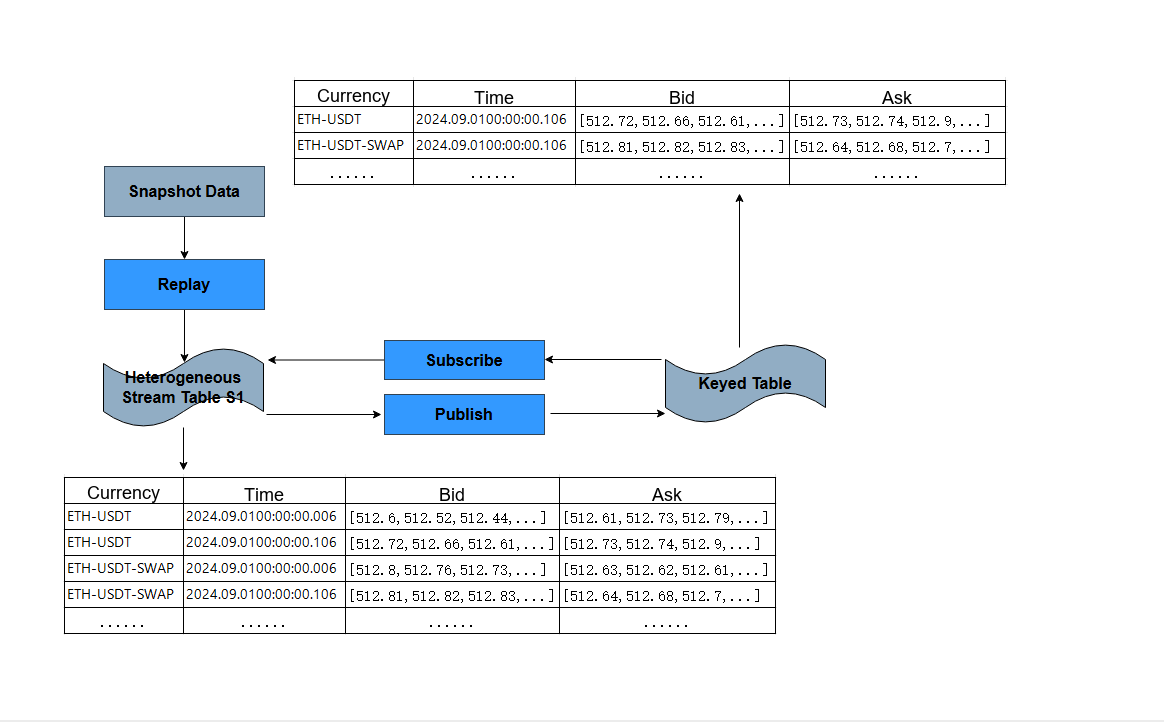
However, snapshot data may contain a large volume of historical data for many cryptocurrencies on an exchange. Feeding it directly to the CEP engine would degrade query performance. In real markets, determining a child order price requires only the latest snapshot for the cryptocurrency. Therefore, you only need to retain the latest snapshot for each cryptocurrency. DolphinDB's keyed table can meet this requirement. For details, see the keyedTable. In this tutorial, the keyed table uses the cryptocurrency ID as the primary key and snapshot data, including the top 10 bid and ask prices, as non-primary-key columns. Using the keyed table, we can provide the CEP engine with real-time cryptocurrency snapshot data and simulate real-time snapshot writes.
2.2.2 Stream Table Publish-Subscribe
DolphinDB uses a Publish-Subscribe (Pub-Sub) communication model to facilitate the publishing and subscription of streaming data through message queues. This model enables event producers (publishers) and event consumers (subscribers) to operate independently. When data streams are injected into a publishing table, they are first pushed to the corresponding message publishing queue. The publisher then notifies all subscribers to retrieve the data from their queues for incremental processing. An in-memory table can subscribe to a stream table using the subscribeTable function. For the keyed table subscribing to the stream table, you need to define a callback function and insert the received data into the keyed table in the callback function. As a result, the keyed table stores the latest snapshot data for all cryptocurrencies. The following figure shows the process.
The CEP engine can subscribe to a stream table using the subscribeTable function. You need to specify handler as the handle of the CEP engine, which can be obtained using getStreamEngine. The CEP engine subscribes to the stream table. When incremental ParentOrder and OrderAlterAction events appear in the stream table, they are injected into the CEP engine. The CEP engine then adds the corresponding monitors and callback functions to process the events, completing child order placement and parent order status management.
2.2.3 CEP Engine
The CEP engine module is the most important and complex part of the order-splitting system. This example uses a dynamic startup approach: the engine sets up a listener for OrderAlterAction only after the event listener captures the strategy startup event ParentOrder. Snapshot data enters the stream table through data replay. The stream table publishes the data to the keyed table, which the CEP engine queries to obtain the latest order book prices for each cryptocurrency.
-
Order splitting and placement: After
ParentOrderenters the CEP engine, the engine calls the core functionPlaceOrderto split the parent order and place child orders.PlaceOrderfirst checks the parent order status. If the order is in “Init” or “Placing”, it splits the order.PlaceOrderuses DolphinDB'srandfunction to randomly select the number of child orders within the range specified by the user. It reads the latest order book prices for the current cryptocurrency from the keyed table to determine the child order price. After determining the parameters of the child orders, the system outputs the child orders to the child order stream table, which places the order. After placing an order, the system checks whether the order placement is complete. If it is, the system unregisters the monitor. Otherwise, it uses therandfunction to randomly select an interval and schedules the next child order placement. -
Parent order status changes: After the strategy starts, the CEP engine sets up a listener for the
OrderAlterActionevent. When anOrderAlterActionevent is injected into the CEP engine, the monitor operates on the parent order based on its current status and target status. For example, you can change a parent order that is in placing to pause. The CEP engine then pauses the child order placement and listens for the nextOrderAlterActionevent to be injected into the engine so that it can resume order placement.OrderAlterActionevents are output to the status change stream table. -
Visualization: Dashboard is a powerful data visualization and analysis tool provided by DolphinDB that helps you better understand and use your data. By outputting data from the child order stream table and the status change stream table to Dashboard, you can monitor the parent order splitting and order placement process, as well as parent order status changes, in real time.
2.3 Code Implementation
This section describes the implementation of TWAP-based order splitting in detail, including defining event classes, subscribing a keyed table to a stream table, replaying market data, defining monitors, creating the CEP engine, subscribing the CEP engine to a stream table, and starting strategy instances. See the appendix for the complete code.
2.3.1 Define Event Classes
DolphinDB defines an event as a class. First, define the parent order information and parent order status change as classes. See the appendix for the complete code.
-
Parent order class
ParentOrder: In addition to basic parent order information, such as parent order ID, batch, cryptocurrency type, exchange, business type, executor, parent order amount, and buy/sell direction, you also need to define the core order-splitting parameters as member variables of the parent order class:symbol:: STRING // Cryptocurrency type symbolSource:: STRING // Exchange + business type, such as "OKX-FUTURES" tradeAmount:: DOUBLE // Total transaction amount tradeDirection:: STRING // Trade direction ("B" for buy, "S" for sell) //Order-splitting parameters splitMethod:: STRING // Order-splitting algorithm orderType:: STRING // Order type (limit/market) price:: DOUBLE // Limit price priceOption:: INT // Best bid or ask price startTime:: TIMESTAMP // Start time of order splitting endTime:: TIMESTAMP // End time of order splitting lowSplitInterval:: INT // Order-splitting interval (seconds) highSplitInterval:: INT // Order-splitting interval (seconds) orderStatus:: STRING // Order-splitting status orderTimes:: INT //Number of split orders intervalAmount:: DOUBLE //Floating amount-
splitMethod specifies the algorithm, which is TWAP in this example. priceOption specifies whether the child order price uses the best bid price or ask price from the snapshot data.
-
startTime and endTime specify the order-splitting time range. The number of order placements is set here. Therefore, the child order amount can be roughly calculated from the parent order amount.
-
intervalAmount specifies the floating amount for child orders to introduce randomness into the child order size and make trading less detectable. lowSplitInterval and highSplitInterval specify the time interval range for child order placement.
-
orderStatus records the parent order status, such as “Init”, “Placing”, or “Pause”.
-
-
Parent order status change class
OrderAlterAction: Defines information about parent order status change as a parent order status change class, including the following variables.splitOrderId:: STRING //ID of the parent order to operate on eventType:: STRING //Event type operation:: STRING //Operation type batchId:: STRING //Batch ID (the unique ID of the parent order) handlerEmpid:: STRING //Executor handlerName:: STRING // Executor eventTime:: TIMESTAMP // Time when the order change was submittedThe core variable is operation, which specifies the operation type for this status change, such as pause, resume or terminate. The CEP engine monitor changes the parent order's
orderStatusbased on the operation type.
2.3.2 Create In-Memory Tables
Create the parent order in-memory table parentOrderManage, the order change in-memory table alterOrderManage, the child order stream table subOrderStream, and the heterogeneous stream table orderBlobStream subscribed by the CEP engine.
//Create the parent order in-memory table
colNames=[
    "splitOrderId","eventType","batchId","tagBatchId","sortNum",
    "combinationNo","combinationName","symbol","symbolSource",
    "tradeDate","tradeAmount","RemainAmount","tradeDirection",
    "handlerEmpid","handlerName","splitMethod","orderType","price",
    "startTime","endTime","splitInterval","orderStatus","splitOrderAmount",
    "eventTime","lastUpdateTime"
]
colTypes=[
    STRING,SYMBOL,STRING,STRING,INT,
    STRING,STRING,SYMBOL,SYMBOL,
    STRING,DOUBLE,DOUBLE,SYMBOL,
    STRING,STRING,SYMBOL,SYMBOL,DOUBLE,
    TIMESTAMP,TIMESTAMP,INT,SYMBOL,INT,
    TIMESTAMP,TIMESTAMP
]
share table(1:0,colNames,colTypes) as parentOrderManage


//Create the order change in-memory table
colNames=`splitOrderId`eventType`operation`batchId`handlerEmpid`handlerName`eventTime
colTypes=[STRING,STRING,STRING,STRING,STRING,STRING,TIMESTAMP]
share table(1:0, colNames, colTypes) as alterOrderManage

// Create the child order stream table
colNames=[
    "splitOrderId","batchId","tagBatchId","sortNum",
    "combinationNo","combinationName","symbol","symbolSource",
    "tradeDate","tradeQuantity","tradeDirection",
    "handlerEmpid","handlerName","orderType","price","lastUpdateTime"
]
colTypes=[
    STRING,STRING,STRING,INT,
    STRING,STRING,SYMBOL,SYMBOL,
    STRING,DOUBLE,SYMBOL,
    STRING,STRING,SYMBOL,DOUBLE,TIMESTAMP
]
share streamTable(1:0, colNames, colTypes) as subOrderStream

// Create the heterogeneous stream table subscribed by the CEP engine
share(streamTable(100:0,`timestamp`eventType`blob`splitOrderId, [TIMESTAMP, STRING,BLOB,STRING]),"orderBlobStream")
2.3.3 Subscribe to a Stream Table
Use the keyed table snapshotOutputKeyedTb to subscribe to the snapshot data stream table snapshotStream. First, define the two tables.
-
Table schema definition: Define the snapshot data stream table snapshotStream to receive replayed snapshot data, and define the keyed table snapshotOutputKeyedTb to store the latest snapshot data for each cryptocurrency.
//Define the snapshot data stream table
colNames = `symbolSource`timestamp`symbol`offerPrice`bidPrice`offerQty`bidQty
colTypes = [
 SYMBOL, // symbolSource: Exchange-business type, such as "Binance-Spot"
 TIMESTAMP, // timestamp: Timestamp
 SYMBOL, // symbol: Cryptocurrency
 DOUBLE[], // offerPrice: Ask price array (best ask price, second-best ask price, and subsequent levels)
 DOUBLE[], // bidPrice: Bid price array (best bid price, second-best bid price, and subsequent levels)
 DOUBLE[], // offerQty: Ask quantity array (supports decimal quantities for cryptocurrency )
 DOUBLE[] // bidQty: Bid quantity array (supports decimal quantities for cryptocurrency )
]
// Shared stream table for receiving replayed snapshot data
share streamTable(1:0, colNames, colTypes) as snapshotStream

// Create a keyed table that subscribes to snapshotStream and stores the bid and ask for each cryptocurrency. Each cryptocurrency has only one bid and ask record.
snapshotOutputKeyedTbTmp = keyedTable(`symbol,1:0,colNames,coltypes)
share snapshotOutputKeyedTbTmp as snapshotOutputKeyedTb
In snapshotStream, symbol is the unique ID of the cryptocurrency, offerPrice contains the 10 ask price levels, and offerQty contains the corresponding 10 ask order quantities. bidPrice contains the 10 bid price levels, and bidQty contains the corresponding 10 bid order quantities.
In snapshotOutputKeyedTb, the primary key is symbol, and the fields are the same as those in snapshotStream. Only one latest snapshot record is stored for each cryptocurrency.
-
Subscription: snapshotOutputKeyedTb subscribes to incremental data in snapshotStream.
// Callback function for subscribing to snapshotStream
def handleSnapshot(msg) {
 // Retrieve all data and convert stream table data into operable data
    data = exec * from msg
 // Insert into or overwrite the keyed table: Old data with the same symbol is overwritten by the latest snapshot
    insert into snapshotOutputKeyedTb values(
        data[`symbolSource],
        data[`timestamp],
        data[`symbol],
        data[`offerPrice],
        data[`bidPrice],
        data[`offerQty],
        data[`bidQty] )
}
// Subscribe
subscribeTable(tableName = `snapshotStream,actionName=`handleSnapshot,handler = handleSnapshot,msgAsTable=true,batchSize = 1)
Use the
subscribeTablefunction to subscribe to snapshotStream. The callback functionhandleSnapshotinserts the received incremental data into snapshotOutputKeyedTb.
2.3.4 Define the Monitor
The most critical step in implementing the order-splitting system is to configure the monitor for the CEP engine. The monitor encapsulates the order-splitting strategy. Its structure is roughly as follows:
class SplitMonitor:CEPMonitor{
	def SplitMonitor() {
		//In this example, no values need to be passed when initializing the monitor. Set them when cloning the task monitor.
	}
 //Initialize parent order record information
    def initPOrderManageInfo(pOrder){...}

 //Update parent order information
    def updatePOrderManageInfo(pOrder,opTime){...}
}


//TWAP order placement monitor and the inheritance relationship
class TWAPSplitMonitor:SplitMonitor {

    //Variable that records the total child order amount
    subOrderAmounts:: DOUBLE

    //Current parent order
	parentOrder:: ParentOrder

	def TWAPSplitMonitor() {
		//In this example, the initial monitor does not require parameters; set them when cloning the task monitor.
	}

 //Select a random number within the range; used for time and order amount fluctuations
    def randNum(lowNum, highNum){...}

    //TWAP order placement method
    def placeOrder(){...}

    //Parent order splitting status change operation
    def orderAlter(oaAction){...}

    //Initialize parentOrder, split and place orders, and set the OrderAlterAction event listener
    def startPlaceOrder(pOrder){...}

    //Create a monitor instance for placing the parent order
	def forkParentOrderMonitor(pOrder){...}

	//Initialization task
	def onload(){
		addEventListener(forkParentOrderMonitor, "ParentOrder", ,"all")
	}
}subOrderAmounts: Because each child order is placed with a random amount within a specified range, subOrderAmounts records the sum of the amounts of child orders placed so far.
parentOrder: Records the parameters of the current parent order, including basic information, split order parameters, and split order status.
The following parts describe each method in the monitor in the logical order in which the CEP engine runs.
-
onload: initialization task
After the engine is created and the monitor is instantiated, its onload function is called first. As described earlier, the CEP engine workflow starts by listening for the strategy startup event ParentOrder. The engine proceeds to the next step only after it detects that ParentOrder has been injected. Therefore, in the onload function, you only need to set the relevant event listeners that start the strategy. Use the addEventListener function to listen for ParentOrder event injections. Specify forkParentOrderMonitor as the callback function, specify the event type as ParentOrder, and configure the listener to keep listening continuously.
//Initialization task
def onload(){
	addEventListener(forkParentOrderMonitor, "ParentOrder", ,"all")
}
The onload function sets an event listener ParentOrder to listen for all parent order events. When an event of this type is detected, the process of order splitting and replacement starts. To ensure the thread safety of order splitting and placement for parent orders, the system creates a separate monitor instance for each parent order. Therefore, the corresponding callback function forkParentOrderMonitor must create the monitor instance and pass in the parent order parameters. Starting from the onload function, the function call flow and functionality can be divided into four modules, as shown in the following figure.
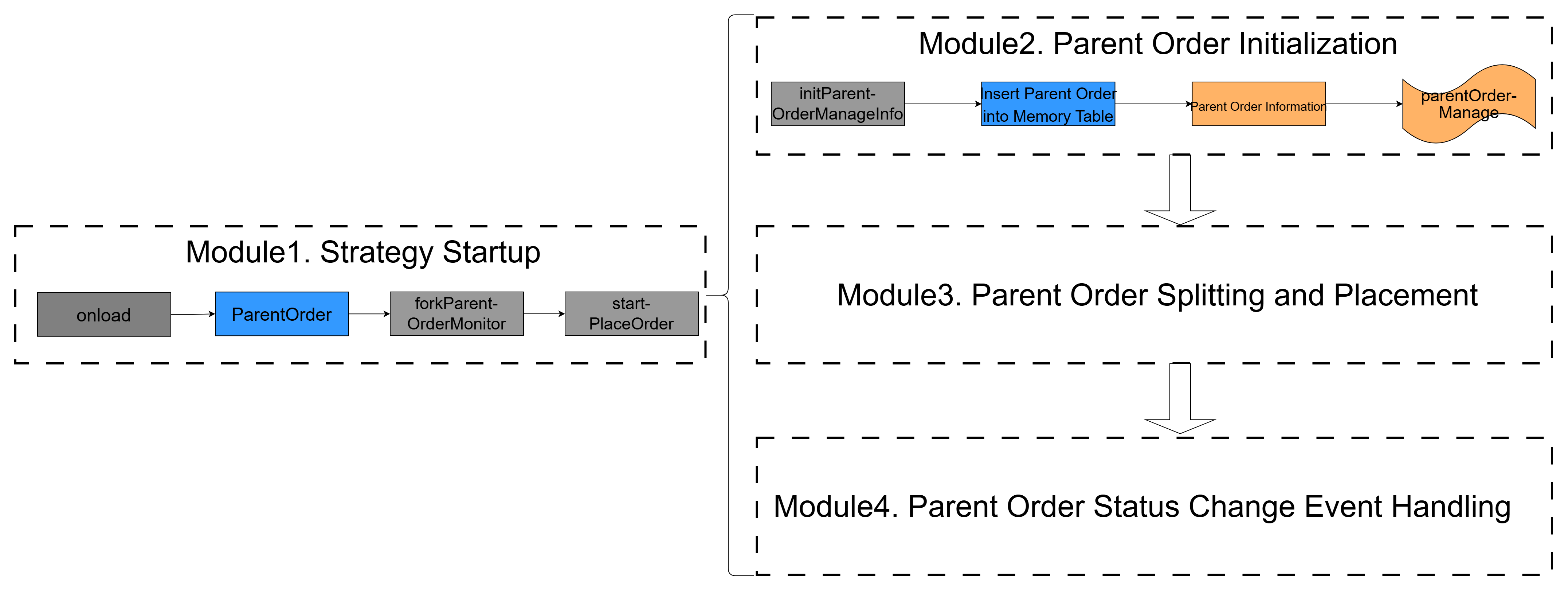
The startPlaceOrder function starts the following three modules, in the sequence shown in the figure above. In modules 3 and 4, the function call flow and functionality are shown in the following figure.
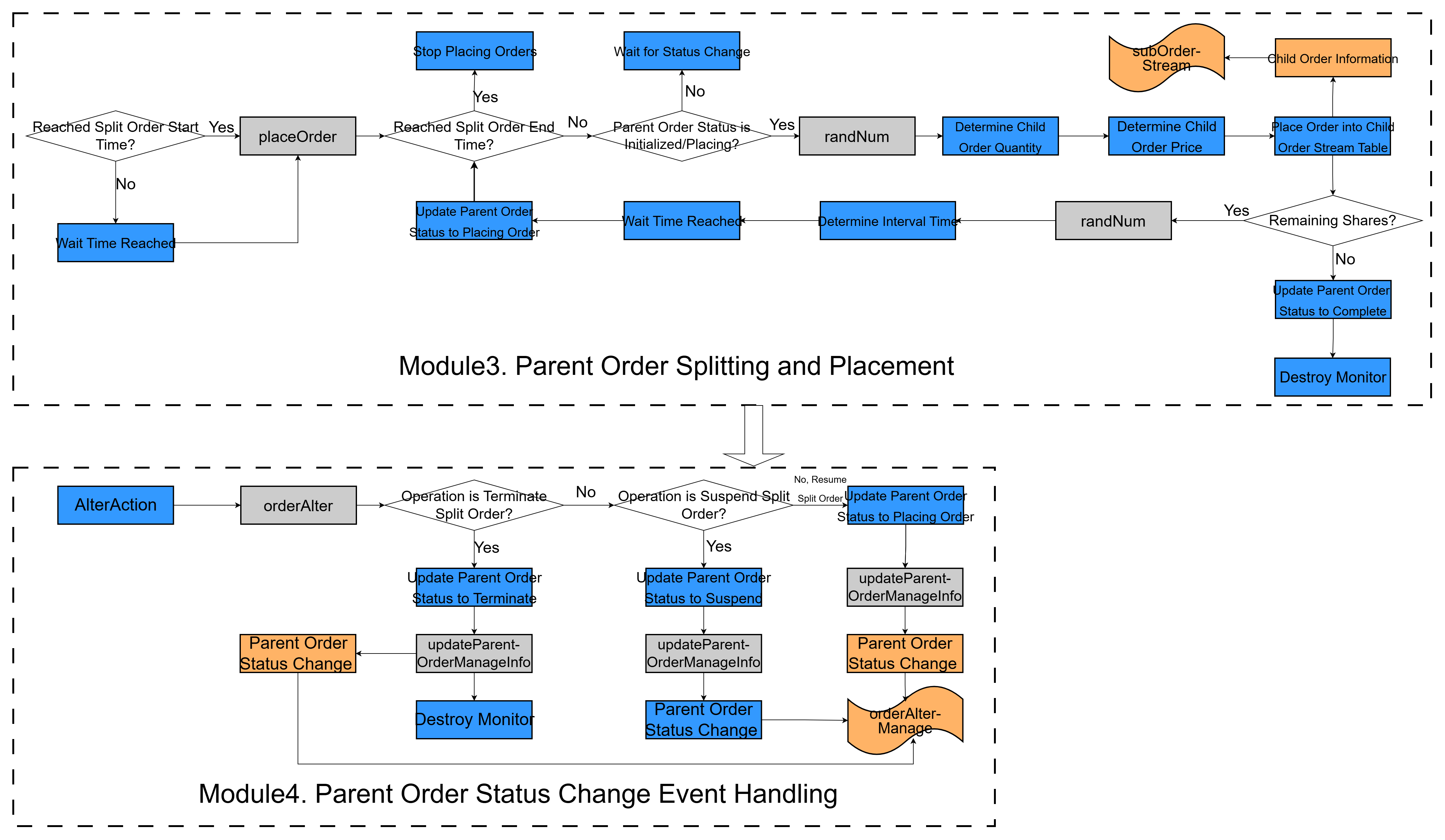
Next, we introduce the code implementation, starting with the callback function forkParentOrderMonitor, which corresponds to the strategy start event.
-
forkParentOrderMonitor: generates the monitor instance
In real trading markets, the system may receive multiple large orders that need to be split at the same time. If the CEP engine uses only one monitor instance to split and place the current order, thread-safety issues can occur. A monitor instance has only one parentOrder, newly injected parent order events would continuously modify the property values of parentOrder .
To solve this, the initial monitor in the CEP engine only monitors the injection of strategy startup events. For details, see the onload function described above. Whenever the onload function detects a newly injected ParentOrder event, it calls forkParentOrderMonitor to generate a sub-monitor instance, which then splits the parent order and places child orders.
//Generate a monitor instance for placing a parent order
	def forkParentOrderMonitor(pOrder){
        name = "Parent Order Placement["+pOrder.splitOrderId +"]"
        spawnMonitor(name,startPlaceOrder, pOrder)
	}
The forkParentOrderMonitor uses the spawnMonitor function to generate a sub-monitor instance. Then it calls the startPlaceOrder method and passes in the ParentOrder event pOrder. This starts the subsequent core modules.
-
startPlaceOrder: the core startup module
The startPlaceOrder function includes the startup steps for modules 2, 3, and 4. Its definition is as follows.
//Module startup function
    def startPlaceOrder(pOrder){
 // Set the internal parent order variable of the current subtask monitor
        parentOrder = pOrder
 // Initialize the total child order amount to 0
        subOrderAmounts = 0

        //Initialize TWAP order splitting
        parentOrder.setAttr(`orderStatus,'Init')
        parentOrder.setAttr(`sortNum,0)  //Order splitting sequence number

 //Record the parent order status in the in-memory table
        initPOrderManageInfo(parentOrder)

        //Calculate the start time for splitting and placing the parent order
        if(parentOrder.startTime == null|| now()>=parentOrder.startTime){//If the initial order time is empty or earlier than the current time, place the order immediately
            placeOrder()
        }else {//Order wait time; start orders at startTime
            //Calculate the interval from the current time to the order placement start time in milliseconds, then convert it to seconds
            period_wait = round((parentOrder.startTime - now())\1000 ,0)
            //Schedule one order placement to start after period_wait seconds
            addEventListener(placeOrder,,,1,,duration(period_wait+"s"))
        }

 //Create a listener to continuously monitor parent order changes
        addEventListener(orderAlter, "OrderAlterAction", <OrderAlterAction.splitOrderId = pOrder.splitOrderId>,"all")
	}
The function works as follows:
-
First, it initializes the current monitor's parent order variable
parentOrderand the total child order amount variablesubOrderAmounts. Then it calls theinitPOrderManageInfofunction to record the current parent order event in the in-memory tableparentOrderManage, which corresponds to module 2. -
After initialization, it checks whether the current time has reached the start time of order splitting. If the start time of order placement has passed, it calls the
placeOrderfunction to split the parent order and place child orders. Otherwise, it waits until the start time and then calls theplaceOrderfunction. This corresponds to the start time check for order splitting in module 3. -
After order splitting starts, the
addEventListenerfunction starts listening forOrderAlterActionevents. This corresponds to the initial listener in module 4.
-
initPOrderManageInfo: records parent order information
The initPOrderManageInfo function records the monitored parent order event in the in-memory table parentOrderManage.
def initPOrderManageInfo(pOrder){
        parentOrderManage=objByName('parentOrderManage')
        insert into parentOrderManage values(
            pOrder.splitOrderId,pOrder.eventType,pOrder.batchId,pOrder.tagBatchId,pOrder.sortNum,
            pOrder.combinationNo,pOrder.combinationName,
            pOrder.symbol, pOrder.symbolSource,
            pOrder.tradeDate,pOrder.tradeAmount,pOrder.tradeAmount,
            pOrder.tradeDirection,pOrder.handlerEmpid,pOrder.handlerName,
            pOrder.splitMethod,pOrder.orderType,pOrder.price,pOrder.startTime,pOrder.endTime,
            0,pOrder.orderStatus,0,pOrder.eventTime,now())
}-
randNum: generates a random integer within a specified range for time generation
The randNum function generates and returns a random integer within a specified range. As mentioned earlier, you can specify the child order splitting interval range in the parent order event as lowSplitInterval to highSplitInterval. The randNum function randomly generates a time interval within the specified range.
// Select a random number within the range; used for time and order amount fluctuations
    def randNum(lowNum, highNum){
        if(lowNum == highNum){
            return lowNum
        }
 // Use a vector to store the fluctuation values
        nums = array(INT, 0).append!(lowNum..highNum)
 // Random index in the range 0 to highnum - lownum; it returns an array, so an index is required
        indexNum = highNum-lowNum
        index = rand(indexNum, 1)[0];
        // Retrieve the fluctuation value
        return nums[index];
    }
The randNum function first generates an array that stores all integers in the specified range, then generates a random index, accesses the array by that index, and returns the corresponding value.
-
randAmount: generates a random floating-point number within a specific range for amount generation
The randAmount function generates and returns a random floating-point number within a specified range. As mentioned earlier, you can specify the child order amount fluctuation intervalAmount in the parent order event. The randAmount function randomly generates a child order amount within the specified range.
def randAmount(lowNum, highNum){
        if(lowNum == highNum){
            return lowNum
        }
 // Use a vector to store the fluctuation values
       return lowNum + rand(1.0,1)[0] * (highNum - lowNum);
}-
updatePOrderManageInfo: updates the parent order's last change time
The updatePOrderManageInfo function updates the parent order's last change time.
//Update the parent order information
    def updatePOrderManageInfo(pOrder,opTime){
        parentOrderManage=objByName('parentOrderManage')
        update parentOrderManage set sortNum = pOrder.sortNum,orderStatus=pOrder.orderStatus, lastUpdateTime = opTime where splitOrderId = pOrder.splitOrderId
}-
updateRemainAmount: updates the parent order amount
updateRemainAmountupdates the remaining amount of the parent order.
def updateRemainAmount(){
        parentOrderManage=objByName('parentOrderManage')
        opTime = now()
        tAmount = parentOrder.tradeAmount
        rAmount = tAmount - subOrderAmounts
        sId = parentOrder.splitOrderId
        update parentOrderManage set remainAmount=rAmount, lastUpdateTime = opTime where splitOrderId = sId
}-
placeOrder: the core order-splitting function
The placeOrder function is the core function for splitting and placing orders. It corresponds to the latter part of module 3.
//TWAP order placement method
    def placeOrder(){

 //Check whether the order placement time has passed
        if(now()>= parentOrder.endTime){ //If the current time is later than the order placement end time, stop placing orders
            parentOrder.setAttr(`orderStatus,'TimedOut')
            updatePOrderManageInfo(parentOrder,now())
            return
        }

        //Check whether the current parent order status allows order placement; if not, exit
        if(!(parentOrder.orderStatus in ['Init','Placing'])){
            return
        }

        // Calculates the number of child orders already placed
        totalAmount = subOrderAmounts
        // Calculates the amount to place in a single order
        amount=parentOrder.tradeAmount/parentOrder.orderTimes
        //Calculates the remaining amount to place = parent order amount - total child order amount
        remainAmount = parentOrder.tradeAmount - totalAmount
        //Calculates the upper and lower limits for the child order amount
        lowChildOrderAmount=amount-parentOrder.intervalAmount
        highChildOrderAmount=amount+parentOrder.intervalAmount
 // Calculate the number of child orders that should be placed
        //If the remaining amount is greater than or equal to the minimum child order amount, places a child order with a random amount
       if(remainAmount >= lowChildOrderAmount){
 //Order amount, split into two ranges: if the remaining amount is between low and high, randomly select an amount between low and remain; otherwise, randomly select an amount between low and high
            //Amount that should be placed
            if(remainAmount < highChildOrderAmount){
                subOrderAmount = randAmount(lowChildOrderAmount, remainAmount)

            }else{
                subOrderAmount = randAmount(lowChildOrderAmount, highChildOrderAmount)
            }
        }else{//Otherwise, proceed with the remaining order amount
            subOrderAmount = remainAmount
        }

 //Determine the order quantity, which cannot be subdivided indefinitely
 // Get the asset code of the parent order
        v_symbol = parentOrder.symbol
        // Query the DFS table directly by defining a function
        if(parentOrder.priceOption == 0){//Retrieve from the best bid price bidPrice[0]
 // Get it from the keyed table
            BidPrice = exec bidPrice from snapshotOutputKeyedTb where symbol = v_symbol
            // best bid price
            subOrderPrice = BidPrice[0]
        }else{//Retrieve from the best ask price from OfferPrice[0]
 // Get it from the keyed table
            OfferPrice = exec offerPrice from snapshotOutputKeyedTb where symbol = v_symbol
            // best ask price
            subOrderPrice = OfferPrice[0]
        }
 //Calculate the order quantity
        subOrderPrice=subOrderPrice[0]
        subOrderQty=subOrderAmount/subOrderPrice
 //Round decimals based on the currency type because the order quantity cannot be arbitrarily small
        subOrderQty=floor(subOrderQty * 1000) / 1000.0
        subOrderAmount=subOrderQty*subOrderPrice
        // Update the child order amount
        subOrderAmounts = subOrderAmounts+subOrderAmount
         // Update the remaining amount
        remainAmount = remainAmount-subOrderAmount

        //Build the child order
        //Child order creation time
        subOrderPlaceTime = now()
        //Build and submit the child order to the stream table
        subOrderStream = objByName('subOrderStream')
        // Insert into the child order stream table
        insert into subOrderStream values(parentOrder.splitOrderId,parentOrder.batchId,
            parentOrder.splitOrderId+'_'+(parentOrder.sortNum+1),parentOrder.sortNum+1,
            parentOrder.combinationNo,parentOrder.combinationName,
            parentOrder.symbol, parentOrder.symbolSource,
            parentOrder.tradeDate,subOrderQty,parentOrder.tradeDirection,parentOrder.handlerEmpid,
            parentOrder.handlerName,parentOrder.orderType,subOrderPrice,subOrderPlaceTime);

        //Set the order placement count
        parentOrder.setAttr(`sortNum,parentOrder.sortNum+1)

        //Update the remaining amount
        updateRemainAmount()
 //Check whether more orders need to be placed when the split-order parameters specify an order count
        if(parentOrder.sortNum<parentOrder.orderTimes){
            parentOrder.setAttr(`orderStatus,'Placing')
            //Save the parent order information
            updatePOrderManageInfo(parentOrder,subOrderPlaceTime)
             realTime = randNum(parentOrder.lowSplitInterval, parentOrder.highSplitInterval)
 //Set the listener for the next order placement, with the wait time generated randomly within the specified range
            addEventListener(placeOrder,,,1,,duration(realTime+"s"))
        }else{//Final order placement; destroy the order listener
            parentOrder.setAttr(`orderStatus,'Placed')
            //Save the parent order information
            updatePOrderManageInfo(parentOrder,now())
            //Order placement is complete; destroy the monitor
            destroyMonitor()
        }
    }
The placeOrder function works as follows:
-
Checks whether the current time exceeds the order-splitting end time. If it does, set the parent order status to "TimedOut" and call the
updatePOrderManageInfofunction to update the last modification time of the parent order. -
Checks whether the current parent order status is "Init” or "Placing". If it is not, stop splitting the order.
-
Calculates the remaining amount to place (remainAmount), and the amount per order based on subOrderAmounts, tradeAmount and orderTimes. It then compares the values, calls the
randAmountfunction to determine the child order amount (subOrderAmount), and updates subOrderAmounts and remainAmount. -
Determines whether the child order price should use the best bid or best ask price based on priceOption, and queries it from the keyed table snapshotOutputKeyedTb.
-
Builds the child order and inserts it into the child order stream table subOrderStream.
-
Compares the configured number of order placements in the parent order attribute (orderTimes) with the number already placed (sortNum) to determine whether more orders need to be placed. If so, save the parent order status and change time, call the
randNumfunction to determine the order placement interval, and schedule another call to theplaceOrderfunction to repeat the preceding steps. If the specified number of order placements has been completed, save the parent order status and modified time, and then destroy the monitor.
-
orderAlter: parent order status management
The startPlaceOrder function sets up a listener for the OrderAlterAction event. When an OrderAlterAction event is injected, the orderAlter function is called to modify the parent order status.
//Parent order split-order changes
    def orderAlter(oaAction){

        alterOrderManage=objByName('alterOrderManage')
        insert into alterOrderManage values (oaAction.splitOrderId,oaAction.eventType,oaAction.operation,oaAction.batchId,oaAction.handlerEmpid,oaAction.handlerName,now())

        if(oaAction.operation=='Pause'){
            parentOrder.setAttr(`orderStatus,'Pause')
            updatePOrderManageInfo(parentOrder,now())
        }else if(oaAction.operation=='Resume'&& parentOrder.orderStatus=='Pause'){
            parentOrder.setAttr(`orderStatus,'Placing')
            updatePOrderManageInfo(parentOrder,now())
            //Restarts order placement
            placeOrder()
        }else if(oaAction.operation=='Terminate'){
            parentOrder.setAttr(`orderStatus,'Terminate')
            //Save the parent order information
            updatePOrderManageInfo(parentOrder,now())
            //Order placement is complete; destroy the monitor
            destroyMonitor()
        }
    }
The function works as follows:
-
Saves the status changes to the status change stream table alterOrderManage.
-
Performs the corresponding operation on the parent order based on the operation attribute of the
OrderAlterActionevent. If the operation is ''Pause'', set the parent order status to paused and update the last modified time. The status check inplaceOrderthen fails, so no split-order operation is performed. If operation is 'Resume' and the parent order status is ''Pause'', resets the parent order status to ordering and updates the last modified time. The status check inplaceOrderthen passes, and the split-order placement process continues. If operation is 'Terminate', sets the parent order status to terminated, updates the last modified time, and destroys the monitor to end the split-order placement process.
2.3.5 Create the CEP Engine and Subscribe to the Heterogeneous Stream Table
Use the createCEPEngine function to create a CEP engine, and use the subscribeTable function to have the CEP engine subscribe to the heterogeneous stream table orderBlobStream. orderBlobStream receives the ParentOrder and OrderAlterAction event streams.
//Create the order placement task engine, which represents the stream table type subscribed to by the TwapSplitMonitor engine (parent order type and change operation type, with extra fields compressed into a BLOB)
dummy = table(1:0, `timestamp`eventType`blobs`splitOrderId, `TIMESTAMP`STRING`BLOB`STRING)
//Create the CEP listener engine
engine = createCEPEngine(name='TwapSplitMonitor', monitors=<TWAPSplitMonitor()>, dummyTable=dummy, eventSchema=[ParentOrder,OrderAlterAction],timeColumn=`timestamp)

// Subscribe to the heterogeneous stream table
subscribeTable(tableName="orderBlobStream", actionName="orderBlobStream",handler=getStreamEngine("TwapSplitMonitor"),msgAsTable=true)
2.3.6 Replay Market Data
Use the replay function to replay historical snapshot data from the DFS table into the snapshot data stream table snapshotStream, simulating real-time market data writes.
// Replays market data into the snapshot data stream table
snapshotTb = loadTable("dfs://TWAP","TWAPDATA")
replayData = select
    symbolSource,  // Exchange
    timestamp,     // timestamp
    symbol,        // Trading Pair
    offerPrice,    // Ask price array
    bidPrice,      // Bid price array
    offerQty, // Ask quantity array
    bidQty    // Bid quantity array
from snapshotTb
where symbol=="ETHUSDT"and timestamp>=2025.11.15

// 3. Replay at Real-Time Intervals (Normal Speed)
submitJob(
    "replay_snapshot_crypto",  // Task name (distinguishes the cryptocurrency scenario)
     "snapshot_crypto",
    // replay function parameters: data source, target stream table, time field (uses the existing timestamp in the database), and replay speed (1 = original speed)
  replay{replayData, snapshotStream, `timestamp,`timestamp, 1, false,,,true}
)
In this example, the historical snapshot data is stored in the DFS table TWAPDATA. Because cryptocurrency snapshot data can be very large, this example replays market data for only one cryptocurrency. After snapshotStream receives the replayed data, it automatically publishes the incremental data to snapshotOutputKeyedTb. Finally, snapshotOutputKeyedTb stores the latest snapshot data.
2.3.7 Start the Strategy Instance
Use the Java API provided by DolphinDB to write a ParentOrder event to orderBlobStream and start the order-splitting strategy. Then write an OrderAlterAction event to orderBlobStream and observe how the CEP engine manages the parent order status. The core function putOrder is shown below. See the appendix for the complete code.
public class startTWAP {
    public static void main(String[] args) throws IOException, InterruptedException {
        putOrder();
    }
    public static HashMap<String, Object> getMap(){
        //        Define the returned map
        HashMap<String, Object> map = new HashMap<>();
        map.put("splitMethod","TWAP");
        map.put("orderType","Limit");
        map.put("price",10.5);
        map.put("startTime",LocalDateTime.now());
        map.put("endTime",LocalDateTime.now().plusHours(5));
        map.put("lowSplitInterval",5);
        map.put("highSplitInterval",10);
        //        Select the best ask price
        map.put("priceOption",0);
        map.put("orderTimes",5);
        map.put("intervalAmount",5000.0);
        return map;
    }

    public static void putOrder() throws IOException, InterruptedException {

        //        Connect to the DolphinDB database
        DBConnection conn = DBUtil.getConnection();
        //        Wrap the parent order subscription stream table
        EventSender sender1 = EventSenderHelperTWAP.createEventSender(conn);
        //      Get the order-splitting parameter map
        HashMap<String, Object> map = getMap();

        //        Define the parent order
        DolphinDbParentSplitParamsTWAPVo dolphinDbParentVo1 = new DolphinDbParentSplitParamsTWAPVo(
                "501599",                    // splitOrderId: unique ID of the parent order split
                "ParentOrder",                  // eventType: event type
                "501019",           // batchId: unique ID of the parent order
                "",    // tagBatchId: unique ID of the child order
 1, // sortNum: split order sequence number (starts from 1)
                "P001",                         // combinationNo: portfolio number
                "test strategy",                    // combinationName: portfolio name
                "ETHUSDT",                       // symbol: cryptocurrency trading pair
                "Binance-Futures",                      // symbolSource: exchange + business type
                "20251120",                     // tradeDate: trading date (yyyyMMdd)
                1000000.0,                         // tradeAmount: total trade amount
                "B",                            // tradeDirection: trade direction (B = buy)
                "E001",                        // handlerEmpid: operator ID
                "tester",                          // handlerName: operator name
                (String) map.get("splitMethod"),     // splitMethod: order-splitting algorithm
                (String) map.get("orderType"),      // orderType: order type
                (Double) map.get("price"),           // Child order placement price
                (Integer) map.get("priceOption"),    //Place the child order at the best ask price
 (LocalDateTime) map.get("startTime"), // startTime: order splitting start time
                (LocalDateTime) map.get("endTime"),     // endTime: order splitting end time
                (Integer) map.get("lowSplitInterval"),   // lowSplitInterval: order splitting interval (seconds)
                (Integer) map.get("highSplitInterval"),  // highSplitInterval: order splitting interval (seconds)
                "Initialized",                        // orderStatus: order splitting status
                (Integer) map.get("orderTimes"),     // orderTimes: number of order splits
                (Double) map.get("intervalAmount"),  // intervalAmount: floating amount
                LocalDateTime.now()             // eventTime: event submission time
        );
 //Send the parent order by writing it to the stream table for the CEP engine to consume
        sender1.sendEvent(dolphinDbParentVo1.getEventType(), dolphinDbParentVo1.toEntities());
        System.out.println("Insert the parent order into the parent order subscription stream table");
        Thread.sleep(5000);

 //Submit a pause instruction by writing a parent order status pause order to the stream table for the CEP engine to consume
        //        Define the pause operation
        DolphinDbOrderActionVo orderAlterAction = new DolphinDbOrderActionVo(
                "501599",                    // splitOrderId: unique ID of the parent order split
                "subOrder",                      // eventType
                "Pause",                        // operation
                "501019",              // batchId
                "E001",                      // handlerEmpid
                "tester",                        // handlerName
                LocalDateTime.now()           // eventTime
        );
        sender1.sendEvent(orderAlterAction.getEventType(), orderAlterAction.toEntities());
        System.out.println("Insert the suspended order into the subscription stream table.");
        Thread.sleep(5000);

 //Submit a resume instruction by writing a parent order status resume to the stream table for the CEP engine to consume
        //        Define the resume operation
        DolphinDbOrderActionVo orderAlterAction1 = new DolphinDbOrderActionVo(
                "501599",                    // splitOrderId: unique ID of the parent order split
                "subOrder",                      // eventType
                "Resume",                        // operation
                "501019",              // batchId
                "E001",                      // handlerEmpid
                "tester",                        // handlerName
                LocalDateTime.now()           // eventTime
        );
        sender1.sendEvent(orderAlterAction1.getEventType(), orderAlterAction1.toEntities());
        System.out.println("Insert the resumed order into the subscription stream table.");
    }
}
The order-splitting parameters in the parent order are passed in through a HashMap, simulating how a real-world system passes user-defined order-splitting parameters.
You can also inject the parent order directly through a DLang script. The code is as follows:
//Test case
ParentOrder = ParentOrder(
    "501599",                  // 1. splitOrderId
    "ParentOrder",            // 2. eventType
    "501019",                   // 3. batchId
    "",                       // 4. tagBatchId
    1,                        // 5. sortNum
    "P001",                   // 6. combinationNo
    "test strategy",                // 7. combinationName
    "ETHUSDT",                 // 8. symbol
    "Binance-Futures",          // 9. symbolSource
    "20251120",               // 10. tradeDate
    1000000,                    // 11. tradeAmount
    "B",                      // 12. tradeDirection
    "E001",                   // 13. handlerEmpid
    "tester",                  // 14. handlerName
    "TWAP",                   // 15. splitMethod
    "Limit",                  // 16. orderType
    10.5,                     // 17. price
    0,                       //18.priceOption
    now() ,                 // 19. startTime
    now() + 5*3600*1000,     // 20. endTime
    5,                       // 21. lowSplitInterval
    10,                        //22.highSplitInterval
    "Init",                  // 23. orderStatus
    5,                          // 24. orderTimes
    5000,                         // 25.intervalAmount
    now()                        //26.eventime
)

    getStreamEngine(`TwapSplitMonitor).appendEvent(ParentOrder)

//Pause order placement
orderAlterAction=OrderAlterAction("501599",OrderAlterAction,"Pause","501599","E001","tester",now())
getStreamEngine(`TwapSplitMonitor).appendEvent(orderAlterAction)

//Resume order placement
orderAlterAction=OrderAlterAction("501599",OrderAlterAction,"Resume","501599","E001","tester",now())
getStreamEngine(`TwapSplitMonitor).appendEvent(orderAlterAction)
2.4 Review Results
This section shows the results of the order-splitting system by reviewing the output events. The DolphinDB web interface provides a powerful data visualization and analysis tool, Dashboard, to help you better understand and use your data. In this example, parent order events and parent order status update events injected into the CEP engine are recorded in their corresponding in-memory tables, while child orders are recorded in the child order receiving stream table. You can then select the required data in Dashboard for visualization.
2.4.1 Prepare the Java Environment
Configure the Maven and JDK environments. This example uses the following JDK and Maven versions:
jdk - java version "1.8.0_441"
maven - Apache Maven 3.8.6
2.4.2 Prepare Data
Download the TWAP algorithm code from the appendix and decompress it. Place data/TWAPDATA.csv in the server directory of DolphinDB. Run the import script data/data_input.dos to create the databases and tables, and import the test data into the DFS table. Import data/dashboard.DC_TWAP_Monitoring.json into Dashboard.
2.4.3 Prepare the System Environment
Run the following scripts in order:
01 clearEnv.dos clears any existing in-memory shared tables, subscription information, and streaming engines from the system to prevent duplicate definitions.
02 Event.dos defines event classes.
03 createTable.dos creates in-memory tables for parent and child order records.
04 subscribeSnapshot.dos subscribes a keyed table to a stream table.
2.4.4 Create the CEP Engine
Run the script 05 Monitor.dos to define the monitor and 06 createCEPEngine.dos to create the CEP engine to subscribe to the heterogeneous stream table.
2.4.5 Replay Snapshot Data
Run the script 07 replaySnapshot.dos to replay the snapshot data to the snapshot stream table snapshotStream. Because the keyed table snapshotOutputKeyedTb subscribes to snapshotStream, data is automatically published to snapshotOutputKeyedTb. After the replay, use the following statement to query the data in snapshotOutputKeyedTb:
select * from snapshotOutputKeyedTbThe latest market data for the cryptocurrency is as follows:

The first four columns represent the exchange and business type, transaction time, and trading pair. offerPrice and bidPrice represent the top 10 ask and bid prices. offerQty and bidQty represent the top 10 ask and bid order quantities.
2.4.6 Start the Strategy
Download the strategy start code from the appendix and extract it. Modify the database configuration in common/DBUtil.java to match your own environment. Run startTWAP.java to write parent order events and parent order status update events to the heterogeneous stream table. Alternatively, use the script 08 simulate.dos to submit parent order events and parent order status update events. In Dashboard, the corresponding outputs in Parent Order Monitoring, Child Order Monitoring, and Order Update Monitoring are as follows:
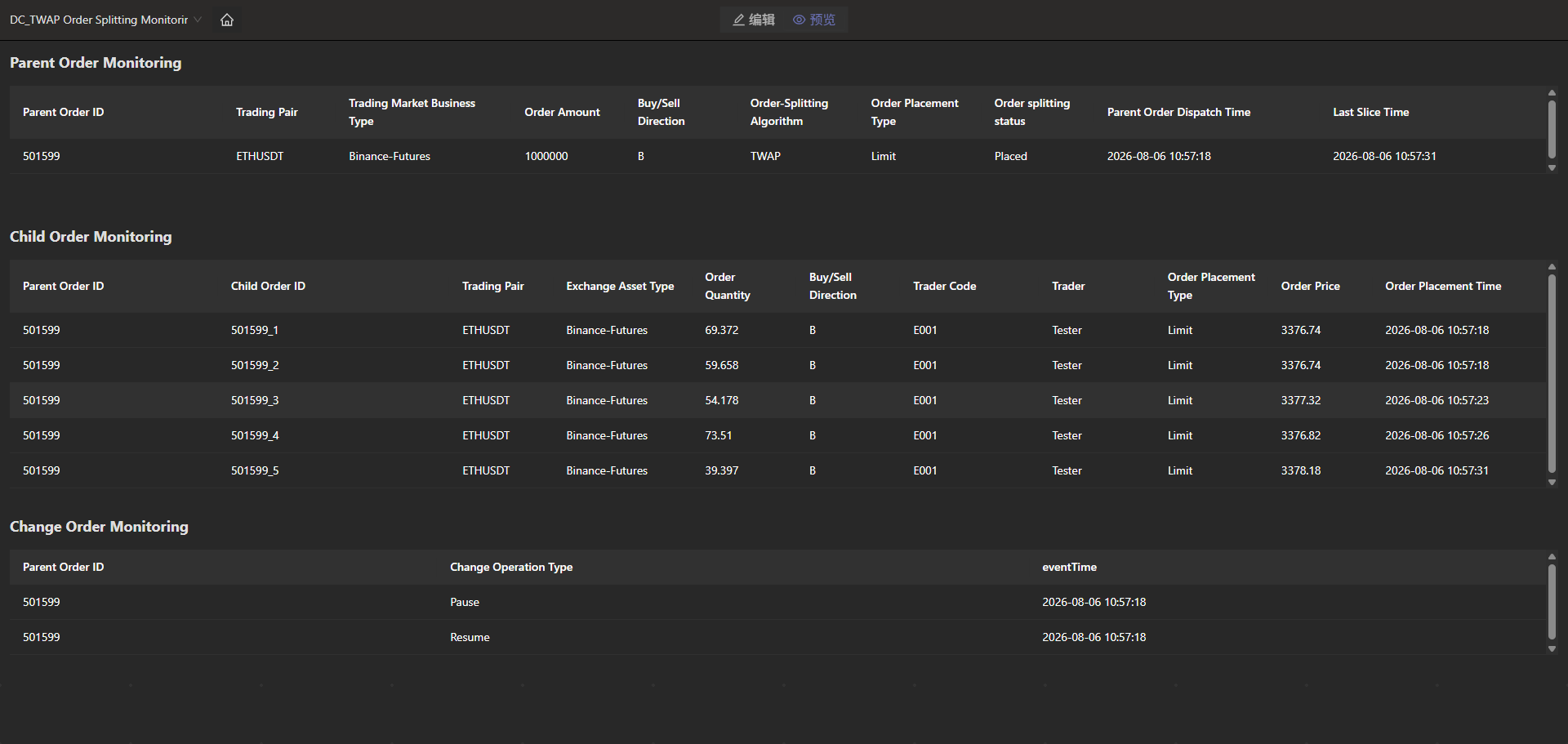
In this example, startTWAP.java specifies a total parent order amount of 1,000,000, five order placements, and a floating amount of 5,000. Therefore, the specified child order amount fluctuates between 195,000 and 205,000, the order placement interval fluctuates between 5s and 10s, the parent order ID is 501019, and priceOption is set to 0, which means the child order price uses the best bid price.
You can see that the number of child order placements and placement intervals is randomized within the specified range. The child order price is the best bid price for the ETHUSDT trading pair in snapshotOutputKeyedTb.
2.5 Summary for TWAP Algorithm
This chapter introduces how to implement the TWAP order-splitting algorithm using the CEP engine. It first introduces the algorithm and then the system functions. Next, it explains the system implementation process and code in detail, with a focus on the most complex part: the monitor definition, including the call relationships among the functions. Finally, the result review section uses Dashboard to review results.
3. VWAP Order-Splitting Algorithm
This chapter describes how to implement the VWAP order-splitting algorithm using the CEP engine.
3.1 What Is the VWAP Algorithm
Volume-Weighted Average Price (VWAP) is a widely used order-splitting strategy, primarily for executing large orders. This model analyzes historical trading volume distribution patterns and splits a large order across time intervals in proportion to trading volume, so that the average execution price stays as close as possible to the market VWAP benchmark. The VWAP formula is as follows:
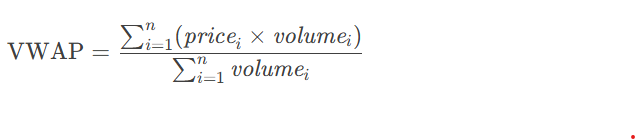
Here, pricei is the price of the split order at split point i, and volumei is the number of units in the split order at split point i.
Unlike TWAP, which splits orders evenly, VWAP dynamically adjusts order size based on typical market trading volume distributions. It allocates more orders during high-volume periods and fewer orders during low-volume periods. This design accounts for time while fully reflecting the market's liquidity distribution.
3.2 Functional Modules
The functional modules of the VWAP algorithm are similar to those of the TWAP algorithm described earlier. The algorithm logic is implemented through the CEP engine. The data replay feature simulates real-time snapshot data writes, and stream table subscriptions decouple user parent order publication from the order-splitting CEP engine. The general process is shown in the following figure.
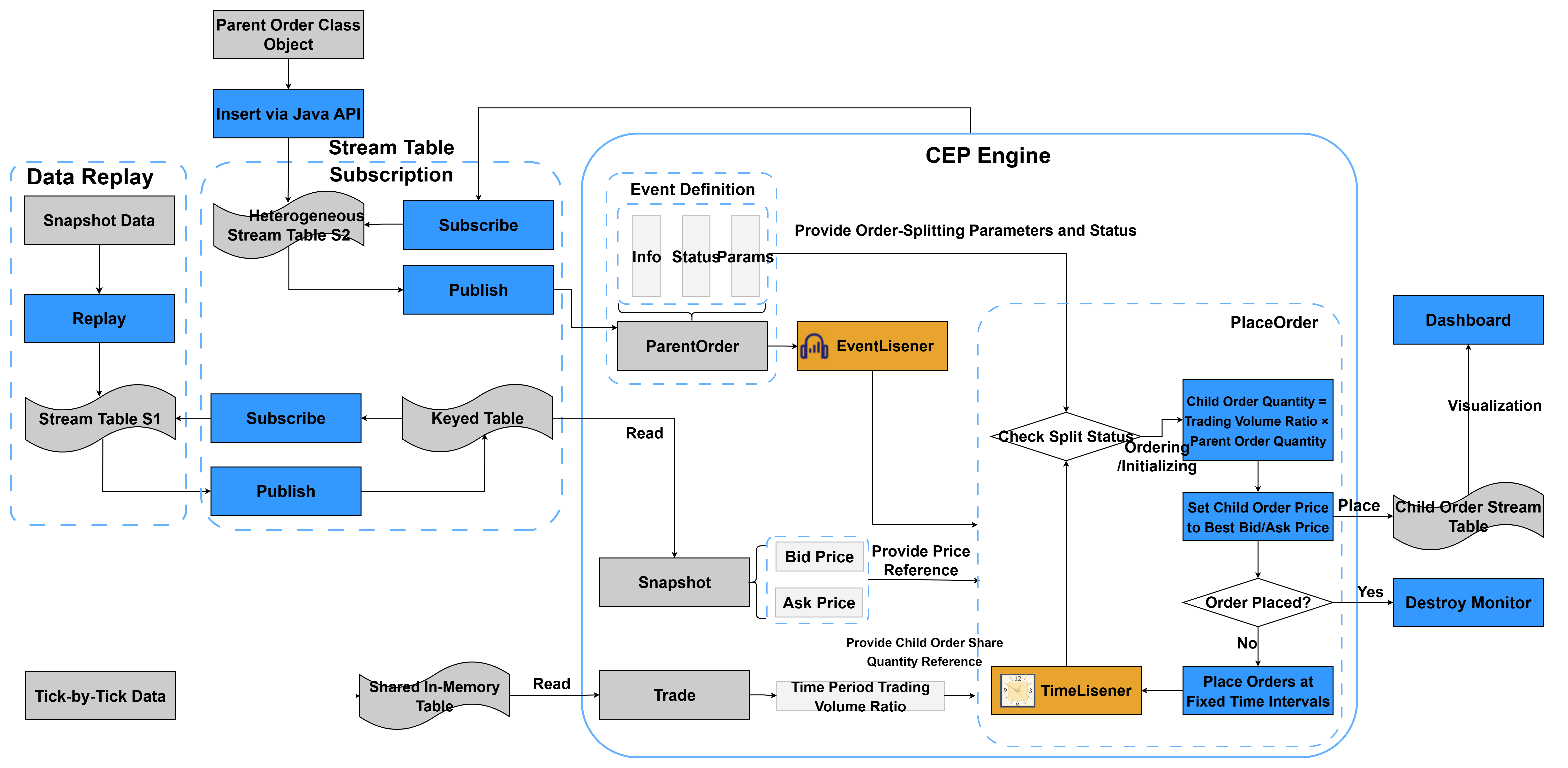
The VWAP algorithm differs from the TWAP algorithm in the following ways:
-
For the VWAP algorithm, the number of child orders is no longer randomized within a specified range. Instead, the algorithm first calculates each time interval's share of the total trading volume in the target period based on the previous day's tick-by-tick data. The child order amount is then calculated as the product of the previous day's transaction amount share for the current interval and the parent order amount. In this example, each time interval is 1 minute.
-
For the VWAP algorithm, the time interval is no longer randomized within a specified range; it is fixed to the interval of 1 minute.
3.3 Code Implementation
This section describes the code implementation of the VWAP algorithm, focusing mainly on how it differs from the TWAP algorithm.
3.3.1 Define Event Classes
The code for defining event classes is similar to 2.3.1 Define Event Classes of the TWAP algorithm. The difference is that the parent order class no longer includes the three parameters intervalAmount, lowSplitInterval, and highSplitInterval.
//Order-splitting parameters
 splitMethod:: STRING // Order-splitting algorithm
    orderType:: STRING            // Order type (limit/market)
    price:: DOUBLE                // Limit price
    priceOption:: INT             // Best bid or best ask price
 startTime:: TIMESTAMP // Start time of order splitting
 endTime:: TIMESTAMP // End time of order splitting
    orderStatus:: STRING          // Order splitting status
    orderTimes:: INT             //Number of split orders
	//End of split order parameters
    eventTime:: TIMESTAMP         // Event submission time
3.3.2 Create In-Memory Tables
-
Create the parent order record in-memory table parentOrderManage, the order change record in-memory table alterOrderManage, the child order receiving stream table subOrderStream, and the heterogeneous streaming table orderBlobStream subscribed by the CEP engine. The code is the same as the TWAP algorithm.
-
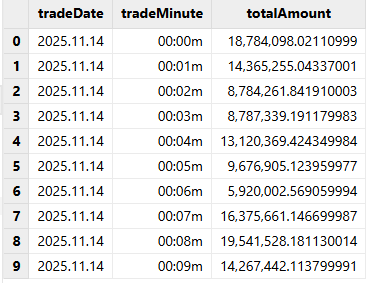
Create an in-memory table to store the trading amount for each minute of a trading day. The code is as follows:
// Create an in-memory table to store the trading volume for each minute
trade = loadTable("dfs://VWAP","trade")
// Share it as a global table for the VWAP algorithm
QtyTB =select * from trade
share QtyTB as QtyTb
The QtyTb table records the trading volume for each minute of a cryptocurrency trading day, as shown in the figure.
3.3.3 Subscribe to a Stream Table
The code for subscribing the keyed table to the stream table is the same as 2.3.3 Subscribe to a Stream Table of the TWAP algorithm.
3.3.4 Define the Monitor
In the VWAP split order algorithm, the number of child orders and the split order interval do not need to be randomized. Therefore, the monitor class does not need the rand function. The monitor class has the following structure:
class SplitMonitor:CEPMonitor{
	def SplitMonitor() {
		//In this example, the initial monitor does not require parameters; set them when cloning the task monitor.
	}
    //Initialize the parent order information
    def initPOrderManageInfo(pOrder){...}
    //Update the parent order information
    def updatePOrderManageInfo(pOrder,opTime){...}
}

//VWAP order placement monitor and inheritance relationship
class VWAPSplitMonitor:SplitMonitor {
    // Variable that records the total number of child orders placed
    subOrderAmounts:: DOUBLE
    // parent order
	parentOrder:: ParentOrder
    // Time corresponding to the historical trade table when order splitting starts, in minutes
    splitStartTime:: TIMESTAMP
    splitEndTime:: TIMESTAMP
    splitStartTimeFirst:: TIMESTAMP

	def VWAPSplitMonitor() {
		//In this example, the initial monitor does not require parameters; set them when cloning the task monitor.
	}
    // Update the remaining amount of the parent order
    def updateRemainAmount(){...}
    //VWAP order placement method
    def placeOrder(){...}

    //Initialize parentOrder, place split orders, and set the OrderAlterAction event listener
    def startPlaceOrder(pOrder){...}

    //Create a monitor instance for placing the parent order
	def forkParentOrderMonitor(pOrder){}

	//Initialization task
	def onload(){
		addEventListener(forkParentOrderMonitor, "ParentOrder", ,"all")
	}
}subOrderAmounts: uses subOrderAmounts to record the total amount of child orders already placed.
parentOrder: records the parameters of the current parent order, including basic information, split order parameters, and split order status.
splitStartTime: records the time of the current child order, corresponding to a time period in the historical trading table.
The following parts describe each method in the monitor in the logical order in which the CEP engine operates.
-
onload: initialization task
After the engine is created and the monitor is instantiated, its internal onload function is called first. In the onload function, use the addEventListener function to listen for ParentOrder event injections. Specify forkParentOrderMonitor as the callback function, set the event type to ParentOrder, and configure the listener to listen continuously.
//Initialization task
	def onload(){
		addEventListener(forkParentOrderMonitor, "ParentOrder", ,"all")
	}
The onload function sets an event listener ParentOrder to listen for all parent order events. When an event of this type is detected, the process of order splitting and replacement starts. To ensure the thread safety of splitting and placing parent orders, you must create a separate monitor instance for each parent order. Therefore, the corresponding callback function forkParentOrderMonitor must create a monitor instance and pass in the parent order parameters. Starting from the onload method, the function call flow and functionality can be divided into three modules, as shown in the following figure.
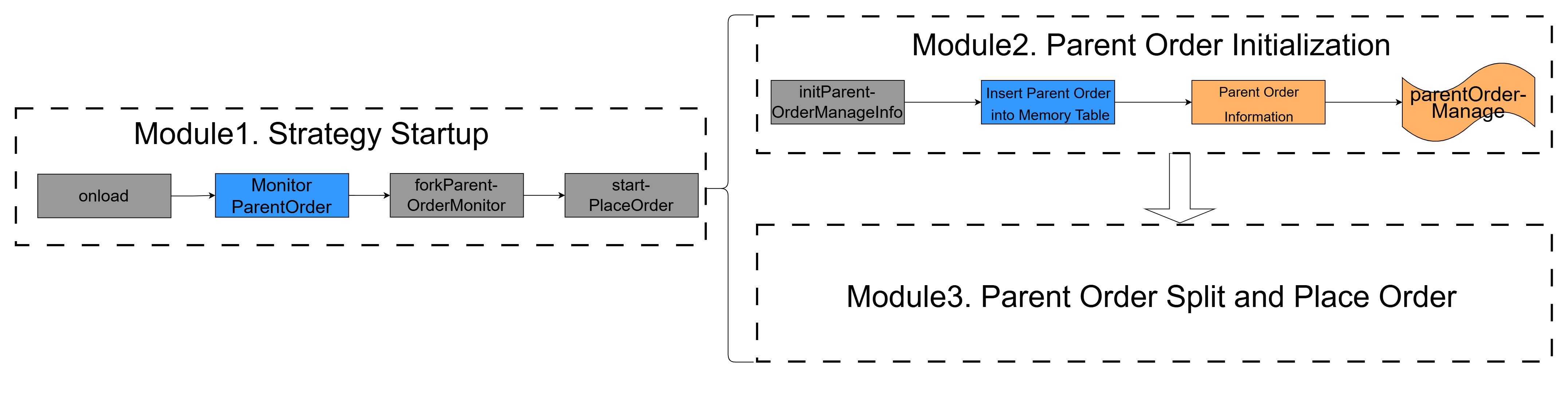
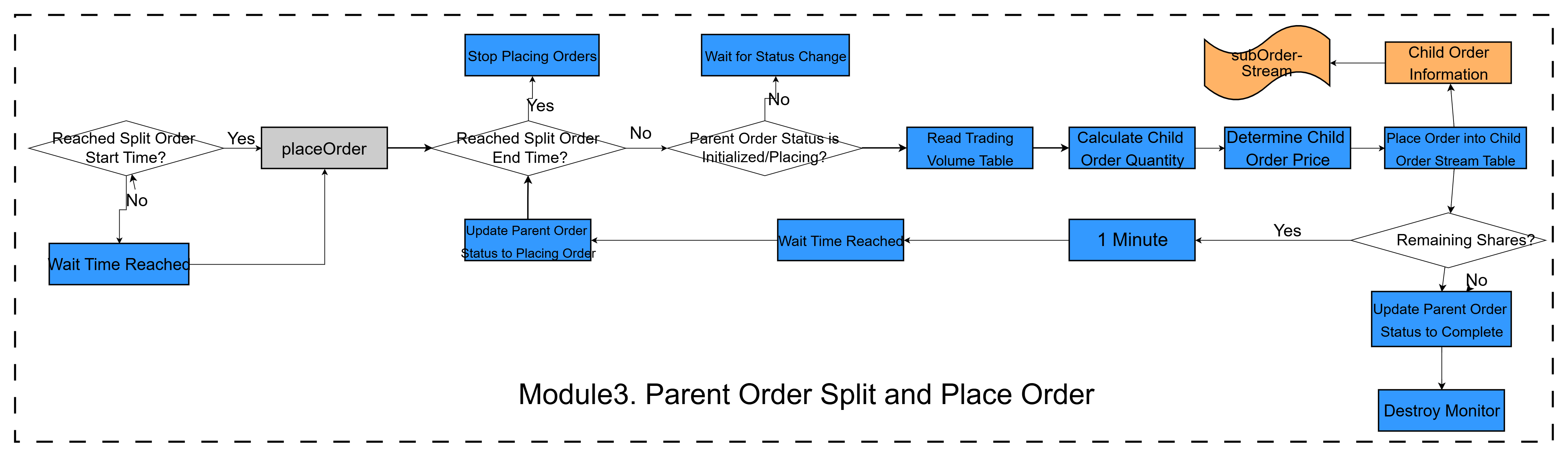
The startPlaceOrder function starts two modules, in the order shown in the figure. In Module 3, the function call chain and functionality are shown in the following figure.
Next, we introduce the code implementation, starting with the callback function forkParentOrderMonitor, which corresponds to the strategy start event.
-
forkParentOrderMonitor: generates a monitor instance
The code implementation of the forkParentOrderMonitor
function is the same as 2.3.4
Define the Monitor of the TWAP algorithm.
-
startPlaceOrder: the core startup module
The code implementation of the startPlaceOrder function is
generally the same as 2.3.4
Define the Monitor of the TWAP algorithm. However, the
order-splitting start time must be initialized.
// Initialize the trading start time
        splitStartTime = now()
        splitStartTimeFirst=splitStartTime
        splitEndTime = splitStartTimeFirst + (parentOrder.orderTimes-1) * 60 * 1000
That is, split orders are placed from the current time until the calculated split order end time.
-
initPOrderManageInfo: records parent order information
The code implementation of the initPOrderManageInfo function
is the same as 2.3.4 Define the
Monitor of the TWAP algorithm.
-
updatePOrderManageInfo: updates the parent order's last change time
The code implementation of the updatePOrderManageInfo
function is the same as 2.3.4
Define the Monitor of the TWAP algorithm.
-
updateRemainAmount: updates the parent order amount
The updateRemainAmount function is the same as 2.3.4 Define the Monitor
of the TWAP algorithm.
-
placeOrder: the core order-splitting function
The placeOrder function is the core function for splitting and placing orders. It corresponds to the latter part of Module 3.
//VWAP order placement monitor and inheritance relationship
class VWAPSplitMonitor:SplitMonitor {
    // Variable that records the total number of child orders placed
    subOrderAmounts:: DOUBLE
    subOrderQtys:: DOUBLE
    // parent order
	parentOrder:: ParentOrder
    // Time corresponding to the historical trade table when order splitting starts, in minutes
    splitStartTime:: TIMESTAMP
    splitEndTime:: TIMESTAMP
    splitStartTimeFirst:: TIMESTAMP

	def VWAPSplitMonitor() {
		//In this example, the initial monitor does not require parameters; set them when cloning the task monitor.
	}

    // Update the remaining amount of the parent order
    def updateRemainAmount(){
        parentOrderManage=objByName('parentOrderManage')
        opTime = now()
        tAmount = parentOrder.tradeAmount
        rAmount = tAmount - subOrderAmounts
        sId = parentOrder.splitOrderId
        update parentOrderManage set remainAmount=rAmount, lastUpdateTime = opTime where splitOrderId = sId
    }

    //VWAP order placement method
    def placeOrder(){
        writeLog("============Start Placing==========")
 //Check whether the order placement time has passed
        if(now()>= parentOrder.endTime){ //If the current time is later than the order placement end time, stop placing orders
            parentOrder.setAttr(`orderStatus,'TimedOut')
            updatePOrderManageInfo(parentOrder,now())
            // Destroy Monitor
            destroyMonitor()
            return
        }
        //Check whether the current parent order status allows order placement; if not, exit
        if(!(parentOrder.orderStatus in ['Init','Placing'])){
            return
        }
           writeLog("============Start Placing==========")
        //Calculate the remaining amount
        remainAmount = parentOrder.tradeAmount - subOrderAmounts
 // Calculate the number of child orders that should be placed
        // Query the historical trade table and calculate the total trading volume
        totalAmounts = exec sum(totalAmount) from QtyTb
        where tradeMinute  between minute(splitStartTimeFirst) and minute(splitEndTime);
        // Convert the current order-splitting time to minutes
        nowMinute = minute(splitStartTime)
        nowDay=date(splitStartTime)
        // Query the historical trade table to check whether the current period, one minute, has trading volume
        nowAmountVector = exec totalAmount from QtyTb where tradeMinute=nowMinute
        // tradeDate=nowDay and
        // Determine the order amount to place
        if(nowAmountVector.size()==0){//No executions in the current session. Skip placing an order and proceed directly to setting up the listener for the next order.
            parentOrder.setAttr(`orderStatus,'Placing')
            //Save the parent order information
            updatePOrderManageInfo(parentOrder,now())
            // Update the order-splitting time
            splitStartTime = temporalAdd(splitStartTime,1,"m")
            //Set the monitor for the next order placement, with a wait time of 1 minute
            addEventListener(placeOrder,,,1,,duration(10+"s"))
            return
        }else{
            // Get the total trading volume for the current period
            nowAmount = nowAmountVector[0]
            totalNum = parentOrder.tradeAmount
            // Calculate based on the ratio. The type conversion here enables fractional ratio calculation; otherwise, the result is 0. Finally, round up. This still needs to be confirmed.
            subOrderAmount = (double(nowAmount)/totalAmounts)*totalNum
            // subOrderAmount may exceed the remaining order amount
            subOrderAmount = (subOrderAmount>remainAmount) ? remainAmount: subOrderAmount
        }

        // Update the order-splitting time
        writeLog("============Start Placing==========")
        splitStartTime = temporalAdd(splitStartTime,1,"m")
 //Determine the order quantity, which cannot be subdivided indefinitely
        //Get the currency code of the parent order
        v_symbol = parentOrder.symbol
        // Query the DFS table directly by defining a function
        if(parentOrder.priceOption == 0){//Retrieve from the best bid price bidPrice[0]
 // Get it from the keyed table
            BidPrice = exec bidPrice from snapshotOutputKeyedTb where symbol = v_symbol
            // best bid price
            subOrderPrice = BidPrice[0]
        }else{//Retrieve from the best ask price from OfferPrice[0]
 // Get it from the keyed table
            OfferPrice = exec offerPrice from snapshotOutputKeyedTb where symbol = v_symbol
            // best ask price
            subOrderPrice = OfferPrice[0]
        }
        subOrderPrice=subOrderPrice[0]
        subOrderQty=subOrderAmount/subOrderPrice
        subOrderQty=floor(subOrderQty * 1000) / 1000.0
        subOrderAmount=subOrderQty*subOrderPrice
        // Update the child order amount
        subOrderAmounts = subOrderAmounts+subOrderAmount
        // Update the remaining amount
        remainAmount = remainAmount-subOrderAmount
        //Build the child order
        //Child order creation time
        subOrderPlaceTime = now()
        //Build and submit the child order to the stream table
        subOrderStream = objByName('subOrderStream')
        // Insert into the child order stream table
        insert into subOrderStream values(parentOrder.splitOrderId,parentOrder.batchId,
            parentOrder.splitOrderId+'_'+(parentOrder.sortNum+1),parentOrder.sortNum+1,
            parentOrder.combinationNo,parentOrder.combinationName,
            parentOrder.symbol,  parentOrder.symbolSource,
            parentOrder.tradeDate,subOrderQty,parentOrder.tradeDirection,parentOrder.handlerEmpid,
            parentOrder.handlerName,parentOrder.orderType,subOrderPrice,subOrderPlaceTime);
        //Set the order placement count
        parentOrder.setAttr(`sortNum,parentOrder.sortNum+1)
        //Update the remaining amount
        updateRemainAmount()
        //Check whether order placement needs to continue
        if(parentOrder.sortNum<parentOrder.orderTimes){
            parentOrder.setAttr(`orderStatus,'Placing')
            //Save the parent order information
            updatePOrderManageInfo(parentOrder,subOrderPlaceTime)
 //Set the monitor for the next order placement, with a wait time of 1 minute. Set to 10 seconds here for testing.
            addEventListener(placeOrder,,,1,,duration(10+"s"))
        }else{//Final order placement; destroy the order listener
            parentOrder.setAttr(`orderStatus,'Placed')
            //Save the parent order information
            updatePOrderManageInfo(parentOrder,now())
            //Order placement is complete; destroy the monitor
            destroyMonitor()
        }
    }
The placeOrder function works as follows:
-
Checks whether the current time exceeds the order-splitting end time. If it does, sets the parent order status to "TimedOut" and calls the
updatePOrderManageInfofunction to update the last modification time of the parent order. -
Checks whether the current parent order status is "Init" or "Placing". If it is not, stops splitting the order.
-
Calculates the remaining order amount (remainAmount) based on the member variable subOrderAmounts and the parent order attribute tradeAmount. Queries the historical trade table QtyTb, determines the child order amount (subOrderAmount) based on the historical trading ratio for the current period and the parent order amount, and updates subOrderAmounts and remainAmount.
-
Determines whether the child order price should use the best bid or best ask price based on priceOption, and queries it from the keyed table snapshotOutputKeyedTb.
-
Builds the child order, inserts it into the child order stream table subOrderStream, and updates the parent order management table.
-
Determines whether more orders need to be placed based on the order placement count. If so, saves the parent order status and modification time, and schedules another call to the
placeOrderfunction to repeat the preceding steps. If no remaining order amount is left, saves the parent order status and modification time, and then destroys the monitor.
3.3.5 Create a CEP Engine and Subscribe to Heterogeneous Stream Tables
The code for creating a CEP engine and subscribing to heterogeneous stream tables is the same as 2.3.5 Create the CEP Engine and Subscribe to the Heterogeneous Stream Table of the TWAP algorithm.
3.3.6 Replay Market Data
The code for replaying market data is the same as 2.3.6 Replay Market Data of the TWAP algorithm.
3.3.7 Start the Strategy Instance
The code for starting a strategy instance is roughly the same as 2.3.7 Start the Strategy Instance of the TWAP algorithm.
3.4 Review the Results
This section shows how to view the import results of the order-splitting system in Dashboard. In this example, parent order events and parent order status update events injected into the CEP engine are recorded in their corresponding in-memory tables, while split child orders are recorded in the child order receiving stream table. You can then select the required data in the Dashboard for visualization.
3.4.1 Prepare the Java Environment
Configure the Maven and JDK environments. This example uses the following JDK and Maven versions:
jdk - java version "1.8.0_441"
maven - Apache Maven 3.8.6
3.4.2 Prepare Data
Download the VWAP algorithm code from the appendix and extract it. Place data/VWAPDATA.csv and data/trade.csv in the server directory of DolphinDB. Run the import script data/data_input.dos to create the databases and tables, and import the test data into the DFS table. Run the import script data/data_input_trade.dos to create the database and tables, and import the test data into the DFS table. Import data/dashboard.DC_VWAP_Monitoring.json into the Dashboard.
3.4.3 Prepare the System Environment
Run the following scripts in order:
01 clearEnv.dos clears existing shared in-memory tables,
subscription information, and streaming engines from the system to prevent
duplicate definitions.
02 Event.dos defines the event classes.
03 createTable.dos creates the in-memory tables.
04 subscribeSnapshot.dos subscribes the keyed in-memory table to the stream table.
3.4.4 Create the CEP Engine
Run the script 05 Monitor.dos to define the monitor and 06 createCEPEngine.dos to create the CEP engine to subscribe to the heterogeneous stream table.
3.4.5 Replay Snapshot Data
Run the script 07 replaySnapshot.dos to replay the snapshot
data to the snapshot stream table snapshotStream. Because the keyed table
snapshotOutputKeyedTb subscribes to snapshotStream, data is automatically
published to snapshotOutputKeyedTb.
3.4.6 Start the Strategy
Download the strategy start code from the appendix and extract it. Modify the database configuration in common/DBUtil.java to match your environment. Run startVWAP.java, or run the 08 simulate.dos script directly to feed parent order events into the heterogeneous stream table and observe the output in the Dashboard.
-
The corresponding output in the child order monitor is as follows:

In this example, startVWAP.java specifies that the parent order uses the trading pair ETHUSDT, the total order amount is 1,000,000, and priceOption is set to 0, which means the child order price uses the best bid price.
You can observe that the number of child orders is calculated based on the historical trading proportion for the current time period, with an order interval of 10 seconds. The child order price is the best bid price for the trading pair ETHUSDT in snapshotOutputKeyedTb.
3.5 Summary for VWAP Algorithm
This chapter explains how to use DolphinDB's CEP engine to implement the VWAP order-splitting algorithm. It first introduces the algorithm and then introduces the system functions in a modular way, explains the system implementation process and code in detail with a focus on the monitor definition and the call relationships among functions, and finally uses the Dashboard to display the system's order-splitting results.
4. Summary
This tutorial systematically explains how to apply the CEP engine for complex event processing in the cryptocurrency field, focusing on the complete design and implementation of order-splitting systems for two algorithms: TWAP and VWAP.
In high-frequency trading scenarios such as cryptocurrency, traditional centralized order-splitting solutions commonly suffer from insufficient real-time performance, high event-processing latency, limited streaming data throughput, and difficulty in flexibly orchestrating complex rules. This tutorial uses DolphinDB's CEP engine, stream table subscriptions, data replay, in-memory computing, and other core capabilities to build a low-latency, high-throughput, scalable, and rule-configurable algorithmic order-splitting system.
The system uses the parent order (ParentOrder) as the task entry. Through the CEP engine, it detects streaming events such as market snapshots, order status, and account funds in real time, and automatically completes the full loop of order splitting, child order dispatch, time-series scheduling, status monitoring, exception intervention, and execution tracking according to the TWAP and VWAP algorithms. The overall architecture adopts an event-driven and rules-engine model. It supports flexible configuration of parameters such as order-splitting intervals, target prices, execution windows, and risk-control thresholds, while also providing engineering capabilities such as real-time order status transitions, batch child order submission, real-time execution result writeback, and traceable historical data.