
CEP Engine Applications: Advanced Tutorial on Implementing an Algorithmic Order-Splitting System
Real-world trading strategies in financial markets often involve various complex scenarios. For example, the iceberg algorithm for splitting large orders keeps only a small portion of the order visible in the order book at any given time to hide trading intent, and processes fill reports as they arrive. In an arbitrage scenario, at least two real-time data streams are required to trigger order placement and use an order matching simulator to match buy and sell orders.
This tutorial demonstrates how to implement complex order-splitting and order-placement strategies, including iceberg order splitting and arbitrage order placement, using DolphinDB's complex event processing (CEP) engine, together with an order matching simulator. In this tutorial, you will learn:
-
How to use the order matching simulator.
-
How to implement the iceberg algorithm and integrate it with the order matching simulator to simulate fill reports.
-
How to implement the arbitrage algorithm and integrate it with the order matching simulator to complete arbitrage.
1. Introduction to the Order Matching Simulator
The order-splitting strategies in this tutorial all process market feedback, that is, fill reports. This section begins with a brief introduction to DolphinDB's order matching simulator.
In medium- and high-frequency strategies, we often encounter the following situation: strategies that perform well in backtesting fall short of expectations once deployed in live trading. One important reason is that transaction costs are underestimated. To simulate real-world trading costs more accurately, DolphinDB developed the order matching simulator. It helps us evaluate and predict how a strategy will perform in live trading more realistically and optimize the strategy accordingly.
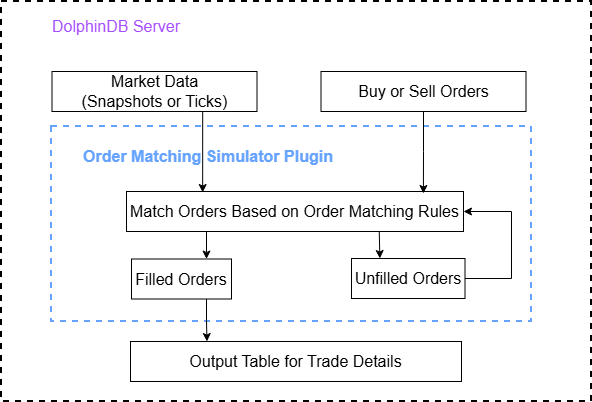
The primary function of the order matching simulator is to simulate order placement and cancellation at a given point in time, and to return the fill results. The order matching simulator takes two inputs: the market data (snapshots or ticks) and the buy or sell orders. It simulates order matching according to the configured matching rules. Fill results are written to the trade details table, including partial fills, rejected orders, and canceled orders. Any unfilled portion remains pending for subsequent matching or cancellation. The order matching process is shown in the following figure.
For more details on the order matching simulator, see Order Matching Simulator User Guide.
2. Iceberg Algorithm
2.1 What Is an Iceberg Algorithm
An iceberg algorithm is a strategy that splits a large order into several smaller orders to hide the actual trade size and reduce market impact. This strategy reveals only a small portion at a time—the tip of the iceberg—and hides the remainder. After the displayed portion is filled, the strategy gradually releases new orders until all orders are filled.
Unlike Time-Weighted Average Price (TWAP), which distributes an order evenly over time, the iceberg algorithm focuses on hiding liquidity and avoiding excessive market reactions caused by exposing a large order. This strategy applies to trading scenarios with sufficient liquidity but a large order size. It is especially suitable for institutional investors who need to execute large trades without affecting market prices.
2.2 Functional Modules
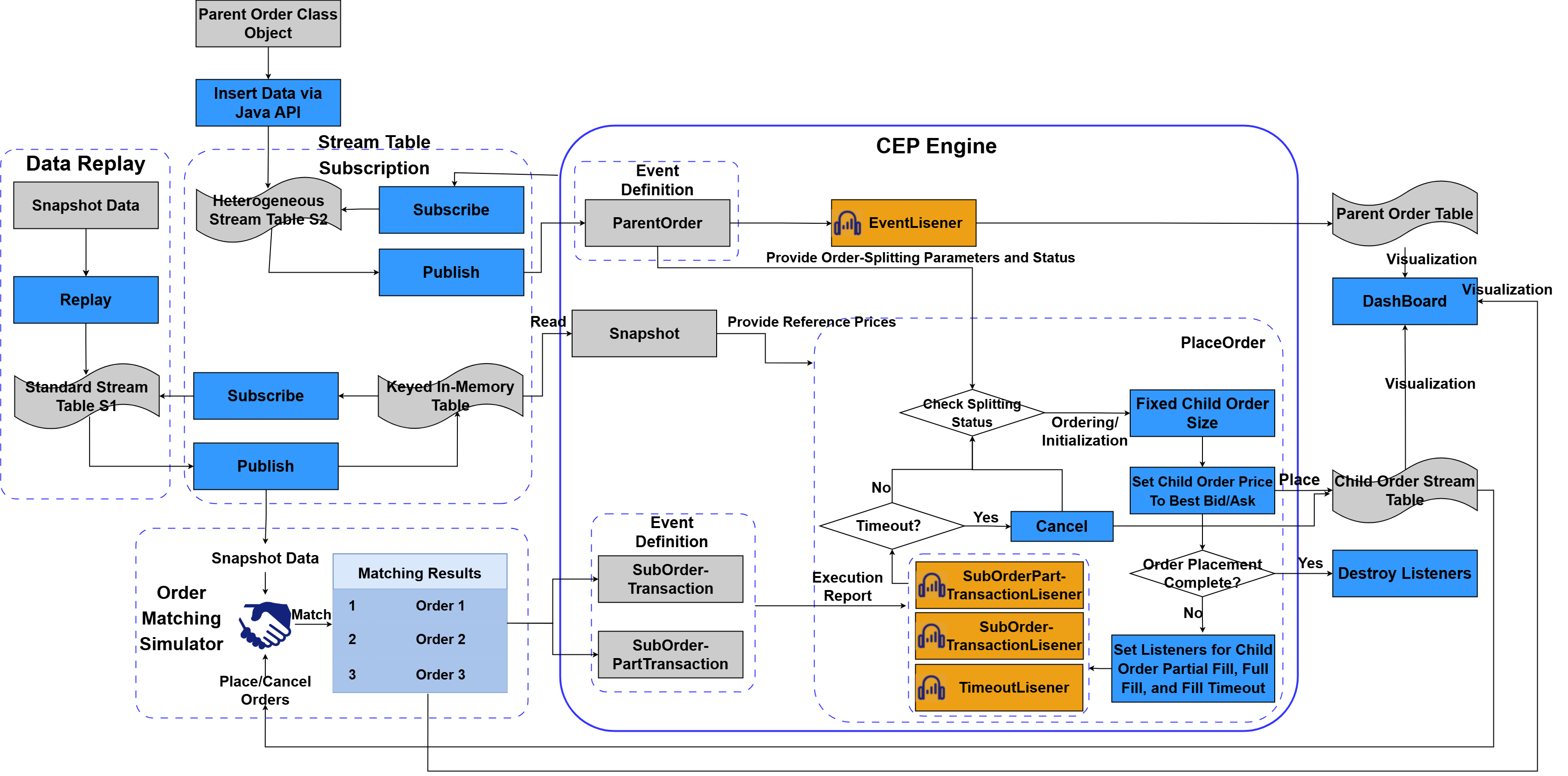
The algorithm consists of the following functional modules:
-
Data replay: simulates writing real-time snapshot data.
-
Stream table subscription: decouples parent order placement from order splitting.
-
Order matching simulator: receives snapshot data, as well as orders and canceled orders from the child order stream table to simulate market trading.
-
CEP engine: implements the algorithm logic and receives the order matching results (constructed as partial-fill events and full-fill events) as fill reports. The general process is shown in the following figure.
The logic of the iceberg algorithm is similar to that of the TWAP algorithm, with the following differences.
-
Integrated with the order matching simulator, the iceberg algorithm feeds snapshot data as well as orders and canceled orders from the child order stream table into the simulator to simulate order fills. It then feeds the order matching results into the CEP engine as fill reports.
-
The CEP engine defines two event classes:
SubOrderTransactionandSubOrderPartTransaction, which represent full-fill and partial-fill events for child orders, respectively. The partial-fill event tracks the cumulative filled quantity for the current child order. If the child order is not fully filled before the timeout, the unfilled quantity will be canceled. -
In the monitor's core order-splitting function
placeOrder, the system places a child order and then sets up listeners for partial-fill, full-fill, and fill-timeout events. If the previous child order is fully filled within the specified time, the system continues splitting the parent order and placing a child order. If the child order is only partially filled within the specified time, the system sends an order cancellation request to the child order stream table, cancels the unfilled quantity, and places a new child order.
2.3 Code Implementation
This section describes the implementation of iceberg order splitting, including event definitions and the detailed logic of the iceberg algorithm.
2.3.1 Define Event Classes
-
Define the parent order class with the following order-splitting parameters:
splitOrderId:: STRING // Unique ID of the parent order split
  eventType:: STRING            // Event type, fixed as "ParentOrder"
  batchId:: STRING // Unique batch ID of the parent order
  tagBatchId:: STRING // Unique split batch ID of the child order
  sortNum:: INT                 // Sequence number of the split order
  combinationNo:: STRING        // Portfolio code
  combinationName:: STRING      // Portfolio name
  symbol:: STRING // Cryptocurrency symbol
  symbolSource:: STRING // Exchange and asset type, for example, "OKX-FUTURES"
  tradeDate:: STRING // Trade date in the yyyyMMdd format
  tradeAmount:: DOUBLE          // Total trading volume
  tradeDirection:: STRING       // Trade direction: "B" for buy, "S" for sell
  handlerEmpid:: STRING         // Operator ID
  handlerName:: STRING          // Operator name
  // Parameters for order splitting
  splitMethod:: STRING          // Order-splitting algorithm
  orderType:: STRING            // Order type: limit or market
  price:: DOUBLE                // Limit price
  priceOption:: INT // Use the best bid or ask price
  orderAmount:: DOUBLE // Order value for each child order
  startTime:: TIMESTAMP         // Start time of order splitting
  endTime:: TIMESTAMP           // End time of order splitting
  timeoutNum:: DOUBLE              // Timeout in seconds
  orderStatus:: STRING          // Order splitting status
  eventTime:: TIMESTAMP         // Event submission time
orderAmount specifies the fixed value per child order, and timeoutNum specifies the timeout for child order fill events.
-
The child order full-fill event class includes the following variables:
splitOrderId:: STRING // ID of the parent order to operate on
 eventType:: STRING          // Event type
 subOrderID:: STRING // Unique child order ID, corresponding to tagBatchId in the child order stream table
 tradeAmount::DOUBLE // Filled value
 tradeQty:: DOUBLE        // Filled quantity
 eventTime:: TIMESTAMP // Event time of the child order fill
splitOrderId specifies the ID of the parent order to operate on; eventType specifies the event type; subOrderID specifies the unique ID of the child order; tradeAmount specifies the trading value; tradeQty specifies the trading volume; and eventTime specifies the event time of the child order fill.
-
The fields of the child order partial-fill event class are the same as those of the child order full-fill event class.
2.3.2 Create In-Memory Tables
Create the following in-memory tables to store information: parentOrderManage records parent order parameters, the remaining order value (remainAmount), and the filled quantity (executedQuantity); alterOrderManage records order modifications; and subOrderTb receives child order data from the child order stream table. In subOrderTb, the transactionQty and subOrderStatus columns record the filled quantity and child order status.
-
parentOrderManage
// Create the in-memory table to record parent order information.
colNames=[
    "splitOrderId","eventType","batchId","tagBatchId","sortNum",
    "combinationNo","combinationName","symbol","symbolSource",
    "tradeDate","tradeAmount","remainAmount","executedQuantity","tradeDirection",
    "handlerEmpid","handlerName","splitMethod","orderType","price",
    "startTime","endTime","orderAmount","orderStatus","timeoutNum",
    "eventTime","lastUpdateTime"
]
colTypes=[
    STRING,SYMBOL,STRING,STRING,INT,
    STRING,STRING,SYMBOL,SYMBOL,
    STRING,DOUBLE,DOUBLE,DOUBLE,SYMBOL,
    STRING,STRING,SYMBOL,SYMBOL,DOUBLE,
    TIMESTAMP,TIMESTAMP,DOUBLE,SYMBOL,INT,
    TIMESTAMP,TIMESTAMP
]
share table(1:0,colNames,colTypes) as parentOrderManage
orderAmount and timeoutNum record the fixed value per child order and the fill timeout for a child order, respectively.
-
subOrderTb and subOrderStream; the former subscribes to latter.
// Create the child order stream table.
colNames=[
    "splitOrderId","batchId","tagBatchId","sortNum",
    "combinationNo","combinationName","symbol","symbolSource",
    "tradeDate","tradeQuantity","tradeDirection",
    "handlerEmpid","handlerName","orderType","price","lastUpdateTime"
]
colTypes=[
    STRING,STRING,STRING,INT,
    STRING,STRING,SYMBOL,SYMBOL,
    STRING,DOUBLE,SYMBOL,
    STRING,STRING,SYMBOL,DOUBLE,TIMESTAMP
]
share streamTable(1:0, colNames, colTypes) as subOrderStream


// Create the in-memory table for child orders.
colNames=["splitOrderId","batchId","tagBatchId","sortNum","combinationNo","combinationName","symbol",
"symbolSource","tradeDate","tradeQuantity","transactionAmount","transactionQuantity","subOrderStatus","tradeDirection","handlerEmpid","handlerName","orderType","price","lastUpdateTime"]
colTypes=[STRING,STRING,STRING,INT,STRING,STRING,SYMBOL,SYMBOL,STRING,DOUBLE,DOUBLE,DOUBLE,STRING,SYMBOL,STRING,STRING,SYMBOL,DOUBLE,TIMESTAMP]
share table(1:0, colNames, colTypes) as subOrderTb


// Handler for subscribing to the child order stream table.
def subscribeSubOrderStream(msg){
    // Get all incoming rows.
    data = exec * from msg
    s = data.size()
    // Initialize filled quantity and child order status.
    tAmountV = array(DOUBLE,s,s,0)
    tQtyV = array(DOUBLE,s,s,0)
    staV = array(STRING,s,s,"Pending")
    // Write data into subOrderTb.
    insert into subOrderTb values(data[`splitOrderId],data[`batchId],data[`tagBatchId],data[`sortNum],
                                  data[`combinationNo],data[`combinationName],
                                  data[`symbol],data[`symbolSource],data[`tradeDate],data[`tradeQuantity],
                                  tAmountV,tQtyV,staV,
                                  data[`tradeDirection],data[`handlerEmpid],data[`handlerName],
                                  data[`orderType],data[`price],data[`lastUpdateTime])
}

// Subscribe to the stream table.
subscribeTable(tableName = `subOrderStream,actionName=`subscribeSubOrderStream,handler = subscribeSubOrderStream,msgAsTable=true,batchSize = 1)
subOrderStream receives child orders and canceled orders. subOrderTb displays order information in Dashboard: transactionAmount shows the filled value, transactionQty shows the filled quantity, and subOrderStatus shows the child order status.
2.3.3 Create an Order Matching Simulator
In this example, the order matching simulator must also subscribe to snapshot data, so you need to create the order matching simulator before subscribing to snapshot data.
-
Install and load the order matching simulator plugin
login("admin", "123456")
//Use the installPlugin function to install the plugin
installPlugin("MatchingEngineSimulator")
//Use the loadPlugin function to load the plugin.
loadPlugin("MatchingEngineSimulator")
Use the preceding code to download and load the order matching simulator plugin from the plugin repository.
-
Create an order matching simulator
// Define the function that creates the order matching simulator.
// Config of order matching simulator
config = dict(STRING, DOUBLE);
config["latency"] = 0;                  // Set order latency to 0.
config["depth"] = 10; // Use a 10-level bid depth.
config["outputOrderBook"] = 0            // Do not output the order book.
config["orderBookMatchingRatio"] = 0.2; // Fill ratio when matching against the order book.
config["dataType"] = 16; // Market data type: 1 indicates cryptocurrency snapshots; 16 indicates crypto snapshots with DOUBLE price and quantity.
config["matchingMode"] = 1; // Matching mode 1: Match against the latest trade price and the order book using the configured ratio.
config["matchingRatio"] = 0; // Snapshot mode: fill ratio within the snapshot interval
config["userDefinedOrderId"] = true // Add an order ID column named userOrderId.

// Market data table schema
// Create an in-memory table for market data, which is used as input to the order matching simulator.
colNames=`symbol`symbolSource`timestamp`lastPrice`tradeQty`totalBidQty`totalOfferQty`bidPrice`bidQty`offerPrice`offerQty`highPrice`lowPrice
colTypes=[STRING,STRING,TIMESTAMP,DOUBLE,DOUBLE,DOUBLE,DOUBLE,DOUBLE[],DOUBLE[],DOUBLE[],DOUBLE[],DOUBLE,DOUBLE]
dummyQuoteTable =  table(1:0, colNames, colTypes)
// Column mapping between the user-defined market data table and the engine's internal schema.
quoteColMap = dict(  `symbol`symbolSource`timestamp`lastPrice`tradeQty`totalBidQty`totalOfferQty`bidPrice`bidQty`offerPrice`offerQty`highPrice`lowPrice,
                     `symbol`symbolSource`timestamp`lastPrice`tradeQty`totalBidQty`totalOfferQty`bidPrice`bidQty`offerPrice`offerQty`highPrice`lowPrice,)


// Order table schema
// Create an in-memory table for orders. There is no stopPrice here.
colNames=`symbol`symbolSource`orderTime`orderType`price`orderQty`BSFlag`timeInForce`orderID
colTypes=[STRING, SYMBOL, TIMESTAMP, INT, DOUBLE, DOUBLE, INT,INT,LONG]
dummyUserOrderTable =  table(1:0, colNames, colTypes)
// Mapping
userOrderColMap = dict( `symbol`symbolSource`timestamp`orderType`price`orderQty`direction`timeInForce`orderId,
                        `symbol`symbolSource`orderTime`orderType`price`orderQty`BSFlag`timeInForce`orderID)

// Output table for order details, including acknowledgements, fills, rejections, and cancellations. Fill records are sent to the CEP engine as events.
// Status codes: 4 indicates order submitted; -2 indicates cancellation rejected; -1 indicates order rejected; 0 indicates partially filled; 1 indicates fully filled; 2 indicates order cancellation.
// Create an output table for the order matching simulator. Fill records are converted to fill events and sent to the CEP engine.
// Add the userOrderId column to the output table and set the table as a stream table.
colNames=`orderId`symbol`direction`sendTime`orderPrice`orderQty`tradeTime`tradePrice`tradeQty`orderStatus`sysReceiveTime`userOrderId
colTypes=[LONG, STRING, INT,TIMESTAMP,DOUBLE,DOUBLE, TIMESTAMP,DOUBLE,DOUBLE, INT,NANOTIMESTAMP, LONG]
orderDetailsOutput = streamTable(1:0, colNames, colTypes)
// Share the output table
share orderDetailsOutput as outputTb

// Match cryptocurrency orders
exchange = "universal"
// Create the order matching simulator
name = "MatchingEngine"
matchingEngine = MatchingEngineSimulator::createMatchEngine(name, exchange,
config, dummyQuoteTable, quoteColMap, dummyUserOrderTable, userOrderColMap, orderDetailsOutput,,)

// Share the order matching simulator
share matchingEngine as mEngine
Use
createMatchEngineto create an order matching simulator. The steps are as follows:-
Define the config parameter. "latency" specifies the order matching latency. When the latest market data time is greater than or equal to the order placement time, the engine starts matching orders. "depth" specifies that the order book depth is 10. "orderBookMatchingRatio" and "matchingRatio" specify the fill ratio. "matchingMode" specifies the matching mode where orders are matched against the latest trade price and the opposite-side order book based on the configured ratios when the snapshot data does not contain interval trade details. "userDefinedOrderId" is set to true to add an order ID column to the order matching result table.
-
Define the market data table (dummyQuoteTable), the order table (dummyUserOrderTable), and the field mappings to the corresponding internal engine tables. Then, define the output table (orderDetailsOutput) and share it as outputTb. The CEP engine will later subscribe to fill events in outputTb and display the order matching results in Dashboard.
-
Set exchange to "universal", specifying an instrument with no trading-hour restrictions.
-
2.3.4 Subscribe to Snapshot Data
-
Create the stream table and keyed table for the snapshot data.
// Create the stream table used to receive replayed snapshot data.
colNames=`symbol`symbolSource`timestamp`lastPrice`tradeQty`totalBidQty`totalOfferQty`bidPrice`bidQty`offerPrice`offerQty`highPrice`lowPrice
colTypes=[STRING,STRING,TIMESTAMP,DOUBLE,DOUBLE,DOUBLE,DOUBLE,DOUBLE[],DOUBLE[],DOUBLE[],DOUBLE[],DOUBLE,DOUBLE]
share streamTable(1:0,colNames,colTypes) as snapshotStream


colNames = `symbolSource`timestamp`symbol`offerPrice`bidPrice`offerQty`bidQty
colTypes = [
 SYMBOL, // symbolSource: exchange and asset type, for example, "Binance-Spot"
 TIMESTAMP, // timestamp: timestamp in milliseconds, replacing the original TradeDate + TradeTime and supporting 24/7 trading
 SYMBOL, // symbol: cryptocurrency trading pair, for example, "ETHUSDT", replacing the original SecurityID
 DOUBLE[],    // OfferPrice: ask price array, including best ask, second ask, and deeper levels
 DOUBLE[],    // BidPrice: bid price array, including best bid, second bid, and deeper levels
 DOUBLE[], // OfferQty: ask quantity array, using DECIMAL[] for cryptocurrency and replacing the original INT[]
 DOUBLE[] // BidQty: bid quantity array, same as above
]

// 2. Create a keyed table that stores the latest bid/ask snapshot for each symbol.
// Use `symbol as the primary key so each symbol keeps only the latest record.
snapshotOutputKeyedTbTmp = keyedTable(`symbol, 1:0, colNames, colTypes)
share snapshotOutputKeyedTbTmp as snapshotOutputKeyedTb
snapshotStream receives replayed snapshot data. snapshotOutputKeyedTb stores the latest snapshot data for each cryptocurrency and provides reference prices for child orders in the order-splitting system.
-
Subscribe to snapshot data via the order matching simulator
// Convert a table row to a [date, time] vector when the source is not a timestamp.
def handleCompleteTime(tb){
    s = tb.size()
    // Initialize the result vector.
    res = array(TIMESTAMP,s,s,now())
    for(i in 0:s){
        dictTime = tb[i]
        // Concatenate the date and time
        tempTimeStr = dictTime[`TradeDate]+" "+dictTime[`TradeTime]+"000"
 // Convert to timestamp
        tempTime = temporalParse(tempTimeStr,"yyyy.MM.dd HH:mm:ss.nnnnnn")
 // Assign the timestamp
        res[i] = tempTime
    }
    return res
}

// Adjust trade time so it aligns with the data time and snapshot time. This demo still works without getLastTime.
def handleTradeTime(x){
 // 1. Convert the target date (2025-11-13) to a timestamp, matching the format of now().
   targetDatetime = date(`2025.11.13)
    targetDate = timestamp(targetDatetime);
 // 2. Compute the difference between now() and 2025-11-13, in milliseconds.
   timeDiffMs = now()-targetDate;
 // Convert milliseconds to days by dividing by the number of milliseconds in a day.
    daysDiff = timeDiffMs / 86400000;
    // Floor the value to avoid fractional days, such as 34.2 -> 34.
    daysDiff = int(daysDiff);
    return temporalAdd(x,daysDiff,"d")
}

// Subscribe to snapshotStream.
def handleSnapshot(msg) {
    // Get all rows.
    data = exec * from msg
    // Write data into snapshotOutputKeyedTb.
    // Adjust TradeDate so it is later than the order time. Note that everything here has been converted to timestamps.
    TimeV = exec timestamp from msg
    // Adjust the snapshot time so it is later than the order time.
    tV = each(handleTradeTime, TimeV)
    insert into snapshotOutputKeyedTb values(data[`symbolSource],tV,data[`symbol],
                                             data[`offerPrice],data[`bidPrice],data[`offerQty],data[`bidQty])


    colNames=`symbol`symbolSource`timestamp`lastPrice`tradeQty`totalBidQty`totalOfferQty`bidPrice`bidQty`offerPrice`offerQty`highPrice`lowPrice
    colTypes=[STRING,STRING,TIMESTAMP,DOUBLE,DOUBLE,DOUBLE,DOUBLE,DOUBLE[],DOUBLE[],DOUBLE[],DOUBLE[],DOUBLE,DOUBLE]
    snapshotTempTb = table(100:0,colNames,colTypes)
    snapshotTempTb.tableInsert(data[`symbol],data[`symbolSource],tV,
                               data[`lastPrice],0,data[`totalBidQty],data[`totalOfferQty],
                               data[`bidPrice],data[`bidQty],data[`offerPrice],data[`offerQty],data[`highPrice],data[`lowPrice])
    MatchingEngineSimulator::insertMsg(getStreamEngine("MatchingEngine"), snapshotTempTb, 1)
}

// Subscribe to the stream table.
subscribeTable(tableName = `snapshotStream,actionName=`handleSnapshot,handler = handleSnapshot,msgAsTable=true,batchSize = 1)
Subscribe to snapshotStream by using
subscribeTable. When snapshotStream generates incremental snapshot data, write the snapshots to snapshotOutputKeyedTb and the order matching simulator. UseinsertMsgto write snapshot data to the order matching simulator. In the order matching simulator, the snapshot time must be later than the order placement time for the engine to perform order matching. Therefore, this example adjusts the timestamps of historical snapshots and converts the historical snapshot data into current-day snapshot data.In this example, snapshot data is written to snapshotOutputKeyedTb and the order matching simulator at the same time. snapshotOutputKeyedTb provides order prices for child orders, ensuring that child order prices are consistent with the real-time market data in the order matching simulator and preventing orders from remaining unfilled for a long time.
2.3.5 Subscribe to the Child Order Stream Table
The order matching simulator requires market data and orders as input. The preceding sections have described how market data is inserted into the engine through replay and subscription. This section shows how to subscribe to the child order stream table and insert orders and canceled orders into the order matching simulator. The code is as follows:
// Insert orders into the order matching simulator via subscription.

// Convert orderType to the engine's INT codes: limit -> 5, cancel -> 6.
def handleOrderType(x){
    if(x=="Limit"){
        return 5
    }else{
        return 6
    }
}

// Convert trade direction to the engine's INT codes: buy -> 1, sell -> 2.
def handleDirection(x){
    if(x=="B"){
        return 1
    }else{
        return 2
    }
}

// Split and rebuild the child order ID and convert it to a LONG value.
def handleOrderId(x){
    oV = split(x,"_")
    res = ""
    for(str in oV){
        res = res+str
    }
    return long(res)
}

// Subscribe to subOrderStream as input to the order matching simulator.
def handleUserOrders(msg) {
 // Get all non-cancellation orders.
    data = exec * from msg

 // Write data into dummyUserOrderTable after converting orderType and direction to INT values.
 // Convert orderId to a LONG value.
    orderTypeV = exec orderType from msg
    otV = each(handleOrderType, orderTypeV)

    directionV = exec tradeDirection from msg
    dV = each(handleDirection, directionV)

    orderIdV = exec tagBatchId from msg
    oV = each(handleOrderId, orderIdV)

    // Temporary table
    colNames=`symbol`symbolSource`orderTime`orderType`price`orderQty`BSFlag`timeInForce`orderID
    colTypes=[STRING, SYMBOL, TIMESTAMP, INT, DOUBLE, DOUBLE, INT,INT,LONG]
    subOrderTempTb = table(1:0, colNames, colTypes)
    subOrderTempTb.tableInsert(data[`symbol],data[`symbolSource],data[`lastUpdateTime],
                                       otV,data[`price],data[`tradeQuantity],dV,0,oV)
    MatchingEngineSimulator::insertMsg(getStreamEngine("MatchingEngine"), subOrderTempTb, 2)
}

// Subscribe to the stream table.
subscribeTable(tableName = `subOrderStream,actionName=`handleUserOrders,handler = handleUserOrders,msgAsTable=true,batchSize = 1)handleOrderType, handleDirection, and handleOrderId process type mismatches for the orderType, tradeDirection, and tagBatchId fields between the child order stream table and the order table in the order matching simulator. insertMsg inserts orders or canceled orders into the order matching simulator.
2.3.6 Define the Monitor
The most critical step in implementing the order-splitting system is to configure an internal monitor for the CEP engine. The monitor encapsulates the order-splitting strategy. Its structure is roughly as follows.
class SplitMonitor:CEPMonitor{

	def SplitMonitor() {
		// In this example, the initial monitor does not need parameter values; set them when cloning the task monitor.
	}

    // Update parent order information
    def updatePOrderManageInfo(pOrder,opTime){...}

    def placeOrder(){}

}

// Inherited iceberg order placement monitor
class IceBergSplitMonitor:SplitMonitor {

    // Variable for recording the total number of child orders placed
    subOrderAmounts:: DOUBLE
    subOrderQtys:: DOUBLE
	parentOrder:: ParentOrder
 // Record the filled quantity of the current child order for the parent order. Initialize it to 0 and use it for managing canceled orders. Reset it to 0 after cancellation or full fill so it can be reused for the next child order.
    transactionQty:: DOUBLE
    transactionAmount:: DOUBLE

	def IceBergSplitMonitor() {
		// In this example, the initial monitor does not need parameter values; set them when cloning the task monitor.
	}
    // Update the current child order status and filled quantity
    def updateSubOrder(Qty,status){...}

    // Return the latest snapshot time
    def getLastTime(){...}

 // After the current child order is filled, place the next child order
    def ifPlaceOrder(subOrderTran){...}

    // Logic for the final full fill
    def ifPlaceOrderLast(subOrderTran){...}

 // Child order ID. The engine requires a LONG value, so split the string and rebuild the child order ID.
    def handleOrderId(x){...}

    // Initialize parent order information
    def initPOrderManageInfo(pOrder){...}

 // Trigger a cancellation event, cancel the previous child order, and restore the total submitted child order count
    def cancelOrder(){...}

    // Iceberg order placement method
    def placeOrder(){...}

 // Initialize the sub-monitor
    def startPlaceOrder(pOrder){...}

 // Clone the parent order's sub-monitor instance
	def forkParentOrderMonitor(pOrder){...}

	// Initial task
	def onload(){
		addEventListener(forkParentOrderMonitor, "ParentOrder", ,"all")
	}
}
subOrderAmounts: records the total value of child orders that have been placed, preventing the parent order value from being exceeded.
parentOrder: records the parameters of the current parent order, including basic information, order-splitting parameters, and order-splitting status.
transactionQty: records the filled quantity of the current child order. If the child order is not fully filled within the specified time, this value is used to cancel the remaining quantity.
transactionAmount: records the trading value of the current child order.
The following parts describe each member method in the monitor in the logical order in which the CEP engine operates.
-
onload: initialization task
After the engine is created and the monitor is instantiated, its internal
onloadfunction is called first. In theonloadfunction, use theaddEventListenerfunction to listen forParentOrderevent injections. SpecifyforkParentOrderMonitoras the callback function, set the event type toParentOrder, and configure the listener to listen continuously.//Initialization task def onload(){ addEventListener(forkParentOrderMonitor, "ParentOrder", ,"all") }The
onloadfunction sets an event listener (ParentOrder) that listens for all parent order events. When an event of this type is detected, the process of order splitting and replacement starts. You can divide the function call chain that starts with theonloadfunction into three modules, each implementing different features, as shown in the following figure.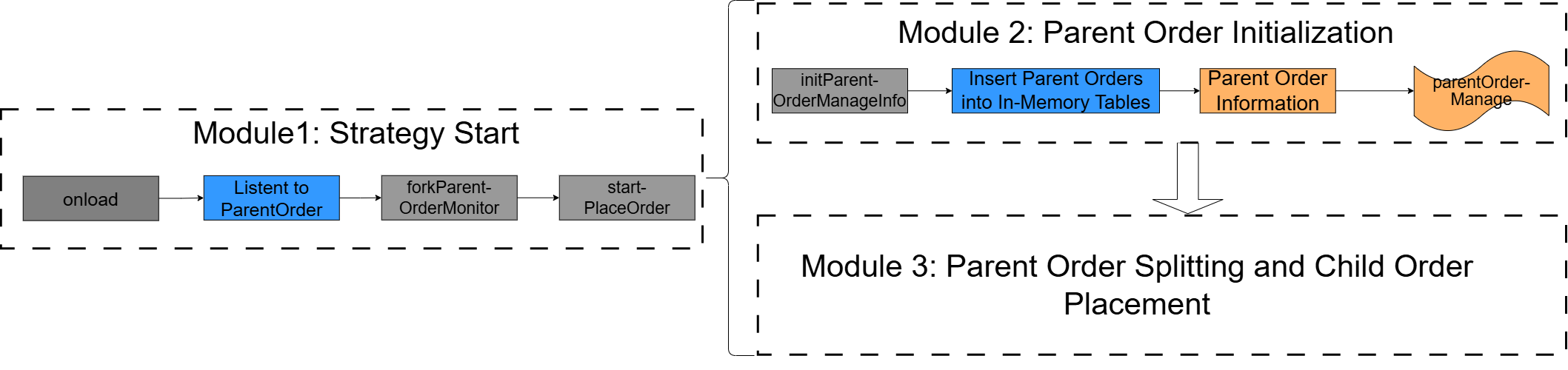
Figure 3. Figure 2-3 Module Call Chain The
startPlaceOrderfunction starts the three modules in the order shown in the preceding figure. In Module 3, the function call chain and implemented functionality are shown in the following figure.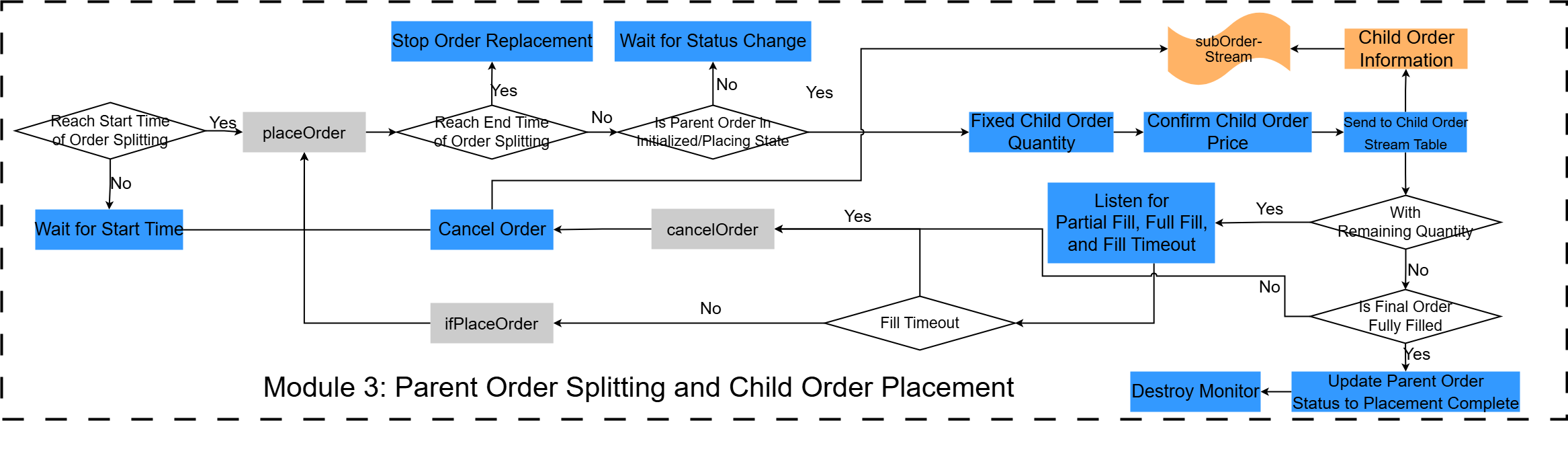
Figure 4. Figure 2-4 Call Chain in Module 3 Next, we describe the code implementation, starting with the callback function
forkParentOrderMonitor, which corresponds to the strategy start event. -
forkParentOrderMonitor: generates a monitor instance
The initial monitor in the CEP engine only monitors the injection of the strategy start event. For details, see the
onloadfunction described earlier. Whenever theonloadfunction detects a newly injectedParentOrderevent, it callsforkParentOrderMonitorto generate a sub-monitor instance, which then splits the parent order and places a child order.// Clone the parent order's sub-monitor instance. def forkParentOrderMonitor(pOrder){ name = "ParentOrder Placement["+pOrder.splitOrderId +"]" spawnMonitor(name,startPlaceOrder, pOrder) }In
forkParentOrderMonitor, thespawnMonitorfunction creates a sub-monitor instance and callsstartPlaceOrder, passing in theParentOrderevent (pOrder). This starts the subsequent core modules. -
startPlaceOrder: starts the core modules
The
startPlaceOrderfunction contains the start steps for Module 2 and Module 3. It is defined as follows.// Initialize the sub-monitor. def startPlaceOrder(pOrder){ // Set the internal parent order field on the current task monitor. parentOrder = pOrder // Initialize the total child order quantity and value to 0. subOrderQtys = 0.0 subOrderAmounts = 0.0 // Initialize order splitting. parentOrder.setAttr(`orderStatus,'Init') parentOrder.setAttr(`sortNum,0) // Sequence number of the order split // Initialize the filled child order quantity. transactionQty = 0.0 transactionAmount=0.0 // Record the parent order status in the in-memory table. initPOrderManageInfo(parentOrder) // Calculate when to start order splitting for the parent order. if(parentOrder.startTime == null|| now()>=parentOrder.startTime){// If the initial order time is empty or earlier than now, start immediately. placeOrder() }else {// Wait until the specified startTime before placing orders. // Convert the interval between now and the start time from milliseconds to seconds. period_wait = round((parentOrder.startTime - now())\1000 ,0) // Attempt order placement after period_wait seconds. addEventListener(placeOrder,,,1,,duration(period_wait+"s")) } }The function works as follows:
-
First, it initializes the following variables: the current monitor's parent order variable (parentOrder), the total child order quantity (subOrderQtys), and the filled child order quantity (transactionQty). Then, it calls
initPOrderManageInfoto record the current parent order event in the in-memory table (parentOrderManage). This corresponds to Module 2. -
After initialization, it checks whether the current time has reached the start time of order splitting. If the start time of order placement has passed, it calls the
placeOrderfunction to split the parent order and place a child order. Otherwise, it waits until the start time and then calls theplaceOrderfunction. This corresponds to the start time check for order splitting in module 3.
-
-
getLastTime: queries the latest snapshot time
The
getLastTimefunction is implemented as follows:// Return the latest snapshot time. def getLastTime(){ tb = exec top 1 timestamp from snapshotOutputKeyedTb return tb[0] }In the order matching simulator, the current snapshot time must be later than the order placement time for the engine to match and fill the order. Therefore, this example uses the latest snapshot time in snapshotOutputKeyedTb as the global time and sets both the child order placement time and the parent order update time to the snapshot time, ensuring that the snapshot time is later than the order placement time. Define the
getLastTimefunction to query the latest snapshot time. -
initPOrderManageInfo: records parent order information
The
initPOrderManageInfofunction records the parent order events it listens for in the corresponding in-memory table (parentOrderManage).// Initialize the parent order information. def initPOrderManageInfo(pOrder){ parentOrderManage=objByName('parentOrderManage') tempTime = getLastTime() insert into parentOrderManage values( pOrder.splitOrderId,pOrder.eventType,pOrder.batchId,pOrder.tagBatchId,pOrder.sortNum, pOrder.combinationNo,pOrder.combinationName, pOrder.symbol, pOrder.symbolSource, pOrder.tradeDate,pOrder.tradeAmount,pOrder.tradeAmount,0, pOrder.tradeDirection,pOrder.handlerEmpid,pOrder.handlerName, pOrder.splitMethod,pOrder.orderType,pOrder.price,pOrder.startTime,pOrder.endTime, pOrder.orderAmount,pOrder.orderStatus,pOrder.timeoutNum,tempTime,tempTime) }Here, the parent order’s placement time and last update time are both set to the latest snapshot time returned by the
getLastTimefunction. -
updatePOrderManageInfo: updates the last modification time of the parent order
// Update the parent order information. def updatePOrderManageInfo(pOrder,opTime){ parentOrderManage=objByName('parentOrderManage') update parentOrderManage set sortNum = pOrder.sortNum,orderStatus=pOrder.orderStatus, lastUpdateTime = opTime where splitOrderId = pOrder.splitOrderId } -
updateSubOrder: updates the current status and filled quantity of a child order
// Update the child order's status and filled quantity.
    def updateSubOrder(Amount,Qty,status,Id){
        // Query the existing cumulative value and add to it.
        tAmount=0.0
        tQty=0.0
        opTime = now()
        subOrderTB = objByName('subOrderTb')
 // Find the ID of the child order to update. It is the latest limit order.
         tAmount = exec top 1 transactionAmount from subOrderTB where orderType="Limit" and tagBatchId = Id
         tQty = exec top 1 transactionQuantity  from subOrderTB where orderType="Limit" and tagBatchId = Id
         subOrderStatus = exec top 1  subOrderStatus  from subOrderTB where orderType="Limit" and tagBatchId = Id
         tAmount =tAmount[0]+Amount
         tQty=tQty[0]+Qty
         subOrderStatus=subOrderStatus[0]
        if(subOrderStatus!="Filled"){
        update subOrderTB set transactionAmount = tAmount,transactionQuantity = tQty,subOrderStatus = status where tagBatchId =  Id}
        else {update subOrderTB set transactionAmount = tAmount,transactionQuantity = tQty where tagBatchId =  Id}

    }
Amount specifies the filled value, Qty specifies the filled quantity, and status specifies the child order fill status.
updateSubOrderupdates the filled quantity and order fill status of the latest limit order. Each time this function is called, the child order's filled quantity and fill status in Dashboard update in real time. -
updateRemainAmount: updates the remaining value and filled quantity in the parent order management table
def updateRemainAmount(Amount,Qty){ parentOrderManage=objByName('parentOrderManage') opTime = now() sId = parentOrder.splitOrderId currentRemainAmount= exec remainAmount from parentOrderManage where splitOrderId = sId currentExecutedQty=exec executedQuantity from parentOrderManage where splitOrderId = sId RAmount=currentRemainAmount-Amount EQuantity=currentExecutedQty+Qty update parentOrderManage set remainAmount=RAmount,executedQuantity=EQuantity,lastUpdateTime = opTime where splitOrderId = sId } -
QtyAdd: accumulates partial fills for a child order
qtyAddis the callback function for the child order's partial-fill event listener.// Accumulate partial fills. def qtyAdd(subOrderPartTran){ qty = subOrderPartTran.tradeQty transactionQty = transactionQty+qty Amount = subOrderPartTran.tradeAmount transactionAmount = transactionAmount+Amount // Update the child order's status and filled quantity. ID=subOrderPartTran.subOrderID writeLog(subOrderPartTran.subOrderID) updateRemainAmount(Amount,qty) updateSubOrder(Amount,qty,"Partial",ID) }QtyAddfirst updates the accumulated quantity (transactionQty) based on the filled quantity of the partial fill event. It then callsupdateSubOrderto update the child order's filled quantity based on transactionQty and sets the child order status to "Partial" (partially filled). -
ifPlaceOrder: triggers the next order split
ifPlaceOrderis the callback function for the child order full-fill event listener. It triggers the next order split upon receiving a full-fill event.// When receiving a full-fill event, place the next order for splitting. def ifPlaceOrder(subOrderTran){ // Unregister the partial-fill listener. // sleep(500) QtyAddListenerName = "QtyAddListener"+"_"+string(parentOrder.sortNum) QtyAddListener = getEventListener(QtyAddListenerName) QtyAddListener.terminate() // Update the child order's status and filled quantity. subOrderTB = objByName('subOrderTb') // Query the order quantity and value. qty = subOrderTran.tradeQty transactionQty = transactionQty+qty Amount = subOrderTran.tradeAmount transactionAmount = transactionAmount+Amount ID=subOrderTran.subOrderID updateRemainAmount(Amount,qty) writeLog(ID) updateSubOrder(Amount,qty,"Filled",ID) writeLog("========Fill received======") // Reset the filled quantity. transactionQty = 0.0 transactionAmount=0.0 // The latest child order received a fill event. Start the next order split. placeOrder() }The
ifPlaceOrderfunction works as follows:-
When a child order full-fill event is injected into the CEP engine, it indicates that the child order has been fully filled. At this point, the filled quantity of the child order no longer needs to be accumulated, so the partial-fill listener is unregistered.
-
When a child order full-fill event is injected into the CEP engine, the filled quantity equals the child order quantity. The function therefore queries the order quantity, calls
updateSubOrderto update the filled quantity based on that value, and sets the child order status to "Fully Filled". It then callsupdateRemainAmountto update the parent order's filled quantity and remaining value based on the order quantity. -
Resets transactionQty to 0 so it can be reused to accumulate the partially filled quantity of the next child order.
-
Calls
placeOrderto start the next order split.
-
-
ifPlaceOrderLast: defines the logic for the final full fill
ifPlaceOrderLastserves as the callback for the final order's fill event listener. After confirming that the child order has been fully filled, it destroys the monitor.// Full-fill logic for the last order. def ifPlaceOrderLast(subOrderTran){ // Unregister the partial-fill listener. //sleep(500) QtyAddListenerName = "QtyAddListener"+"_"+string(parentOrder.sortNum) QtyAddListener = getEventListener(QtyAddListenerName) QtyAddListener.terminate() parentOrder.setAttr(`orderStatus,'Placed') tempTime = getLastTime() // Save the parent order status. updatePOrderManageInfo(parentOrder,tempTime) // Update the child order's status and filled quantity. subOrderTB = objByName('subOrderTb') // Query the order quantity and value. qty = subOrderTran.tradeQty transactionQty = transactionQty+qty Amount = subOrderTran.tradeAmount transactionAmount = transactionAmount+Amount ID=subOrderTran.subOrderID updateRemainAmount(Amount,qty) updateSubOrder(Amount,qty,"Filled",ID) // The child order is fully filled. Destroy the monitor. destroyMonitor() }The
ifPlaceOrderLastfunction works as follows:-
When a child order full-fill event is injected into the CEP engine, it indicates that the child order has been fully filled. At this point, the filled quantity of the child order no longer needs to be accumulated, so the partial-fill listener is unregistered.
-
When a child order full-fill event is injected into the CEP engine, the filled quantity equals the child order quantity. The function therefore queries the order quantity, calls
updateSubOrderto update the filled quantity based on that value, and sets the child order status to "Filled" (fully filled). It then callsupdateRemainAmountto update the parent order's filled quantity and remaining value based on the order quantity. -
After the final order is fully filled, order placement is complete. The function destroys the order-splitting monitor and stops placing orders.
-
-
cancelOrder: cancels an order
If the child order full-fill event is not received within the specified time, it cancels the previously placed child order and places a new child order.
// Submit a cancellation event for the previous child order and restore the total placed quantity.
    def cancelOrder(){
        // Unregister the partial-fill listener.
        QtyAddListenerName = "QtyAddListener"+"_"+string(parentOrder.sortNum)
        QtyAddListener = getEventListener(QtyAddListenerName)
        QtyAddListener.terminate()
        writeLog("========Timed-out order======")
        oType = parentOrder.orderType
        subOrderTB = objByName('subOrderTb')
        subOrderFromStreams = exec top 1 * from subOrderTB where orderType = oType order by lastUpdateTime desc
        s = subOrderFromStreams.size()
        if(s==0){// No sub-order has been placed yet.
            return
        }
        // Get the previously placed child order.
        subOrder = subOrderFromStreams[0]
        cancelOrderType = "cancel"
        // Use the latest snapshot time as the order cancellation timestamp.
        cancelOrderPlaceTime = getLastTime()
 // Send the canceled order to the child order stream table. The cancellation ID must be converted here.
        // Get the ID of the child order that needs to be canceled.
        tagBatchId = subOrder[`tagBatchId]
        ID=tagBatchId
        tagBatchId = handleOrderId(tagBatchId)
        // Query the corresponding system ID.
        orderIds = exec top 1 orderId from outputTb where userOrderId = tagBatchId and orderStatus = 4
        if(orderIds == 0){
            writeLog("========No corresponding unfilled sub-order found========")
            return
        }
        orderId = orderIds[0]
        writeLog("========Timed-out order======")
 // Use the cumulative fill quantity to calculate the canceled quantity.
        // Total quantity
        tAmount = subOrder[`tradeAmount]
        cAmount = tAmount - transactionAmount
        tQty = subOrder[`tradeQuantity]
        cQty = tQty - transactionQty
         writeLog("========Timed-out order======")
        insert into subOrderStream values(subOrder[`splitOrderId],subOrder[`batchId],orderId,subOrder[`sortNum],
        subOrder[`combinationNo],subOrder[`combinationName],subOrder[`symbol],subOrder[`symbolSource],
        subOrder[`tradeDate],cQty,subOrder[`tradeDirection],
        subOrder[`handlerEmpid],subOrder[`handlerName],cancelOrderType,subOrder[`price],
        cancelOrderPlaceTime);
 // Ensure the order matches the child order sequence.
        // Restore the total child order quantity.
        subOrderQtys = subOrderQtys-cQty
        subOrderAmounts = subOrderAmounts-cAmount

 // Update the child order's status and filled quantity.
        updateSubOrder(0,0,"Canceled",ID)
        // Reset the filled quantity.
        transactionQty = 0.0
        transactionAmount = 0.0
 // Continue placing a child order.
        placeOrder()
    }
The
cancelOrderfunction works as follows:-
If no child order full-fill event is injected into the CEP engine within the specified time, the child order has timed out. At this point, the filled quantity of the child order no longer needs to be accumulated, so the partial-fill listener is unregistered.
-
When a child order times out, the function submits a cancellation request to the child order stream table (subOrderStream) and calculates the canceled quantity from the order quantity and filled quantity.
-
Restores the total child order quantity (subOrderQtys) and total child order value (subOrderAmounts).
-
Calls
updateSubOrderto update the child order fill status to "Canceled". -
Resets transactionQty to 0 so it can be reused to accumulate the partially filled quantity of the next child order.
-
Calls
placeOrderto start the next order split.
-
-
placeOrder: core order-splitting function
// Iceberg order placement function
    def placeOrder(){
        writeLog("==========Start placing order===========")
 // Check whether the end time of order placement has passed.
 if(now()>= parentOrder.endTime){ // Stop placing orders if the end time has passed.
            parentOrder.setAttr(`orderStatus,'TimedOut')
            tempTime = getLastTime()
            updatePOrderManageInfo(parentOrder,tempTime)
            return
        }
 // Check whether the parent order can still place orders; otherwise, exit.
        if(!(parentOrder.orderStatus in ['Init','Placing'])){
            return
        }
          sId = parentOrder.splitOrderId
 // Calculate the quantity of the order that has been placed.
         ReAmount =exec remainAmount from parentOrderManage where splitOrderId = sId
         sQtys=exec executedQuantity from parentOrderManage where splitOrderId =sId
         subOrderQtys=sQtys[0]
         subOrderAmounts=parentOrder.tradeAmount-ReAmount[0]
        totalQty = subOrderQtys
        totalAmount = subOrderAmounts
 // Calculate the remaining quantity to place: parent quantity minus total child order quantities.
        remainAmount = parentOrder.tradeAmount - totalAmount
        // Quantity for the next child order.
        subOrderAmount = parentOrder.orderAmount
 // The child order quantity may exceed the remaining quantity.
        subOrderAmount = min(subOrderAmount,remainAmount)
        // Get the trading symbol of the parent order.
        v_symbol = parentOrder.symbol
 // Query from the DFS table with a helper function.
 // For buy orders, use the best bid; for sell orders, use the best ask.
        if(parentOrder.priceOption == 1){// Use the best ask price.
            // Get the value from the keyed table.
            OfferPrice = exec offerPrice from snapshotOutputKeyedTb where symbol = v_symbol
            // Best ask price
            subOrderPrice = OfferPrice[0]
        }else{// Use the best bid price.
            // Get the value from the keyed table.
            BidPrice = exec bidPrice from snapshotOutputKeyedTb where symbol = v_symbol
            // Best bid price
            subOrderPrice = BidPrice[0]
        }
        // Update the total child order quantity.
        subOrderPrice=subOrderPrice[0]
        subOrderQty=(subOrderAmount/subOrderPrice)*1000
        subOrderQty=floor(subOrderQty)/1000.0
 // Change this condition to less than or equal to the minimum order quantity if needed.
        if(subOrderQty<0.01) {
        parentOrder.setAttr(`orderStatus,'Filled')
        tempTime = getLastTime()
 // Save the parent order status.
        updatePOrderManageInfo(parentOrder,tempTime)
 // The child order is fully filled. Destroy the monitor.
        destroyMonitor()
        return
    }

        subOrderAmount=subOrderQty*subOrderPrice
        subOrderQtys = subOrderQtys+subOrderQty
        subOrderAmounts = subOrderAmounts+subOrderAmount
 // Update the remaining quantity and value. A minor rounding error is acceptable here.
        remainAmount = remainAmount-subOrderAmount
 // Build the child order.
 // Create the child order timestamp.
        // Use the latest snapshot time as the order timestamp.
        subOrderPutTime = getLastTime()
 // Build the child order event and send it to the stream table.
        subOrderStream = objByName('subOrderStream')
 // Insert data into the child order stream table with zero initial fill and waiting status.
        insert into subOrderStream values(parentOrder.splitOrderId,parentOrder.batchId,
            parentOrder.splitOrderId+'_'+(parentOrder.sortNum+1),parentOrder.sortNum+1,
            parentOrder.combinationNo,parentOrder.combinationName,parentOrder.symbol,parentOrder.symbolSource,
            parentOrder.tradeDate,subOrderQty,parentOrder.tradeDirection,parentOrder.handlerEmpid,
            parentOrder.handlerName,parentOrder.orderType,subOrderPrice,subOrderPutTime);
        // Update the order count.
        parentOrder.setAttr(`sortNum,parentOrder.sortNum+1)

 // Check whether more orders are needed.
        if(remainAmount>0){
            parentOrder.setAttr(`orderStatus,'Placing')
 // Save the parent order status.
            updatePOrderManageInfo(parentOrder,subOrderPutTime)
 // Do not use class members in the function’s condition expression.
            pOrder = parentOrder
            // Timeout
            timeoutN = parentOrder.timeoutNum
            timeoutTime = duration(timeoutN+"s")
          //  tbId = parentOrder.splitOrderId + '_' + parentOrder.sortNum
            QtyAddListenerName = "QtyAddListener"+"_"+string(parentOrder.sortNum)
           // addEventListener(QtyAdd, "SubOrderPartTransaction",<SubOrderPartTransaction.subOrderID = tbId>,"all",,,,,QtyAddListenerName)
 // Listen for partial fills to manage canceled quantity. Keep listening until full fill or cancellation unregisters it.
               addEventListener(qtyAdd, "SubOrderPartTransaction", <SubOrderPartTransaction.splitOrderId = pOrder.splitOrderId>,"all",,,,,QtyAddListenerName)
 // Only one of the two listeners will fire, effectively canceling the other one.
 // If a fill event arrives within 30 seconds, trigger once and then remove the listener.
            addEventListener(ifPlaceOrder, "SubOrderTransaction", <SubOrderTransaction.splitOrderId = pOrder.splitOrderId>,1,,,timeoutTime,,)
 // If no fill arrives within 30 seconds, trigger a cancellation and send it to the child order stream.
            addEventListener(cancelOrder, "SubOrderTransaction", <SubOrderTransaction.splitOrderId = pOrder.splitOrderId>,1,,,,timeoutTime,)
        }else{// Last order placement: wait for the final sub-order to finish, then mark ordering as completed.
            parentOrder.setAttr(`orderStatus,'Placing')
            tempTime = getLastTime()
 // Save the parent order status.
            updatePOrderManageInfo(parentOrder,tempTime)
 // Do not use class members in the function’s condition expression.
            pOrder = parentOrder
            // Timeout
            timeoutN = parentOrder.timeoutNum
            timeoutTime = duration(timeoutN+"s")
         //     tbId= parentOrder.splitOrderId+'_'+(parentOrder.sortNum)
            QtyAddListenerName = "QtyAddListener"+"_"+string(parentOrder.sortNum)

 // Listen for partial fills to manage canceled quantity. Keep listening until full fill or cancellation unregisters it.
              addEventListener(qtyAdd, "SubOrderPartTransaction", <SubOrderPartTransaction.splitOrderId = pOrder.splitOrderId>,"all",,,,,QtyAddListenerName)
 // Only one of the two listeners will fire, effectively canceling the other one.
 // If a fill event arrives within 30 seconds, trigger once and call a different callback for full-fill handling.
            addEventListener(ifPlaceOrderLast, "SubOrderTransaction", <SubOrderTransaction.splitOrderId = pOrder.splitOrderId>,1,,,timeoutTime,,)
 // If no fill arrives within 30 seconds, trigger a cancellation and send it to the child order stream.
            addEventListener(cancelOrder, "SubOrderTransaction", <SubOrderTransaction.splitOrderId = pOrder.splitOrderId>,1,,,,timeoutTime,)
        }
    }
The
placeOrderfunction works as follows:-
Checks whether the current time exceeds the order-splitting end time. If it does, sets the parent order status to "Terminated" and calls the
updatePOrderManageInfofunction to update the last modification time of the parent order. -
Checks whether the current parent order status is "Init" or "Placing". If it is not, stops splitting the order.
-
Calculates the remaining quantity (remainAmount) to be placed based on the variable (subOrderAmounts) and the parent order attribute (tradeAmount). Determines the fixed child order quantity (subOrderAmount) based on the parent order and updates subOrderAmounts and remainAmount.
-
Determines whether the child order price should use the best bid or best ask price based on the parent order attribute (tradeDirection), and queries it from the keyed in-memory table (snapshotOutputKeyedTb).
-
Checks whether the child order quantity for this placement is below the minimum order quantity. If it is, destroys the monitor, stops placing orders, and updates the parent order status to "Filled" (fully filled).
-
Builds the child order and inserts it into the child order stream table (subOrderStream).
-
Determines whether this is the final order based on the remaining quantity (remainAmount). For a non-final order, saves the parent order status and modification time, sets the child order partial-fill event listener with
QtyAddas the callback function, sets the child order full-fill event listener withifPlaceOrderas the callback function, and sets the child order fill-timeout listener withcancelOrderas the callback function. For the final order, saves the parent order status and modification time, sets the child order partial-fill event listener withQtyAddas the callback function, sets the child order full-fill event listener withifPlaceOrderLastas the callback function, and sets the child order fill-timeout listener withcancelOrderas the callback function.ifPlaceOrderLastdefines the logic for the final full fill and then destroys the monitor.
-
2.3.7 Create the CEP Engine and Subscribe to the Stream Table
Use the createCEPEngine function to create a CEP engine, and use the subscribeTable function to have the CEP engine subscribe to the heterogeneous stream table (orderBlobStream). From orderBlobStream, it receives the ParentOrder, OrderAlterAction, SubOrderTransaction, and SubOrderPartTransaction event streams.
// Create the engine for order placement.
dummy = table(1:0, `timestamp`eventType`blobs`splitOrderId, `TIMESTAMP`STRING`BLOB`STRING)
// Create the CEP engine.
engine = createCEPEngine(name='IceBergSplitMonitor', monitors=<IceBergSplitMonitor()>, dummyTable=dummy, eventSchema=[ParentOrder,SubOrderTransaction,SubOrderPartTransaction],timeColumn=`timestamp)

// Subscribe to the heterogeneous stream table.
subscribeTable(tableName="orderBlobStream", actionName="orderBlobStream",handler=getStreamEngine("IceBergSplitMonitor"),msgAsTable=true)
2.3.8 Subscribe to Fill Reports
In the order matching simulator, the matching result table (outputTb) is defined as a stream table. This section shows how to subscribe to outputTb. When new partial-fill or full-fill records are added to the result table, the system constructs the corresponding partial-fill or full-fill events and injects them into the CEP engine as fill reports for the iceberg algorithm. The code is as follows:
// Parse the trade ID and return a vector: [splitOrderId, subOrderID].

def handleTransactionId(tIdNum){
    tId = string(tIdNum)
    s = strlen(tId)
    splitOrderId = substr(tId,0,13)
    s1 = s-13
    sortNum = substr(tId,13,s1)
    subOrderID = splitOrderId+"_"+sortNum
    writeLog("=========subOrderID========= "+string(subOrderID))
    return [splitOrderId,subOrderID]
}


// Define the event stream serializer.
streamEventSerializer("blobStreamEventSerializer",[ParentOrder,SubOrderTransaction,SubOrderPartTransaction],objByName("orderBlobStream"),"eventTime","splitOrderId")


// Subscribe to the output stream from the order matching simulator and inject full-fill or partial-fill events into the CEP engine.
// Subscribe to outputTb.
def handleOutputTb(msg) {
 // Get the ID of the latest partially filled order.
    data = exec  userOrderId,tradeQty,tradePrice from msg where orderStatus = 0 order by tradeTime asc
    s = data.size()
 // If size > 0, build the partial-fill event and inject it into the CEP engine.
    if(s>0){  for(i in 0:s) {
 // Build splitOrderId_ and subOrderID_ from trade ID in LONG.
        tId = data[i][`userOrderId]
        IdVector = handleTransactionId(tId)
        tradeQty = data[i][`tradeQty]
        tradePrice=data[i][`tradePrice]
        tradeAmount = tradeQty*tradePrice
        // Build the partial-fill event.
        sopTransaction = SubOrderPartTransaction(IdVector[0],"SubOrderPartTransaction",IdVector[1],tradeAmount,tradeQty,now())
 // Inject the event into the CEP engine.
        appendEvent(`blobStreamEventSerializer,sopTransaction)
    }
 }
 // Get the ID of the latest fully filled order.
    data = exec userOrderId,tradeQty,tradePrice from msg where orderStatus = 1 order by tradeTime asc
    s = data.size()
 // If size > 0, build the fill event and inject it into the CEP engine.
    if(s>0){ for(i in 0:s) {
 // Build splitOrderId_ and subOrderID_ from trade ID in LONG.
        tId = data[i][`userOrderId]
        IdVector = handleTransactionId(tId)
        tradeQty = data[i][`tradeQty]
        tradePrice=data[i][`tradePrice]
        tradeAmount = tradeQty*tradePrice
        // Build the fill event.
        soTransaction = SubOrderTransaction(IdVector[0],"SubOrderTransaction",IdVector[1],tradeAmount,tradeQty,now())
 // Inject the event into the CEP engine.
        appendEvent(`blobStreamEventSerializer,soTransaction)
 // Inject only one type of event at a time: full fill or partial fill.
    }
    }
}

// Subscribe to the stream table.
subscribeTable(tableName = `outputTb,actionName=`handleOutputTb,handler = handleOutputTb,msgAsTable=true,batchSize = 1)
The logic is as follows:
-
Define the event stream serializer (blobStreamEventSerializer) to serialize partial-fill and full-fill events and then place them into the stream table (blobStream) subscribed to by the CEP engine.
-
Subscribe to outputTb, query the newly added partial-fill and full-fill records (multiple records may be added at the same time), construct the corresponding fill events, and use blobStreamEventSerializer to place the fill events into blobStream, thereby injecting them into the CEP engine.
2.3.9 Replay Snapshot Data
Use replay to replay historical market data. The code is as follows:
// Replay market data into the stream table.
snapshotTb = loadTable('dfs://Iceberg','IcebergData')
// Replay using the required columns only.

replayData = select
    symbol,
    symbolSource,
    timestamp,
    lastPrice,
    0 as tradeQty,
    totalBidQty,
    0 as totalOfferQty,
    bidPrice,
    bidQty ,
    offerPrice,
    offerQty ,
    highPrice,
    lowPrice
from snapshotTb
where symbol=="ETHUSDT" and timestamp>=2025.11.13

// Replay rows with precise timing.
submitJob("replay_snapshot", "snapshot",  replay{replayData, snapshotStream, `timestamp, `timestamp, 1, false,,,true})
In the replay function, specify preciseRate=true and replayRate=1 to replay data at 1x speed based on the timestamps of adjacent snapshot records. This makes the replay speed correspond to the intervals between snapshot records in the historical snapshot table (snapshot), more closely reflecting actual market conditions.
2.3.10 Start the Strategy
Use the DolphinDB Java API to place ParentOrder events into orderBlobStream
and start the order-splitting strategy. The core function
putOrder is shown below. For the full code, see the
appendix.
package cepSplitDemo;


import com.xxdb.DBConnection;
import com.xxdb.streaming.client.cep.EventSender;
import cepSplitDemo.VO.DolphinDbOrderActionVo;
import cepSplitDemo.VO.DolphinDbParentSplitParamsIceBergVo;
import cepSplitDemo.common.DBUtil;
import cepSplitDemo.help.EventSenderHelperIceBerg;

import java.io.IOException;
import java.time.LocalDateTime;
import java.time.ZoneId;
import java.time.ZonedDateTime;
import java.util.HashMap;

public class startIceBerg {
    public static void main(String[] args) throws IOException, InterruptedException {
        putOrder();
    }

    public static HashMap<String, Object> getMap(){
 // Define the returned map
        HashMap<String, Object> map = new HashMap<>();
        map.put("splitMethod","IceBerg");
        map.put("orderType","Limit");
        map.put("price",110.5);
//        map.put("startTime",LocalDateTime.now());
//        map.put("endTime",LocalDateTime.now().plusHours(2));

        ZonedDateTime startTime = ZonedDateTime.now(ZoneId.of("Asia/Shanghai"));
        ZonedDateTime endTime = ZonedDateTime.now(ZoneId.of("Asia/Shanghai")).plusHours(2);
        LocalDateTime localStart = startTime.toLocalDateTime();
        LocalDateTime localEnd = endTime.toLocalDateTime();
        map.put("startTime",localStart);
        map.put("endTime",localEnd);

 // Use the best ask price
        map.put("priceOption",0);
 // Child order quantity; set to 100 so it either fully fills or does not fill at all
        map.put("orderQty",100000);
 // Timeout in seconds
        map.put("timeoutNum",30);
        return map;
    }

    public static void putOrder() throws IOException, InterruptedException {

 // Connect to the DolphinDB database
        DBConnection conn = DBUtil.getConnection();
 // Create an event sender for the parent order stream table
        EventSender sender1 = EventSenderHelperIceBerg.createEventSender(conn);
 // Get the map for order splitting parameters
        HashMap<String, Object> map = getMap();

 // Define the parent order
        DolphinDbParentSplitParamsIceBergVo dolphinDbParentVo1 = new DolphinDbParentSplitParamsIceBergVo(
                "2025030500001", // splitOrderId: unique ID of the parent order split
                "ParentOrder",                  // eventType: event type
                "2025030500001", // batchId: unique ID of the parent order
                "", // tagBatchId: unique ID of the child order
                0,                              // sortNum: split sequence number (starts from 1)
                "300041",                       // fundCode: fund code
                "fundName",                  // fundName: fund name
                "A123456789",                   // assetId: asset unit ID
                "Quantitative Investment Portfolio",                  // assetName: asset unit name
                "C789",                         // combinationNo: portfolio ID
                "All-Weather Strategy",                    // combinationName: portfolio name
                "600000",                       // stockCode: security code
                "stockName",                      // stockName: security name
                "20231010",                     // tradeDate: trade date (yyyyMMdd)
                400000L,                         // tradeQuantity: trade quantity (note the L suffix)
                "B",                            // tradeDirection: trade direction (1 = buy)
                "XSHE",                          // market: trading market
                "E1001", // handlerEmpid: operator ID
                "wangqiang",                          // handlerName: operator name
 (String) map.get("splitMethod"), // splitMethod: order splitting algorithm
                (String) map.get("orderType"),      // orderType: order type
                (Double) map.get("price"),           // Child order price
 (Integer) map.get("priceOption"), // Place a child order at the best ask price
                (Integer) map.get("orderQty"),    // Child order quantity
 (Integer) map.get("timeoutNum"), // Timeout
 (LocalDateTime) map.get("startTime"), // startTime: start time of order splitting
 (LocalDateTime) map.get("endTime"), // endTime: end time of order splitting
 "", // orderStatus: order splitting status
                LocalDateTime.now()             // eventTime: event dispatch time
        );
 // Define the pause operation
        DolphinDbOrderActionVo orderAlterAction = new DolphinDbOrderActionVo(
                "2025030500001", // splitOrderId: unique ID of the parent order split
                "OrderAlterAction",                      // eventType
                "Pause",                        // operation
                "2025030500001",              // batchId
                "OOOO1",                      // handlerEmpid
                "Wang Qiang",                        // handlerName
                LocalDateTime.now()           // eventTime
        );
 // Define the resume operation
        DolphinDbOrderActionVo orderAlterAction1 = new DolphinDbOrderActionVo(
 "2025030500001", // splitOrderId: unique ID of the parent order split
                "OrderAlterAction",                      // eventType
                "Resume",                        // operation
                "2025030500001",              // batchId
                "OOOO1",                      // handlerEmpid
                "Wang Qiang",                        // handlerName
                LocalDateTime.now()           // eventTime
        );

 // Send the parent order to the stream table for the CEP engine to consume
        sender1.sendEvent(dolphinDbParentVo1.getEventType(), dolphinDbParentVo1.toEntities());
        System.out.println("Parent order inserted into the parent-order subscription stream table");
    }
}
The order-splitting parameters in the parent order are passed in through a HashMap, simulating how a real-world system passes user-defined order-splitting parameters.
Alternatively, you can run the DolphinDB script. The code is as follows:
// Test case
ParentOrder = ParentOrder(
    "2025030500005",            // 1. splitOrderId
    "ParentOrder",              // 2. eventType
    "2025030500005",            // 3. batchId
    "",                         // 4. tagBatchId
    0,                          // 5. sortNum
    "P001",                     // 6. combinationNo
    "test",                  // 7. combinationName
    "ETHUSDT",                 // 8. symbol
    "Binance-Futures",          // 9. symbolSource
    "20251205",                  // 10. tradeDate
    1000000,                    // 11. tradeQuantity
    "B",                      // 12. tradeDirection
    "E001",                   // 13. handlerEmpid
    "test-user",                  // 14. handlerName
    "IceBerg",                   // 15. splitMethod
    "Limit",                  // 16. orderType
    10.5,                     // 17. price
    0,                       // 18. priceOption
    100000,                  //19. orderAmount
    now() ,                  // 20. startTime
    now() + 5*3600*1000,     // 21. endTime
    30,                      //22. timeout
    "Init",                  // 23. orderStatus
    now()                    //24. eventime
)
    getStreamEngine(`IceBergSplitMonitor).appendEvent(ParentOrder)
2.4 Review Results
This section shows how to view the fill results of the order-splitting system in Dashboard. In this example, after parent order events and parent order status modification events are injected into the CEP engine, they are recorded in the in-memory tables. After child orders are sent to the child order stream table, they are published to the child order in-memory table. The order matching simulator matches orders to generate fills, cancel orders on timeout, and records the results in the matching result stream table. You can then select the data you need in Dashboard for visualization.
Step1: Prepare the Java Environment
Configure the Maven and JDK environments. This example uses the following JDK and Maven versions:
jdk - java version "1.8.0_441"
maven - Apache Maven 3.8.6
Step2: Prepare Data
Download the iceberg algorithm code from the appendix and extract it. Place data/IcebergData.csv
in the dolphindb/server directory. Run
data/data_input.dos to create the database and tables, and
import the test data into the created DFS table. Run
data/loadMatchEngine.dos to load the order matching
simulator plugin. Import data/iceberg_monitoring.json from the
appendix into Dashboard.
Step 3: Prepare the System Environment
Run the following scripts in order:
01 clearEnv.dos: clears existing shared in-memory tables, subscription information, streaming engines, and other objects in the system to prevent duplicate definitions.
02 Event.dos: creates the event classes defined earlier.
03 createTable.dos: creates the in-memory tables.
04 createMatchEngine.dos: creates the order matching simulator.
05 subscribeSnapshot.dos: implements the snapshot data subscription described earlier.
Step 4: Subscribe to the Child Order Stream Table
Run 06 subscribeSubOrder.dos to have the order matching simulator subscribe to the child order stream table.
Step 5: Create the CEP Engine
Run 07 Monitor.dos and 08 createCEPEngine.dos, which correspond to the functions described earlier for defining the monitor and creating the CEP engine.
Step 6: Subscribe to Fill Reports
Run 09 subscribeTransactionOrder.dos to have the CEP engine subscribe to the order matching result table. The table serves as the fill report event input for the iceberg algorithm.
Step 7: Replay Snapshot Data
Run 10 replaySnapshot.dos to replay the snapshot data to the snapshot stream table (snapshotStream). Because the keyed in-memory table (snapshotOutputKeyedTb) and the order matching simulator subscribe to snapshotStream, data is automatically synchronized and published to snapshotOutputKeyedTb and the order matching simulator.
Step 8: Start the Strategy
Download the strategy start code from the appendix and extract it. Modify the database configuration in
common/DBUtil.java for your environment, and then run
startIceBerg.java. Alternatively, run 11
simulate.dos to write the parent order event to the heterogeneous
stream table and observe the output in Dashboard.
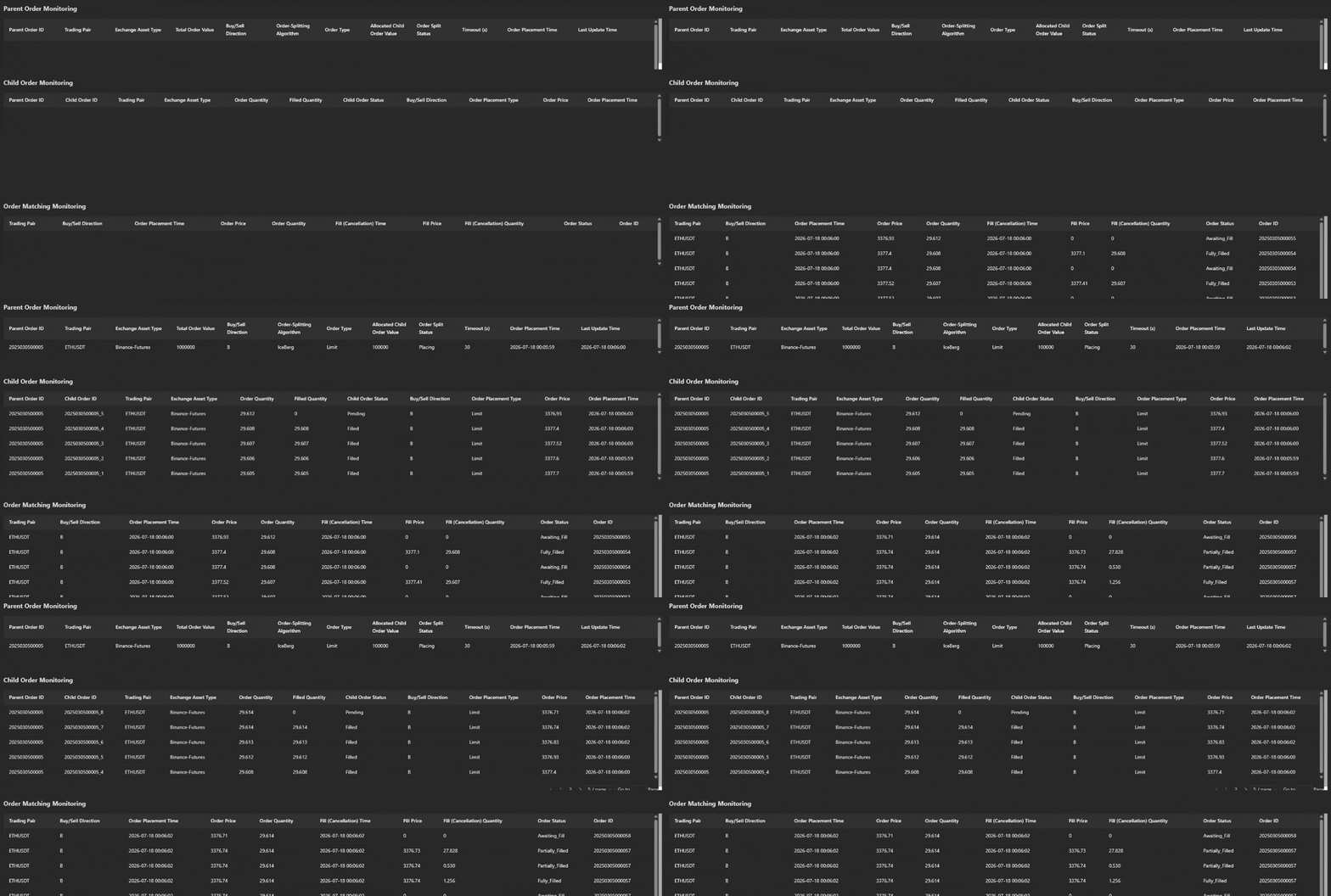
-
Write the parent order to the stream table (orderBlobStream), as shown in Parent Order Monitoring in Figure 2-5. The letter "B" indicates a buy parent order. The total order value is 1,000,000, the quantity of each child order is 100,000, and the fill timeout is 30 seconds. That is, if an order is not fully filled within 30 seconds, the remaining quantity is canceled.
-
The system starts splitting the parent order and placing a child order. Then, the parent order splitting status changes from "Initialized" to "Placing", and a limit order with a value of 100,000 is written to the child order stream table. The child order price is set to the best bid price in the real-time market snapshot. This is shown in Child Order Monitoring in Figure 2-5.
-
The order matching simulator starts matching orders based on real-time market data, and the matching results are displayed in the order matching result table, as shown in the Order Matching Monitoring in Figure 2-5. Matching records are displayed in descending order by fill or cancellation time, making it easier to view the latest matching status.
-
The Child Order Monitoring table in Figure 2-5 allows you to observe child order fills in real time based on filled quantity and child order status. Child order records are displayed in descending order by placement time, making it easier to view the fill status of the latest child order. If the order is not fully filled before the timeout, the system cancels the remaining quantity and places a new child order. If the child order is fully filled within the specified time, the system places the next child order.
-
When the filled quantity of child orders reaches the parent order quantity or the minimum fill quantity, the system stops splitting the parent order and placing child orders, and updates the parent order status from "Placing" to “Placement_Complete”.
2.5 Summary for Iceberg Algorithm
This chapter introduces how to use the DolphinDB's CEP engine and order matching simulator to integrate the iceberg algorithm with the order matching simulator. It first describes the algorithm, then introduces the functional modules. Next, it explains the implementation process and code in detail, with a focus on the most complex part: the monitor definition, including the call chain among the functions. Finally, the result review section describes how to display the order-splitting and order matching process using Dashboard.
3. Arbitrage Order Placement
3.1 What Is Risk-Free Arbitrage
Risk-free arbitrage captures real-time pricing discrepancies between futures and spot markets and establishes hedged positions in opposite directions—for example, selling futures and buying spot when futures trade at a premium, or buying futures and shorting spot when futures trade at a discount. As market forces drive prices to converge and the spread narrows, the strategy closes the positions and locks in risk-free profit.

Figure 3-1 shows the replayed LastPrice trend of ETH-USDT spot and futures over a period of time. The red line represents the index's LastPrice, and the green line represents the futures' LastPrice. The market tends to drive LastPrice_CryptoSpotIndex and LastPrice_CryptoFutures toward convergence. Therefore, when the spread ratio exceeds a specified value, the system determines that an arbitrage opportunity exists and buys the spot. When the spread ratio falls below a specified value, the system determines that the two prices have converged and that the index price has reached a high, and then sells short the spot position bought in the current round to achieve risk-free arbitrage. The figure uses ETH-USDT as an example. For spot and futures, each price divergence and subsequent convergence may present an arbitrage opportunity and allow one round of arbitrage.
Unlike directional speculation, which depends on price increases or decreases, arbitrage focuses on eliminating directional market risk and profits purely from spread convergence. Its effectiveness depends heavily on high-speed algorithms that monitor basis in real time, accurately calculate transaction costs such as fees and stock borrowing interest, and execute quickly. It applies to short-term pricing inefficiencies, such as widening discounts during dividend seasons or abnormal spreads between contracts with different maturities. This example demonstrates arbitrage based solely on the spread, without considering fees or other additional costs. You can adapt and extend this example for your own application scenario.
3.2 Functional Modules
-
Data replay: simulates writing real-time spot and futures data.
-
Stream table subscription: decouples parent order placement from arbitrage order placement.
-
Order matching simulator: receives snapshot data as well as orders and canceld orders from the child order stream table to simulate market trading.
-
CEP engine: implements the algorithm logic and receives the order matching results (constructed as fill events) as fill reports. After receiving fill reports, the system calculates the profit for each order. The general process is shown in the following figure.
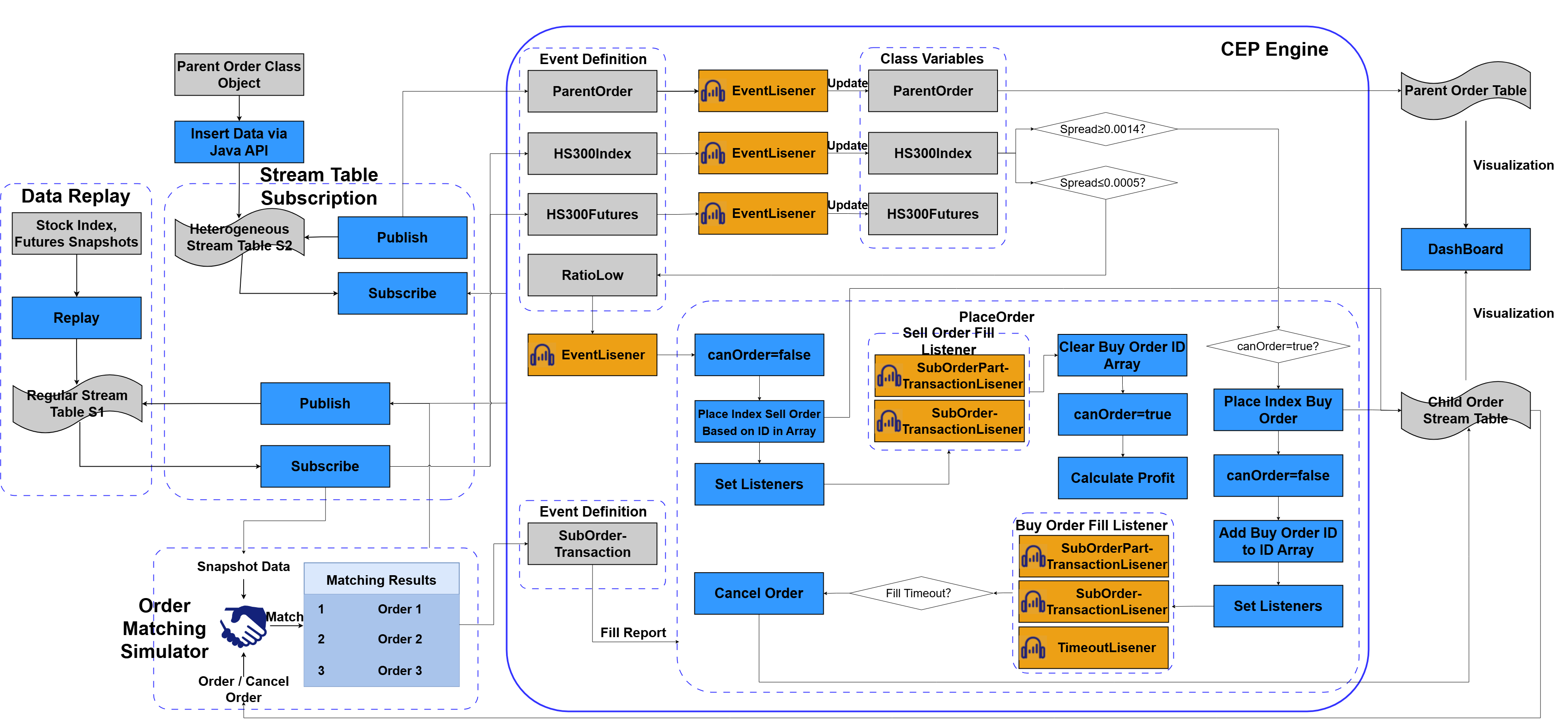
The workflow of an arbitrage order is similar to that of an iceberg order, with the following differences.
-
The arbitrage order also integrates with the order matching simulator plugin. It injects index snapshot data, as well as index orders and canceled orders from the child order stream table into the order matching simulator to simulate order fills. However, the orders include both buy and sell orders, enabling risk-free arbitrage profit by buying low and selling high.
-
The CEP engine defines two event classes (
CryptoSpotandCryptoFutures) as variables to store real-time spot and futures data, respectively. In this example, the spread is calculated with the lastPrice field. When the spread exceeds the specified value, the system places a buy order based on the real-time spot's lastPrice and listens for fill and timeout events. The event classRatioLowis also defined. When the spread falls below the specified value, a ratioLow event is injected into the CEP engine. The buy orders filled in the current round are then placed as sell orders based on the real-time spot's lastPrice, and the system listens for fill events to calculate arbitrage profit. -
After placing an index buy order, the system listens for fill and timeout events. When the index price in the current round reaches a high, meaning the spot-futures spread falls below the specified value, the system cancels the remaining quantity of buy orders in the current round. After placing a sell order, however, it listens only for fill events in order to capture more arbitrage profit.
3.3 Code Implementation
This section describes the code implementation of the arbitrage order, including spread calculation and storage of the arbitrage order queue.
3.3.1 Define Event Classes
-
Define the cryptocurrency spot data class and the cryptocurrency futures data class. These two classes have similar fields:
// Fields for the cryptocurrency spot data class
    splitOrderId:: STRING // Unique ID of the parent order split
    eventType:: STRING            // Event type
    tradeDate:: DATE // Trade date
    tradeTime:: TIME // Trade time
    securityID:: STRING // Cryptocurrency symbol
    lastPrice:: DOUBLE // Latest price
    eventTime:: TIMESTAMP         // Event submission time

// Fields for the cryptocurrency futures data
    splitOrderId:: STRING // Unique ID of the parent order split
    eventType:: STRING            // Event type
    tradeDate:: DATE // Trade date
    tradeTime:: TIME // Trade time
    tnstrumentID:: STRING // Futures symbol
    lastPrice:: DOUBLE // Latest price
    eventTime:: TIMESTAMP         // Event submission time
The meaning of each field is described in the comment on its line. The spread between spot and futures is calculated with the LastPrice field, and the child order price is also constrained by the index’s real-time LastPrice.
-
Define the parent order class with the following order-splitting parameters:
//Order-splitting parameters
    splitMethod:: STRING          // Order-splitting algorithm
    orderType:: STRING            // Order type (limit/market)
    orderAmount:: DOUBLE       // Value per order
    startTime:: TIMESTAMP // Start time of order splitting
    endTime:: TIMESTAMP // End time of order splitting
    timeoutNum:: INT              // Timeout in seconds
    orderStatus:: STRING // Order splitting status
    eventTime:: TIMESTAMP         // Event submission time
Here, orderAmount specifies the fixed value per child order. When the spread exceeds the specified value, the system places an order with this value. timeoutNum specifies the timeout for each buy order, and any portion not fully filled before the timeout is canceled.
-
Define the child order fill class. Unlike the iceberg algorithm, this class uses the transactionType field to distinguish between partial and full fills:
splitOrderId:: STRING //ID of the parent order to operate on eventType:: STRING // Event type transactionType:: STRING // Fill type (all: full fill; part: partial fill) subOrderID:: STRING // Unique ID of the child order, corresponding to tagBatchId in the child order stream table tradeQty:: DOUBLE // Filled quantity tradePrice:: DOUBLE // Fill price eventTime:: TIMESTAMP // Child order fill time -
Define a spread convergence class that calculates the ask price when the spread falls below the specified value:
splitOrderId:: STRING //ID of the parent order to operate on
eventType:: STRING          // Event type
price:: DOUBLE            // Ask price
eventTime:: TIMESTAMP // Child order fill time
The price field is the index's LastPrice when the spread falls below the specified value. It is used to determine the ask price.
-
Define the
mySetclass that stores the buy order IDs for one round of arbitrage:// User-defined class that stores child order IDs class mySet{ ids:: STRING VECTOR def mySet(ids_){ ids = ids_ } def clear(){ ids = array(STRING,0) } def appendId(newId){// Do not add duplicate elements // Check whether the array contains the ID for(id in ids){ if(id==newId){ return } } ids.append!(newId) } }When adding a buy order ID to the array in the
mySetclass, the system first checks whether the ID exists. It adds the ID only if it does not exist, thereby deduplicating IDs.
3.3.2 Create Tables
-
Create the parent order in-memory table and the child order stream table:
// Create the parent order management table
colNames=[
    "splitOrderId","eventType","batchId","tagBatchId","sortNum",
    "combinationNo","combinationName","symbol","symbolSource",
    "tradeDate","tradeAmount","remainAmount","executedQuantity",
    "tradeDirection",
    "handlerEmpid","handlerName","splitMethod","orderType",
    "startTime","endTime","orderAmount","orderStatus","timeoutNum",
    "eventTime","lastUpdateTime","profit"
]
colTypes=[
    STRING,SYMBOL,STRING,STRING,INT,
    STRING,STRING,SYMBOL,SYMBOL,
    STRING,DOUBLE,DOUBLE,DOUBLE,
    SYMBOL,
    STRING,STRING,SYMBOL,SYMBOL,
    TIMESTAMP,TIMESTAMP,DOUBLE,SYMBOL,INT,
    TIMESTAMP,TIMESTAMP,DOUBLE
]
share table(1:0,colNames,colTypes) as parentOrderManage


// Create the stream table for receiving child orders
colNames=[
    "splitOrderId","batchId","tagBatchId","sortNum",
    "combinationNo","combinationName","symbol","symbolSource",
    "tradeDate","tradeQuantity","tradeDirection",
    "handlerEmpid","handlerName","orderType","price","lastUpdateTime"
]
colTypes=[
    STRING,STRING,STRING,INT,
    STRING,STRING,SYMBOL,SYMBOL,
    STRING,DOUBLE,SYMBOL,
    STRING,STRING,SYMBOL,DOUBLE,TIMESTAMP
]
share streamTable(1:0, colNames, colTypes) as subOrderStream
The fields have the same meanings as in the iceberg algorithm, with the addition of the profit field to track total arbitrage profit.
-
Create a table to store index spot positions, record buy and sell transactions, and update the profit realized after each sale in real time:
colNames=["splitOrderId","batchId","tagBatchId","sortNum","fundCode","fundName","assetId","assetName","combinationNo","combinationName","stockCode","stockName","tradeDate","tradeQuantity","saleQty","tradeDirection","market","handlerEmpid","handlerName","orderType","price","salePrice","profit","lastUpdateTime"]
colTypes=[STRING,STRING,STRING,INT,SYMBOL,SYMBOL,STRING,STRING,STRING,STRING,SYMBOL,SYMBOL,STRING,INT[],INT[],SYMBOL,SYMBOL,STRING,STRING,SYMBOL,DOUBLE[],DOUBLE[],DOUBLE,TIMESTAMP]
colTypes.size()
share table(1:0, colNames, colTypes) as purchasedIndexTb
tradeQuantity and saleQty record the number of buy and sell orders; price and salePrice record the executed buy and sell prices; profit updates the profit earned by the order in real time; and orderType updates the order's arbitrage status in real time.
3.3.3 Define the Monitor
The most critical step in implementing the arbitrage order system is to configure an internal monitor for the CEP engine. The monitor encapsulates the arbitrage order strategy. Its structure is roughly as follows.
//Monitor for arbitrage order
class arbiSplitMonitor:CEPMonitor{
    // Parent order attributes
	parentOrder:: ParentOrder
 // Cryptocurrency data
    cryptoSpot:: CryptoSpot
    // Futures data
    cryptoFutures:: CryptoFutures
    // Flag indicating whether orders can be placed
    canOrder:: BOOL
 // Sell order sequence number. When concatenating it with the parent order ID, append '0' first and then the sequence number to distinguish it from the buy order ID.
    sNum:: INT
 // ratioLow event listener's sequence number, used for listener naming
    ratioLowNum:: INT
    // Child order ID array. Store the IDs of child orders bought in each arbitrage round, and is cleared each time sell orders are placed.
    subOrderIds:: mySet
    subOrderAmounts:: DOUBLE
    subOrderQtys:: DOUBLE
 // Records the number of filled child orders under the current parent order, initially 0. Used for cancellation management. Reset this variable to 0 after cancellation or full fill so it can be reused for cancellation management of the next child order.
    transactionQty:: DOUBLE
    transactionAmount:: DOUBLE

    def arbiSplitMonitor() {
        //In this example, the initial monitor does not require parameters. Set them when cloning the task monitor.
    }

    // Process the date and time and return a vector containing year, month, day, hour, minute, and second
    def handleCompleteTime(dt,ti){...}

    //Initialize the parent order information
    def initPOrderManageInfo(pOrder){...}

    //Update the parent order information
    def updatePOrderManageInfo(pOrder){...}

    // After receiving a partial fill in the cumulative partial fill handler, first check whether the position table contains the corresponding child order. If it does, update the position; otherwise, add a new record.
    def QtyAdd(subOrderPartTran){...}

    // Convert between sell order and buy order IDs
    def saleID2buyID(saleID){...}

    // Convert between buy order and sell order IDs
    def buyID2saleID(buyID){...}

    def saleQtyAdd(subOrderPartTran){...}

    // When a full fill event is injected, update the position table and the buy order ID array
    def ifPlaceOrder(subOrderPartTran){...}

    // Sell order full fill event
    def saleIfPlaceOrder(subOrderPartTran){...}

    // Child order ID. The engine requires a LONG value, so split the string and concatenate the parts into the child order ID.
    def handleOrderId(x){...}

    // After a timeout, first unregister the partial fill listener, and then write the cancellation request to the child order stream table
    def cancelOrder(){...}

    // Cancel the order by ID. Because the system is still waiting for this child order to fill or time out, unregister the three corresponding buy order listeners here.
    def cancelOrderById(id,qty){...}

    // Place sell orders. The sell order ID differs from the buy order ID only by a 0.
    // For each ID in the array, if there is no fill or partial fill, cancel the order and destroy all corresponding listeners
    // Listener name: obtain the corresponding sortNum from the child order ID, and then concatenate the listener name
    def saleIndex(price){...}

    def ratioLowHandler(lowRatio){...}

    //Place buy orders
    def placeOrder_Crypto_arbitrage(){...}

    // Cryptocurrency spot
    def CryptoSpotHandler(CryptoSpotEvent){...}

    // Cryptocurrency futures
    def CryptoFuturesHandler(CryptoFuturesEvent){...}

    //Initialize the sub-monitor
    def startPlaceOrder(pOrder){...}

    //Create a sub-monitor instance for parent order placement
    def forkParentOrderMonitor(pOrder){...}

    //Initial task
    def onload(){
        addEventListener(forkParentOrderMonitor, "ParentOrder", ,"all")
    }
}parentOrder: records the attribute values of the current parent order.
cryptoSpot: records real-time market data for the current index.
cryptoFutures: records real-time market data for the current futures contract.
canOrder: a flag indicating whether buy orders can be placed. In one arbitrage round, a new buy order can be placed only after the previous buy order has been filled. When a profit is realized by closing a short index position, no further buy orders can be placed.
sNum: the sell order sequence number, which plays a role similar to the sortNum field in the parent order. Buy order IDs and sell order IDs correspond to each other and can be converted to each other.
ratioLowNum: the sequence number used to name listeners for price reversion events.
subOrderIds: records all buy order IDs in each arbitrage round, which are used to place the corresponding sell orders when closing positions for a profit.
-
onload: initial task
After the engine is created and the monitor is instantiated, its internal
onloadfunction is called first. In theonloadfunction, use theaddEventListenerfunction to listen for ParentOrder event injections. SpecifyforkParentOrderMonitoras the callback function, set the event type to ParentOrder, and configure the listener to listen continuously.//Initial task def onload(){ addEventListener(forkParentOrderMonitor, "ParentOrder", ,"all") }The
onloadfunction sets an event listener (ParentOrder) that listens for all parent order events. When an event of this type is detected, the process of arbitrage order starts. You can divide the function call chain that starts with theonloadfunction into three modules, each implementing different features, as shown in the following figure.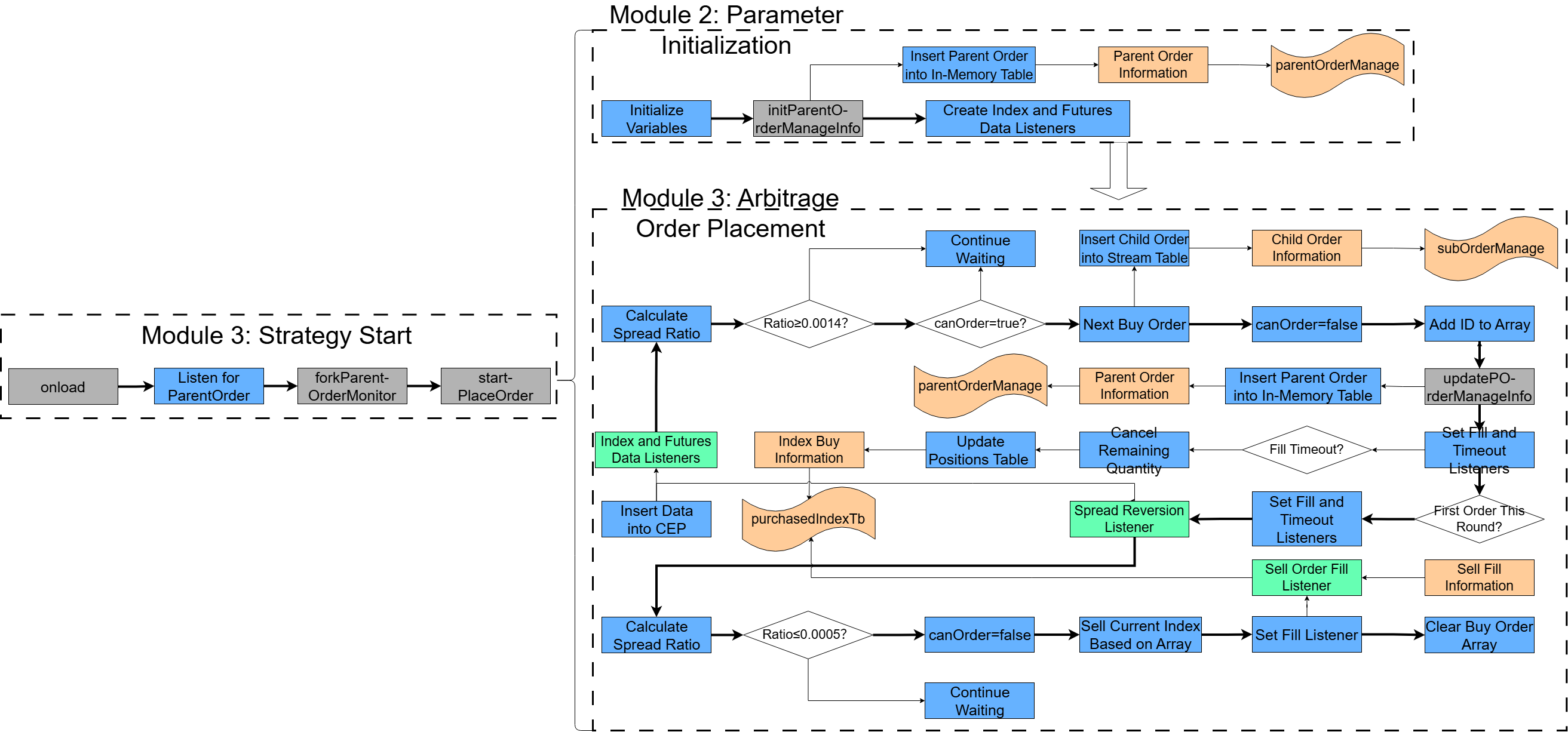
Figure 8. Figure 3-3 Function Call Chain Next, we describe the code implementation, starting with the callback function
forkParentOrderMonitor, which corresponds to the strategy start event. -
forkParentOrderMonitor: generates a monitor instance
The initial monitor in the CEP engine only monitors the injection of strategy start events. For details, see the
onloadfunction described earlier. Whenever theonloadfunction detects a newly injected ParentOrder event, it callsforkParentOrderMonitorto create a sub-monitor instance, which then performs arbitrage order placement for the current order.//Create a sub-monitor instance for parent order placement def forkParentOrderMonitor(pOrder){ writeLog("@@@@@@@@@@@@@@@@@@@arbiTradeSplitMonitor-forkParentOrderMonitor+ in") spawnMonitor(pOrder.splitOrderId + "_forksubMonitor",startPlaceOrder, pOrder) }In
forkParentOrderMonitor, DolphinDB'sspawnMonitorfunction generates a sub-monitor instance, calls thestartPlaceOrdermethod, and passes in the injected ParentOrder eventpOrder. This starts the subsequent core modules. -
startPlaceOrder: starts the core modules
The
startPlaceOrderfunction includes the start steps for modules 2 and 3. The code is as follows:// Initialize the sub-monitor. def startPlaceOrder(pOrder){ // Initialize the placement flag. canOrder = true sNum = 0 ratioLowNum = 1 // Deduplication vector subOrderIds = mySet(array(STRING,0)) subOrderQtys = 0.0 subOrderAmounts = 0.0 transactionQty = 0.0 transactionAmount = 0.0 // In this example, build an initial object. In production, the last data point from the previous day can be loaded instead. spotEvent = CryptoSpot( `2025030500001, `CryptoSpot, 2026.09.01, 00:00:00.000, "ETH-USDT", 2513.045000000000000000, now() ) // Initialize class members. cryptoSpot = spotEvent print(cryptoSpot) print("splitOrderId:", spotEvent .splitOrderId) futuresEvent = CryptoFutures( `2025030500001, `CryptoFutures, 2026.09.01, 00:00:00.000, "ETH-USDT-SWAP", 2513.205000000000000000, now() ) // Initialize class members. cryptoFutures = futuresEvent // Set the internal parent order field on the current task monitor. parentOrder = pOrder // Initialize the order split status. parentOrder.setAttr(`orderStatus,'Init') parentOrder.setAttr(`sortNum,0) // Sequence number of the order split // Save the parent order status. initPOrderManageInfo(parentOrder) // Create the index data listener. addEventListener(CryptoSpotHandler, "CryptoSpot", ,"all") // Create the futures data listener. addEventListener(CryptoFuturesHandler, "CryptoFutures", ,"all") }It includes the following steps:
-
Initialize the CEP class variables: canOrder, sNum, ratioLowNum, subOrderIds, CryptoSpot, CryptoFutures, and parentOrder.
-
Initialize the order split status and sequence number.
-
Save the parent order information to the parent order in-memory table.
-
Create listeners for cryptocurrency spot and futures data events, using
CryptoSpotHandlerandCryptoFuturesHandleras their respective callback functions.
-
-
initPOrderManageInfo: records parent order information
The
initPOrderManageInfofunction is called by thestartPlaceOrderfunction. The code is as follows://Initialize the parent order information def initPOrderManageInfo(pOrder){ parentOrderManage=objByName('parentOrderManage') // Get the latest index time and call handleCompleteTime lastTime = handleCompleteTime(cryptoSpot.TradeDate,cryptoSpot.TradeTime) insert into parentOrderManage values( pOrder.splitOrderId,pOrder.eventType,pOrder.batchId,pOrder.tagBatchId,pOrder.sortNum, pOrder.combinationNo,pOrder.combinationName,pOrder.symbol, pOrder.symbolSource, pOrder.tradeDate,pOrder.tradeAmount,pOrder.tradeAmount,0, pOrder.tradeDirection,pOrder.handlerEmpid,pOrder.handlerName, pOrder.splitMethod,pOrder.orderType,pOrder.startTime,pOrder.endTime, pOrder.orderAmount,pOrder.orderStatus,pOrder.timeoutNum,lastTime,lastTime,0) }This function inserts the parent order record into the parent order in-memory table, with the order time set to the current snapshot time.
-
updatePOrderManageInfo: updates parent order information
The
updatePOrderManageInfofunction updates the basic information about the parent order. The code is as follows://Update the parent order information def updatePOrderManageInfo(pOrder){ parentOrderManage=objByName('parentOrderManage') opTime = handleCompleteTime(cryptoSpot.TradeDate,cryptoSpot.TradeTime) update parentOrderManage set sortNum = pOrder.sortNum,orderStatus=pOrder.orderStatus, lastUpdateTime = opTime where splitOrderId = pOrder.splitOrderId }This function updates the records in the parent order in-memory table and sets the update time to the current snapshot time.
-
updateRemainAmount: update the remaining value and quantity of the parent order
The
updateRemainAmountfunction updates the remaining value and quantity of the parent order. The code is as follows://Update the remaining value and quantity of the parent order def updateRemainAmount(Amount,Qty){ parentOrderManage=objByName('parentOrderManage') opTime = now() sId = parentOrder.splitOrderId currentRemainAmount= exec remainAmount from parentOrderManage where splitOrderId = sId currentExecutedQty=exec executedQuantity from parentOrderManage where splitOrderId = sId RAmount=currentRemainAmount-Amount EQuantity=currentExecutedQty+Qty update parentOrderManage set remainAmount=RAmount,executedQuantity=EQuantity,lastUpdateTime = opTime where splitOrderId = sId subOrderQtys = subOrderQtys+Qty subOrderAmounts = subOrderAmounts+Amount } -
handleCompleteTime: gets the complete timestamp
The
handleCompleteTimefunction processes a date parameter and a time parameter, and returns a complete timestamp. The code is as follows:// Process the date and time and return a vector containing year, month, day, hour, minute, and second def handleCompleteTime(dt,ti){ // Concatenate time strings tempTimeStr = dt+" "+ti+"000" // Convert time string tempTime = temporalParse(tempTimeStr,"yyyy.MM.dd HH:mm:ss.nnnnnn") // Assign value return tempTime }The steps are as follows:
-
Concatenate strings to construct a complete time string.
-
Use the
temporalParsesystem function to convert the string to the specified format and return the result.
-
-
cryptoSpotHandle: processes cryptocurrency spot data events
When a cryptocurrency spot data event is injected into the CEP engine, the
CryptoSpotHandlerfunction is called to handle it. The code is as follows:// Process cryptocurrency data. def cryptoSpotHandler(CryptoSpotEvent){ // Update the cryptocurrency data. cryptoSpot = CryptoSpotEvent // Check the timestamp. lastTime = handleCompleteTime(cryptoSpot.TradeDate,cryptoSpot.TradeTime) // Check whether replay is complete. If so, destroy the monitor and set the parent order status to "Arbitrage_Completed". writeLog(lastTime) if(lastTime > timestamp("2026.09.01T00:05:00.000000000")){ parentOrder.setAttr(`orderStatus,'Arbitraged') // Save the parent order status. updatePOrderManageInfo(parentOrder) // The child order is fully filled. Destroy the monitor. destroyMonitor() return } // Check the ratio. ratio = (cryptoFutures.LastPrice - cryptoSpot.LastPrice)/cryptoSpot.LastPrice if(ratio<=0){ price = cryptoSpot.LastPrice lowRatioEvent = RatioLow("2025030500001","ratioLow",price,now()) appendEvent(`blobStreamEventSerializer,lowRatioEvent) } // Check whether order placement should be triggered. placeOrder_crypto_arbitrage() }The steps are as follows:
-
Assign the injected cryptocurrency data event to the class variable cryptoSpot.
-
Check whether the end time has been reached. Because this example replays ten minutes of spot and futures data, the replay finishes when the specified time is reached and the arbitrage run ends. At this point, set the parent order status to "Arbitrage_Complete" and destroy the monitor.
-
Check whether the spread has reverted. If the spread is less than 0, inject a reversion event into the CEP engine.
-
Determine whether to trigger order placement.
-
-
CryptoFuturesHandler: processes cryptocurrency future data events
CryptoFuturesHandlerprocesses futures data events. The code is as follows:// Cryptocurrency futures def CryptoFuturesHandler(CryptoFuturesEvent){ // Cryptocurrency futures information cryptoFutures = CryptoFuturesEvent }Assign the futures market data event to be injected to the variable CryptoFutures.
-
placeOrder_crypto_arbitrage: places a buy order
The
placeOrder_crypto_arbitragefunction is called byCryptoSpotHandler. The code is as follows:// Function for placing buy orders def placeOrder_crypto_arbitrage(){ ratio = (cryptoFutures.LastPrice - cryptoSpot.LastPrice)/cryptoSpot.LastPrice // A check for order placement time may still be missing here. totalQty = subOrderQtys totalAmount = subOrderAmounts // Calculate the remaining quantity to place: parent quantity minus total child order quantities. remainAmount = parentOrder.tradeAmount - totalAmount // Quantity for the next child order. subOrderAmount = parentOrder.orderAmount // The child order quantity may exceed the remaining quantity. subOrderAmount = min(subOrderAmount,remainAmount) subOrderPrice=cryptoSpot.LastPrice subOrderQty=(subOrderAmount/subOrderPrice)*1000 subOrderQty=floor(subOrderQty) / 1000.0 // Change this condition to less than or equal to the minimum order quantity if needed. if(subOrderQty<0.01) { parentOrder.setAttr(`orderStatus,'Filled') if(canOrder != false){ updatePOrderManageInfo(parentOrder) } canOrder = false } // Order placement condition with an additional flag check. if (ratio >= 0.000015 && canOrder == true && subOrderQty>0) { // Next child order // Get the latest index time by calling handleCompleteTime. lastTime = handleCompleteTime(cryptoSpot.TradeDate,cryptoSpot.TradeTime) subOrderStream = objByName('subOrderStream') // Buy order ID tbId = parentOrder.splitOrderId+'_'+(parentOrder.sortNum+1) // Insert data into the child order stream table. insert into subOrderStream values(parentOrder.splitOrderId,parentOrder.batchId, tbId,parentOrder.sortNum+1, parentOrder.combinationNo,parentOrder.combinationName,parentOrder.symbol,parentOrder.symbolSource, parentOrder.tradeDate,subOrderQty,parentOrder.tradeDirection,parentOrder.handlerEmpid, parentOrder.handlerName,parentOrder.orderType,subOrderPrice,lastTime); // Update the flag and wait for the buy order to fill. canOrder = false // Refresh the array. subOrderIds.appendId(tbId) // Update the order count. parentOrder.setAttr(`sortNum,parentOrder.sortNum+1) parentOrder.setAttr(`orderStatus,'Placing') // Save the parent order status. updatePOrderManageInfo(parentOrder) // Timeout timeoutN = parentOrder.timeoutNum timeoutTime = duration(timeoutN+"s") QtyAddListenerName = "QtyAddListener"+"_"+string(parentOrder.sortNum) // Listen for fills and store the successfully bought cryptocurrency in the positions in-memory table. // Listen for partial fills to manage canceled quantity. When the spread narrows to the target value, cancel the unfilled quantity. partstr = "part" allstr = "all" writeLog("=========Register buy-order listener=========") addEventListener(qtyAdd, "SubOrderTransaction", <SubOrderTransaction.transactionType = partstr && SubOrderTransaction.subOrderID = tbId>,"all",,,,,QtyAddListenerName) // Only one of the two listeners will fire, effectively canceling the other one. // If a full-fill event arrives within 30s, trigger once and then remove the listener. ifPlaceOrderListenerName = "ifPlaceOrderListener"+"_"+string(parentOrder.sortNum) addEventListener(ifPlaceOrder, "SubOrderTransaction", <SubOrderTransaction.transactionType = allstr && SubOrderTransaction.subOrderID = tbId>,1,,,timeoutTime,,ifPlaceOrderListenerName) // If there is no full fill within 30s, trigger a cancel and send it to the child order stream. cancelOrderListenerName = "cancelOrderListener"+"_"+string(parentOrder.sortNum) addEventListener(cancelOrder, "SubOrderTransaction", <SubOrderTransaction.transactionType = allstr && SubOrderTransaction.subOrderID = tbId>,1,,,,timeoutTime,cancelOrderListenerName) // Create a lowRatio listener at the start of each round. Call the handler when the spread condition is met. // The child order ID list contains only one element at this point. s = subOrderIds.ids.size() if(s==1){ lName = "ratioLowListener_"+string(ratioLowNum) addEventListener(ratioLowHandler, "ratioLow",,"all",,,,,lName) } } }The steps are as follows:
-
Calculate the current spread ratio between the cryptocurrency spot price and futures price.
-
Check whether the child order quantity to place is smaller than the minimum order quantity. If it is, set canOrder to false.
-
If the spread is not high enough or canOrder is false, do not place an order. canOrder being false indicates that the previous buy order has not been filled, that the system is currently selling the index spot position to close it for profit, or that the order quantity is smaller than the minimum order quantity.
-
If both the spread and canOrder meet the conditions, place an order. Insert the buy order into the child order stream table, and set canOrder to false while waiting for the buy order to be filled. Add the buy order ID to the ID array (subOrderIds).
-
Update the parent order information, including the order placement count (sortNum), the order status, and the last update time.
-
Set three listeners for the current buy order based on the timeout (timeoutNum) and the order placement count (sortNum). These are the partial-fill listener, the full-fill listener, and the timeout listener.
-
If this is the first buy order in the current arbitrage round, set the spread reversion event listener.
-
-
QtyAdd: accumulates partial fills for buy orders
The
qtyAddfunction processes partial-fill events for buy orders. The code is as follows:// Accumulate partial fills for buy orders. def qtyAdd(subOrderPartTran){ qty = subOrderPartTran.tradeQty id = subOrderPartTran.subOrderID writeLog("========Partial fill event============"+id) tPrice = subOrderPartTran.tradePrice subOrders = select * from purchasedIndexTb where tagBatchId=id s = subOrders.size() tAmount=qty*tPrice updateRemainAmount(tAmount,qty) // Get the latest index time by calling handleCompleteTime. lastTime = handleCompleteTime(cryptoSpot.TradeDate,cryptoSpot.TradeTime) if(s==0){// Insert a new holdings-table record. bQty = array(DOUBLE[],0) bQty.append!(qty) sQty = array(DOUBLE[],0) sQty.append!(0) bPrice = array(DOUBLE[],0) bPrice.append!(tPrice) sPrice = array(DOUBLE[],0) sPrice.append!(0) insert into purchasedIndexTb values( parentOrder.splitOrderId,parentOrder.batchId, id,parentOrder.sortNum, parentOrder.combinationNo,parentOrder.combinationName,parentOrder.symbol,parentOrder.symbolSource, parentOrder.tradeDate,bQty,sQty,parentOrder.tradeDirection,parentOrder.handlerEmpid, parentOrder.handlerName,"BuyPartial",bPrice,sPrice,0,lastTime) }else{// Update holdings, including the buy-quantity array and price array. // Query the buy quantity array and price array first. indexs = select tradeQuantity,price from purchasedIndexTb where tagBatchId=id bQty = indexs[0][`tradeQuantity] bPrice = indexs[0][`price] bQtyu = append!(bQty,qty) bPriceu = append!(bPrice,tPrice) currentOrderType = exec orderType from purchasedIndexTb where tagBatchId=id; if(currentOrderType=="BuyPartial"){ update purchasedIndexTb set tradeQuantity = bQtyu,price = bPriceu,orderType = "BuyPartial",lastUpdateTime = lastTime where tagBatchId=id } else{ update purchasedIndexTb set tradeQuantity = bQtyu,price = bPriceu,orderType = "BuyFilled",lastUpdateTime = lastTime where tagBatchId=id } } }This function checks whether the positions table contains the corresponding order by buy order ID. If no such order exists, it adds a record and writes the partially filled quantity and price to the array. If one exists, it updates the record.
-
ifPlaceOrder: processes full-fill events for buy orders
The
ifPlaceOrderfunction processes full-fill events for buy orders. The code is as follows:// Process full fills for buy orders. def ifPlaceOrder(subOrderPartTran){ id = subOrderPartTran.subOrderID writeLog("========Full fill event============"+id) // Update the table. tPrice = subOrderPartTran.tradePrice // Get the order quantity. qty = subOrderPartTran.tradeQty subOrders = select * from purchasedIndexTb where tagBatchId=id s = subOrders.size() tAmount=qty*tPrice updateRemainAmount(tAmount,qty) // Get the latest index time by calling handleCompleteTime. lastTime = handleCompleteTime(cryptoSpot.TradeDate,cryptoSpot.TradeTime) if(s==0){// Insert a new holdings-table record. bQty = array(DOUBLE[],0) bQty.append!(qty) sQty = array(DOUBLE[],0) sQty.append!(0) bPrice = array(DOUBLE[],0) bPrice.append!(tPrice) sPrice = array(DOUBLE[],0) sPrice.append!(0) writeLog("==========Start inserting into holdings table") insert into purchasedIndexTb values( parentOrder.splitOrderId,parentOrder.batchId, id,parentOrder.sortNum, parentOrder.combinationNo,parentOrder.combinationName,parentOrder.symbol,parentOrder.symbolSource, parentOrder.tradeDate,bQty,sQty,parentOrder.tradeDirection,parentOrder.handlerEmpid, parentOrder.handlerName,"BuyFilled",bPrice,sPrice,0,lastTime) writeLog("==========Finished inserting into holdings table") }else{// Update holdings, including the buy-quantity array and price array. // Query the buy quantity array and price array first. indexs = select tradeQuantity,price from purchasedIndexTb where tagBatchId=id bQty = indexs[0][`tradeQuantity] bPrice = indexs[0][`price] bQtyu = append!(bQty,qty) bPriceu = append!(bPrice,tPrice) update purchasedIndexTb set tradeQuantity = bQtyu,price = bPriceu,orderType = "BuyFilled",lastUpdateTime = lastTime where tagBatchId=id } // Update the placement flag. canOrder = true }The steps are as follows:
-
Check whether the positions table contains a corresponding order based on the buy order ID. If no such order exists, add a record and write the fully filled quantity and price to the array. If one exists, update the record.
-
Set the flag canOrder to true. That is, after the current buy order is fully filled, the system can continue to place buy orders if the spread is greater than the specified value.
-
-
cancelOrder: processes buy order fill timeout
If a buy order is not fully filled within the specified time, cancel the remaining quantity. The code is as follows:
// Process buy order fill timeout.
    def cancelOrder(){

 // Send a canceled order to the child order stream table. Use the latest buy order and get the ID of the canceled order from the child order stream table.
        ids = exec top 1 tagBatchId,tradeQuantity from subOrderStream where tradeDirection = "B" order by lastUpdateTime desc
        id = ids[0][`tagBatchId]
        writeLog("========Timeout event============"+id)

        // Unregister the partial-fill listener.
 // Derive listenerName from the child order ID because sortNum may have changed after other orders are placed.
        QtyAddListenerName = "QtyAddListener"+"_"+string(parentOrder.sortNum)
        QtyAddListener = getEventListener(QtyAddListenerName)
        QtyAddListener.terminate()

        qty = ids[0][`tradeQuantity]
 // Query the ID of the canceled order.
        id2long = handleOrderId(id)
        orderIds = exec top 1 orderId from outputTb where userOrderId = id2long and orderStatus = 4
        orderId = orderIds[0]
        cancelOrderPlaceTime = handleCompleteTime(cryptoSpot.TradeDate,cryptoSpot.TradeTime)

 // Fill in the canceled order here.
 // Calculate the canceled quantity. qty is the total placed quantity, and the filled quantity comes from the positions table.
        qtys = select tradeQuantity from purchasedIndexTb where tagBatchId=id
        if(qtys.size()==0){
            qty1=0
        }else{
            qtyV = qtys[0][`purchasedIndexTb]
            qty1 = sum(qtyV)
        }
        cancelQty = qty-qty1
 // Add the canceled order to the child order stream table.
        insert into subOrderStream values(parentOrder.splitOrderId,parentOrder.batchId,orderId,parentOrder.sortNum,
        parentOrder.combinationNo,parentOrder.combinationName,parentOrder.symbol,parentOrder.symbolSource,
        cryptoSpot.TradeDate,cancelQty,parentOrder.tradeDirection,parentOrder.handlerEmpid,
        parentOrder.handlerName,"cancel",0,cancelOrderPlaceTime);
        // Get the latest index time by calling handleCompleteTime.
        lastTime = handleCompleteTime(cryptoSpot.TradeDate,cryptoSpot.TradeTime)
 // Update the status of the positions table. The row may not exist, so check first.
        subOrders = select * from purchasedIndexTb where tagBatchId=id
        s = subOrders.size()
        // Get the latest index time by calling handleCompleteTime.
        lastTime = handleCompleteTime(cryptoSpot.TradeDate,cryptoSpot.TradeTime)
        if(s==0){// Insert a new holdings-table record.
            bQty = array(DOUBLE[],0)
            bQty.append!(0)
            sQty = array(DOUBLE[],0)
            sQty.append!(0)
            bPrice = array(DOUBLE[],0)
            bPrice.append!(0)
            sPrice = array(DOUBLE[],0)
            sPrice.append!(0)
            writeLog("==========Start inserting into holdings table")
            insert into purchasedIndexTb values(
                parentOrder.splitOrderId,parentOrder.batchId,
                id,parentOrder.sortNum,
                parentOrder.combinationNo,parentOrder.combinationName,parentOrder.symbol,parentOrder.symbolSource,
                parentOrder.tradeDate,bQty,sQty,parentOrder.tradeDirection,parentOrder.handlerEmpid,
                parentOrder.handlerName,"BuyCanceled",bPrice,sPrice,0,lastTime)
            writeLog("==========Finished inserting into holdings table")
        }else{
            update purchasedIndexTb set orderType = "BuyCanceled",lastUpdateTime = lastTime where tagBatchId=id
        }
        canOrder = true
    }
The steps are as follows:
-
Query the child order stream table for the ID of the buy order that should be canceled. Because the next buy order is placed only after the current buy order is fully filled or canceled due to timeout, the ID of the buy order to cancel is the ID of the latest buy order in the child order stream table.
-
Unregister the listener for partial fills of the current buy order.
-
Query the ID of the canceled order from the order matching simulator's output table based on the queried buy order ID.
-
Calculate the number of orders to cancel. The canceled quantity equals the order quantity minus the filled quantity. The filled quantity is the sum of the filled quantities in the vector stored in the tradeQuantity field of the positions table.
-
Insert the canceled orders into the child order stream table.
-
Check whether the positions table contains a corresponding order based on the buy order ID. If no such order exists, add a record and set the arbitrage status to "Buy_Canceled" (all buy orders that were not successfully filled have been canceled). If one exists, update it and reset canOrder.
-
-
ratioLowHandler: processes spread reversion events
ratioLowHandlerprocesses spread reversion events. The code is as follows:// Process the spread reversion event. def ratioLowHandler(lowRatio){ writeLog("=========Ratio meets arbitrage condition = sell all sub-orders in the array=========") // Stop placing buy orders. canOrder = false // Destroy the listeners in handleCompleteTime. lName = "ratioLowListener_"+string(ratioLowNum) lowRatioListener = getEventListener(lName) lowRatioListener.terminate() // Start a new arbitrage round and increment the counter. ratioLowNum = ratioLowNum+1 price = lowRatio.price // Place sell orders for the matching child orders in the array. // If the previous buy order was not fully filled, cancel the remainder before selling. Otherwise, sell directly. saleIndex(price) // Start a new buy round. canOrder = true // Refresh the buy order array. subOrderIds = mySet(array(STRING,0)) }The steps are as follows:
-
Set the canOrder flag to false. When the spread reverts, positions need to be closed to lock in profit, so buy order placement is suspended.
-
Destroy the current spread reversion listener so it no longer listens for spread reversion events, and increment the spread reversion event counter by one.
-
Place sell orders for all buy orders whose IDs are stored in subOrderIds to close the positions and realize the profit.
-
Set the canOrder flag to true to start a new round of arbitrage. Clear subOrderIds.
-
-
Convert between buy order IDs and sell order IDs
Define two functions to convert between buy order IDs and sell order IDs in the positions table. The code is as follows:
// Convert between sell and buy order IDs.
    def saleID2buyID(saleID){
        s = strlen(saleID)
        s1 = s-15
        buyID = substr(saleID,0,14)+substr(saleID,15,s1)
        return buyID
    }

    // Convert between buy and sell order IDs.
    def buyID2saleID(buyID){
        s = strlen(buyID)
        s1 = s-14
        saleID = substr(buyID,0,14)+"0"+substr(buyID,14,s1)
        return saleID
    }
For the same batch of index spot orders, the buy order ID and sell order ID differ only by the character '0'. For example, if the buy order ID is "2025030500001_1", the corresponding sell order ID is "2025030500001_01".
-
saleIndex: places a sell order
The
saleIndexfunction is called byratioLowHandler. The code is as follows:def saleIndex(price){ // Place sell orders for the corresponding child order IDs in the array. ks = subOrderIds.ids for(bId in ks){ // Check for full fill first. Otherwise, cancel the remainder and destroy the listeners. // Filled quantity of buy orders bQtys = select tradeQuantity,orderType from purchasedIndexTb where tagBatchId=bId // Order quantity wQtys = select tradeQuantity from subOrderStream where tagBatchId=bId wQty = wQtys[0][`tradeQuantity] s1 = bQtys.size() if(s1==0){// No fill // Calculate the quantity to cancel. writeLog("=========Full cancel") cQty = wQty cancelOrderById(bId,cQty) }else{ bQty = sum(bQtys[0][`tradeQuantity]) status = bQtys[0][`orderType] // Floating-point precision may be an issue here. if(bQty<wQty && status!=`BuyCanceled && status!=`BuyFilled){// A cancel is needed but has not happened yet, which means this sub-order is still waiting to be filled. writeLog("=========Partial cancel") cQty = wQty-bQty cancelOrderById(bId,cQty) } } // Convert the buy order ID to the sell order ID. sId = buyID2saleID(bId) writeLog("===========Start sell order=========="+bId+"===="+sId) // Read the filled quantity for the matching buy order from the positions table. indexs = select * from purchasedIndexTb where tagBatchId=bId // Extract index = indexs[0] // If nothing was bought, skip to the next one. buyQty = sum(index[`tradeQuantity]) if(buyQty==0){ writeLog("=========No holdings, skip===="+bId) continue } // Sell all acquired quantity. buyQtyV = index[`tradeQuantity] saleQty = sum(buyQtyV) // Sell order ID tbId = sId lastTime = handleCompleteTime(cryptoSpot.TradeDate,cryptoSpot.TradeTime) // Insert it into the child order stream table. insert into subOrderStream values(index.splitOrderId,index.batchId, tbId,sNum+1, index.combinationNo,index.combinationName,index.symbol,index.symbolSource, index.tradeDate,saleQty,"S",index.handlerEmpid, index.handlerName,parentOrder.orderType,price,lastTime); // Update the order count. sNum = sNum+1 // Register listeners for the sell order. saleQtyAddListenerName = "saleQtyAddListener"+"_"+string(sNum) // Listen for fills and store the successfully bought cryptocurrency in the positions in-memory table. partstr = "part" allstr = "all" addEventListener(saleQtyAdd, "SubOrderTransaction", <SubOrderTransaction.transactionType = partstr && SubOrderTransaction.subOrderID = tbId>,"all",,,,,saleQtyAddListenerName) // Keep the full-fill listener for the sell order active as well. addEventListener(saleIfPlaceOrder, "SubOrderTransaction", <SubOrderTransaction.transactionType = allstr && SubOrderTransaction.subOrderID = tbId>,"all",,,,,) } }The steps are as follows:
-
Check whether the buy orders corresponding to subOrderIds have been fully filled. If they have not been fully filled, cancel the remaining quantity. This cancellation calls the
cancelOrderByIdfunction, whose implementation differs somewhat from that of thecancelOrderfunction. -
Place sell orders for the full bought quantity of the buy orders corresponding to subOrderIds, and update the sell order sequence number (sNum).
-
Set up the fill listeners for the sell orders. These include listeners for partial fills and full fills. No timeout is set here; the listeners keep running until the corresponding fill event is received.
-
-
cancelOrderById: cancel a buy order by ID
cancelOrderByIdis called bysaleIndexto cancel the corresponding buy order based on the ID and canceled quantity. The code is as follows:// Cancel the order by ID. Because the child order may still be waiting for a fill or timeout, unregister the three related buy listeners first. def cancelOrderById(id,qty){ // Get sortNumOrigin. s = strlen(id)-14 sortNumOrigin = substr(id,14,s) // Derive the listener name from the child order ID. // Partial-fill listener name pListenerName = "QtyAddListener_"+sortNumOrigin // Full-fill listener name aListenerName = "ifPlaceOrderListener_"+sortNumOrigin // Timeout listener name tListenerName = "cancelOrderListener_"+sortNumOrigin // Destroy the listeners. sleep(100) pListener = getEventListener(pListenerName) pListener.terminate() aListener = getEventListener(aListenerName) aListener.terminate() tListener = getEventListener(tListenerName) tListener.terminate() // Cancel order // Query the ID of the canceled order. id2long = handleOrderId(id) orderIds = exec top 1 orderId from outputTb where userOrderId = id2long and orderStatus = 4 orderId = orderIds[0] cancelOrderPlaceTime = handleCompleteTime(cryptoSpot.TradeDate,cryptoSpot.TradeTime) // Add the canceled order to the child order stream table. insert into subOrderStream values(parentOrder.splitOrderId,parentOrder.batchId,orderId,parentOrder.sortNum, parentOrder.combinationNo,parentOrder.combinationName,parentOrder.symbol,parentOrder.symbolSource, cryptoSpot.TradeDate,qty,parentOrder.tradeDirection,parentOrder.handlerEmpid, parentOrder.handlerName,"cancel",0,cancelOrderPlaceTime); // Update the status of the positions table. The row may not exist, so check first. subOrders = select * from purchasedIndexTb where tagBatchId=id s = subOrders.size() // Get the latest index time by calling handleCompleteTime. lastTime = handleCompleteTime(cryptoSpot.TradeDate,cryptoSpot.TradeTime) if(s==0){// Insert a new holdings-table record. bQty = array(DOUBLE[],0) bQty.append!(0) sQty = array(DOUBLE[],0) sQty.append!(0) bPrice = array(DOUBLE[],0) bPrice.append!(0) sPrice = array(DOUBLE[],0) sPrice.append!(0) writeLog("==========Start inserting into holdings table") insert into purchasedIndexTb values( parentOrder.splitOrderId,parentOrder.batchId, id,parentOrder.sortNum, parentOrder.combinationNo,parentOrder.combinationName,parentOrder.symbol,parentOrder.symbolSource, parentOrder.tradeDate,bQty,sQty,parentOrder.tradeDirection,parentOrder.handlerEmpid, parentOrder.handlerName,"BuyCanceled",bPrice,sPrice,0,lastTime) writeLog("==========Finished inserting into holdings table") }else{ update purchasedIndexTb set orderType = "BuyCanceled",lastUpdateTime = lastTime where tagBatchId=id } }The steps are as follows:
-
Based on the incoming buy order ID, concatenate strings to obtain the buy order sequence number (sortNum) assigned by the parent order when the buy order was placed. Then concatenate listener names for the fill listener and timeout listener based on sortNum, and destroy the corresponding listeners.
-
Query the ID of the canceled order from the order matching simulator's output table based on the buy order ID, and insert the canceled order into the child order stream table.
-
Check whether the positions table contains a corresponding order based on the buy order ID. If no such order exists, add a record and set the arbitrage status to "Buy_Canceled". If one exists, update it.
-
-
saleQtyAdd: accumulates partial fills for sell orders
saleQtyAddprocesses partial fill events for sell orders. The code is as follows:// Accumulate partial fills for sell orders. def saleQtyAdd(subOrderPartTran){ qty = subOrderPartTran.tradeQty id = saleID2buyID(subOrderPartTran.subOrderID) writeLog("========Sell-side partial fill event============"+id) tPrice = subOrderPartTran.tradePrice // Get the latest index time by calling handleCompleteTime. lastTime = handleCompleteTime(cryptoSpot.TradeDate,cryptoSpot.TradeTime) // Update the sell quantity vector and sell price vector in the positions table. // Query the buy quantity array and price array first. indexs = select saleQty,salePrice from purchasedIndexTb where tagBatchId=id sQty = indexs[0][`saleQty] sPrice = indexs[0][`salePrice] if(sQty.size()==1 && sQty[0]==0){// First insert sQty[0]=qty sQtyu = sQty sPrice[0]=tPrice sPriceu = sPrice }else{// Not the first time sQtyu = append!(sQty,qty) sPriceu = append!(sPrice,tPrice) } // Update update purchasedIndexTb set saleQty = sQtyu,salePrice = sPriceu,lastUpdateTime = lastTime where tagBatchId=id // Calculate profit by multiplying and subtracting the vectors element by element. indexs = select tradeQuantity,saleQty,price,salePrice from purchasedIndexTb where tagBatchId=id writeLog("=========Start profit calculation========") bQty = indexs[0][`tradeQuantity] sQty = indexs[0][`saleQty] bPrice = indexs[0][`price] sPrice = indexs[0][`salePrice] pf = sum(sQty*sPrice) - sum(bQty*bPrice) // Update profit and status in the positions table. currentOrderType = exec orderType from purchasedIndexTb where tagBatchId=id; if(currentOrderType=="SellPartial"){ update purchasedIndexTb set profit=pf,orderType = "SellPartial",lastUpdateTime = lastTime where tagBatchId=id} else{ update purchasedIndexTb set profit=pf,orderType = "SellFilled",lastUpdateTime = lastTime where tagBatchId=id } totalProfit = exec sum(profit) from purchasedIndexTb where splitOrderId=subOrderPartTran.splitOrderId update parentOrderManage set profit=totalProfit where splitOrderId=subOrderPartTran.splitOrderId }The steps are as follows:
-
Convert the sell order ID to a buy order ID, and then check whether the positions table contains the corresponding order. If no such order exists, add a record and record the sold quantity and price. If one exists, update it.
-
Calculate the current profit and update the positions table. Calculate the profit based on tradeQuantity, saleQty, price, and salePrice in the positions table, and set the arbitrage status of the corresponding order in the positions table to "SellPartial" (sell orders are partially filled).
-
-
saleIfPlaceOrder: processes full-fill events for sell orders
saleIfPlaceOrder: processes full-fill events for sell orders. The code is as follows:// Full-fill event for sell orders. def saleIfPlaceOrder(subOrderPartTran){ id = saleID2buyID(subOrderPartTran.subOrderID) writeLog("========Sell-side full fill event============"+id) // Update the table. tPrice = subOrderPartTran.tradePrice // Get the filled quantity. qty = subOrderPartTran.tradeQty // Get the latest index time by calling handleCompleteTime. lastTime = handleCompleteTime(cryptoSpot.TradeDate,cryptoSpot.TradeTime) // Update the sell quantity vector and sell price vector in the positions table. // Query the buy quantity array and price array first. indexs = select saleQty,salePrice from purchasedIndexTb where tagBatchId=id sQty = indexs[0][`saleQty] sPrice = indexs[0][`salePrice] if(sQty.size()==1 && sQty[0]==0){// First insert sQty[0]=qty sQtyu = sQty sPrice[0]=tPrice sPriceu = sPrice }else{// Not the first time sQtyu = append!(sQty,qty) sPriceu = append!(sPrice,tPrice) } // Update update purchasedIndexTb set saleQty = sQtyu,salePrice = sPriceu,lastUpdateTime = lastTime where tagBatchId=id // Calculate profit by multiplying and subtracting the vectors element by element. indexs = select tradeQuantity,saleQty,price,salePrice from purchasedIndexTb where tagBatchId=id bQty = indexs[0][`tradeQuantity] sQty = indexs[0][`saleQty] bPrice = indexs[0][`price] sPrice = indexs[0][`salePrice] pf = sum(sQty*sPrice) - sum(bQty*bPrice) // Update profit in the positions table. update purchasedIndexTb set profit=pf,orderType = "SellFilled",lastUpdateTime = lastTime where tagBatchId=id totalProfit = exec sum(profit) from purchasedIndexTb where splitOrderId=subOrderPartTran.splitOrderId update parentOrderManage set profit=totalProfit where splitOrderId=subOrderPartTran.splitOrderId }The steps are as follows:
-
Convert the sell order ID to a buy order ID, and then check whether the positions table contains the corresponding order. If no such order exists, add a record and record the sold quantity and price. If one exists, update it.
-
Calculate the current profit and update the positions table. Calculate the profit based on tradeQuantity, saleQty, price, and salePrice in the positions table, and set the arbitrage status of the corresponding order in the positions table to "SellFilled" (sell orders are fully filled).
-
Sum the profits in the positions table and update the total profit of the corresponding parent order in the parent order management table.
-
3.3.4 Create the CEP Engine
Use the createCEPEngine function to create a CEP engine, and use the subscribeTable function to have the CEP engine subscribe to the heterogeneous stream table (orderBlobStream). From orderBlobStream, it receives the ParentOrder, CryptoSpot, CryptoFutures, SubOrderTransaction, and ratioLow event streams.
// Create the engine for order placement.
dummy = table(1:0, `timestamp`eventType`blobs`splitOrderId, `TIMESTAMP`STRING`BLOB`STRING)
// Create the CEP engine.
engine = createCEPEngine(name='arbitrageSplitMonitor', monitors=<arbiSplitMonitor()>, dummyTable=dummy, eventSchema=[ParentOrder,CryptoSpot,CryptoFutures,SubOrderTransaction,RatioLow],timeColumn=`timestamp)

// Subscribe to the heterogeneous stream table.
subscribeTable(tableName="orderBlobStream", actionName="orderBlobStream",handler=getStreamEngine("arbitrageSplitMonitor"),msgAsTable=true)
3.3.5 Create the Order Matching Simulator
In this example, the order matching simulator must also subscribe to snapshot data, so you must create the order matching simulator before subscribing to the snapshot data.
-
Install and load the order matching simulator plugin
login("admin", "123456") // Install the plugin with the installPlugin function. installPlugin("MatchingEngineSimulator") // Load the plugin with the loadPlugin function. loadPlugin("MatchingEngineSimulator") -
Create an order matching simulator
// Config of order matching simulator
config = dict(STRING, DOUBLE);
config["latency"] = 0; // Set order latency to 0.
config["depth"] = 10; // Use a 10-level bid depth.
config["outputOrderBook"] = 0            // Do not output the order book.
config["orderBookMatchingRatio"] = 0.2; // Fill ratio when matching against the order book.
config["dataType"] = 16; // Market data type: 16 indicates cryptocurrency snapshots.
config["matchingMode"] = 1; // Matching mode 1: Match against the latest trade price and the order book using the configured ratio.
config["matchingRatio"] = 0; // Snapshot mode: fill ratio within the snapshot interval
config["userDefinedOrderId"] = true // Add an order ID column named userOrderId.


// Market data table schema
// Create an in-memory table for market data, which is used as input to the order matching simulator.
colNames=`symbol`symbolSource`timestamp`lastPrice`tradeQty`totalBidQty`totalOfferQty`bidPrice`bidQty`offerPrice`offerQty`highPrice`lowPrice
colTypes=[STRING,STRING,TIMESTAMP,DOUBLE,DOUBLE,DOUBLE,DOUBLE,DOUBLE[],DOUBLE[],DOUBLE[],DOUBLE[],DOUBLE,DOUBLE]
dummyQuoteTable =  table(1:0, colNames, colTypes)
// Column mapping between the user-defined market data table and the engine's internal schema.
quoteColMap = dict(  `symbol`symbolSource`timestamp`lastPrice`tradeQty`totalBidQty`totalOfferQty`bidPrice`bidQty`offerPrice`offerQty`highPrice`lowPrice,
                     `symbol`symbolSource`timestamp`lastPrice`tradeQty`totalBidQty`totalOfferQty`bidPrice`bidQty`offerPrice`offerQty`highPrice`lowPrice,)


// Order table schema
// Create an in-memory table for orders. There is no stopPrice here.
colNames=`symbol`symbolSource`orderTime`orderType`price`orderQty`BSFlag`timeInForce`orderID  // This probably needs adjustment to match the mapping below, at least for the INT fields.
colTypes=[STRING, SYMBOL, TIMESTAMP, INT, DOUBLE, DOUBLE, INT,INT,LONG]
dummyUserOrderTable =  table(1:0, colNames, colTypes)
// Mapping
userOrderColMap = dict( `symbol`symbolSource`timestamp`orderType`price`orderQty`direction`timeInForce`orderId,
                        `symbol`symbolSource`orderTime`orderType`price`orderQty`BSFlag`timeInForce`orderID)


// Output table for order details, including acknowledgements, fills, rejections, and cancellations. Fill records are sent to the CEP engine as events.
// Status codes: 4 indicates order submitted; -2 indicates cancellation rejected; -1 indicates order rejected; 0 indicates partially filled; 1 indicates fully filled; 2 indicates order cancellation.
// Create an output table for the order matching simulator. Fill records are converted to fill events and sent to the CEP engine.
// Add the userOrderId column to the output table and set the table as a stream table.
colNames=`orderId`symbol`direction`sendTime`orderPrice`orderQty`tradeTime`tradePrice`tradeQty`orderStatus`sysReceiveTime`userOrderId
colTypes=[LONG, STRING, INT,TIMESTAMP,DOUBLE,DOUBLE, TIMESTAMP,DOUBLE,DOUBLE, INT,NANOTIMESTAMP, LONG]
orderDetailsOutput = streamTable(1:0, colNames, colTypes)
// Share the output table
share orderDetailsOutput as outputTb


// Match cryptocurrency orders
exchange = "universal"
// Create the order matching simulator
name = "MatchingEngine"
matchingEngine = MatchingEngineSimulator::createMatchEngine(name, exchange,
config, dummyQuoteTable, quoteColMap, dummyUserOrderTable, userOrderColMap, orderDetailsOutput,,)

// Share the order matching simulator
share matchingEngine as mEngine
Use
createMatchEngineto create an order matching simulator. The steps are as follows:-
Define the config parameter. "latency" specifies the order matching latency. When the latest market data time is greater than or equal to the order time, the engine starts matching user orders. "depth" specifies that the order book depth of 10. "orderBookMatchingRatio" and "matchingRatio" specify the fill ratio. "matchingMode" specifies the matching mode here orders are matched against the latest trade price and the opposite-side order book based on the configured ratios when the snapshot data does not contain interval trade details. "userDefinedOrderId" is set to true to add an order ID column to the order matching result table.
-
Define the market data table (dummyQuoteTable), the order table schema (dummyUserOrderTable), and the field mappings to the corresponding internal engine tables. Then define the output table (orderDetailsOutput) and share it as outputTb. The CEP engine will later subscribe to the fill events in outputTb and display the order matching results in Dashboard.
-
exchange is set to "universal", indicating an instrument with no trading-hour restrictions.
-
3.3.6 Subscribe to the Child Order Stream Table
The order matching simulator requires market data and orders as input. This section describes how to subscribe to the child order stream table and insert buy/sell orders and canceled orders into the order matching simulator. The code is as follows:
// Insert orders into the order matching simulator via subscription.
// Convert orderType to the engine's INT codes: limit -> 5, cancel -> 6.
def handleOrderType(x){
    if(x=="Limit"){
        return 5
    }else{
        return 6
    }
}

// Convert trade direction to the engine's INT codes: buy -> 1, sell -> 2.
def handleDirection(x){
    if(x=="B"){
        return 1
    }else{
        return 2
    }
}

// Split and rebuild the child order ID and convert it to a LONG value.
def handleOrderId(x){
    oV = split(x,"_")
    res = ""
    for(str in oV){
        res = res+str
    }
    return long(res)
}


// Subscribe to subOrderStream as input to the order matching simulator.
def handleUserOrders(msg) {
 // Get all non-cancellation orders.
    data = exec * from msg

 // Write data into dummyUserOrderTable after converting orderType and direction to INT values.
 // Convert orderId to a LONG value.
    orderTypeV = exec orderType from msg
    otV = each(handleOrderType, orderTypeV)

    directionV = exec tradeDirection from msg
    dV = each(handleDirection, directionV)

    orderIdV = exec tagBatchId from msg
    oV = each(handleOrderId, orderIdV)

    // Temporary table
    colNames=`symbol`symbolSource`orderTime`orderType`price`orderQty`BSFlag`timeInForce`orderID
    colTypes=[STRING, SYMBOL, TIMESTAMP, INT, DOUBLE, DOUBLE, INT,INT,LONG]
    subOrderTempTb = table(1:0, colNames, colTypes)
    subOrderTempTb.tableInsert(data[`symbol],data[`symbolSource],data[`lastUpdateTime],
                                       otV,data[`price],data[`tradeQuantity],dV,0,oV)
    MatchingEngineSimulator::insertMsg(getStreamEngine("MatchingEngine"), subOrderTempTb, 2)

}

// Subscribe to the stream table.
subscribeTable(tableName = `subOrderStream,actionName=`handleUserOrders,handler = handleUserOrders,msgAsTable=true,batchSize = 1)handleOrderType, handleDirection, and handleOrderId process the child order stream table and the order table in the order matching simulator, respectively. insertMsg inserts orders or canceled orders into the order matching simulator.
3.3.7 Subscribe to Fill Reports
Subscribe to fill reports. The code is as follows:
// Parse the trade ID and return a vector: [splitOrderId, subOrderID].
def handleTransactionId(tIdNum){
    tId = string(tIdNum)
    s = strlen(tId)
    splitOrderId = substr(tId,0,13)
    s1 = s-13
    sortNum = substr(tId,13,s1)
    subOrderID = splitOrderId+"_"+sortNum
    writeLog("=========subOrderID========= "+string(subOrderID))
    return [splitOrderId,subOrderID]
}


// Subscribe to the output stream from the order matching simulator and inject full-fill or partial-fill events into the CEP engine.
// Subscribe to outputTb.
// Taking only the latest record is imperfect because multiple child orders can fill at the same time.
def handleOutputTb(msg) {
 // Get the ID of the latest partially filled order.
    data = exec userOrderId,tradeQty,tradePrice from msg where orderStatus = 0 order by tradeTime asc
    s = data.size()
 // If size > 0, build the partial-fill event and inject it into the CEP engine.
    if(s>0){
        for(i in 0:s){
 // Build splitOrderId_ and subOrderID_ from trade ID in LONG.
            tId = data[i][`userOrderId]
            IdVector = handleTransactionId(tId)
            // Get the filled quantity.
            qty = data[i][`tradeQty]
            // Get the trade price.
            tPrice = data[i][`tradePrice]
            // Build the trade event.
            soTransaction = SubOrderTransaction(IdVector[0],"SubOrderTransaction","part",IdVector[1],qty,tPrice,now())
 // Inject the event into the CEP engine.
            appendEvent(`blobStreamEventSerializer,soTransaction)
            writeLog("========Partial fill injected into CEP engine========== "+IdVector[1])
        }
    }
        // Get the latest fully filled order ID and trade price.
    data = exec userOrderId,tradeQty,tradePrice from msg where orderStatus = 1 order by tradeTime asc
    s = data.size()
 // If size > 0, build the fill event and inject it into the CEP engine.
    if(s>0){
        for(i in 0:s){
 // Build splitOrderId_ and subOrderID_ from trade ID in LONG.
            tId = data[i][`userOrderId]
            IdVector = handleTransactionId(tId)
            // Get the filled quantity.
            qty = data[i][`tradeQty]
            // Get the trade price.
            tPrice = data[i][`tradePrice]
            // Build the trade event.
            soTransaction = SubOrderTransaction(IdVector[0],"SubOrderTransaction","all",IdVector[1],qty,tPrice,now())
 // Inject the event into the CEP engine.
            appendEvent(`blobStreamEventSerializer,soTransaction)
            writeLog("========Full fill injected into CEP engine========== "+IdVector[1])
            writeLog(soTransaction)
        }
    }
}

// Subscribe to the stream table.
subscribeTable(tableName = `outputTb,actionName=`handleOutputTb,handler = handleOutputTb,msgAsTable=true,batchSize = 1)
In the order matching simulator, the matching result table outputTb is defined as a stream table. This section describes how to subscribe to outputTb. When the result table receives new partial-fill or full-fill records, it constructs the corresponding partial-fill or full-fill events and injects them into the CEP engine as fill reports for the arbitrage algorithm.
3.3.8 Subscribe to Snapshot Data
-
Define stream tables for index and futures data
First, define two stream tables to receive the replayed index and futures data, respectively. The code is as follows:
// Define the futures snapshot stream table used to receive replayed futures snapshots. colNames = `symbol`tradeDate`tradeTime`lastPrice //coltypes = [SYMBOL,DATE,TIME,DECIMAL128(18)] coltypes = [SYMBOL,DATE,TIME,DOUBLE] share streamTable(1:0,colNames,coltypes) as CryptoFuturesSnapshotStream // Define the spot snapshot stream table used to receive replayed spot snapshots. colNames=`symbol`symbolSource`tradeDate`tradeTime`lastPrice`tradeQty`totalBidQty`totalOfferQty`bidPrice`bidQty`offerPrice`offerQty`highPrice`lowPrice //colTypes=[STRING,STRING,DATE,TIME,DECIMAL128(18),DOUBLE,DOUBLE,DOUBLE,DECIMAL128(18)[],DECIMAL128(18)[],DECIMAL128(18)[],DECIMAL128(18)[],DOUBLE,DOUBLE] colTypes=[STRING,STRING,DATE,TIME,DOUBLE,DOUBLE,DOUBLE,DOUBLE,DOUBLE[],DOUBLE[],DOUBLE[],DOUBLE[],DOUBLE,DOUBLE] share streamTable(1:0,colNames,colTypes) as CryptoSpotSnapshotStream -
Subscribe to stream tables for index and futures data
By subscribing to CryptoFuturesSnapshotStream and CryptoSpotSnapshotStream, the system wraps the received incremental market data as events and injects them into the CEP engine. The code is as follows:
// Convert a table row into a [date, time] vector.
def handleCompleteTime(tb){
    s = tb.size()
    // Initialize the result vector.
    res = array(TIMESTAMP,s,s,now())
    for(i in 0:s){
        dictTime = tb[i]
 // Concatenate the date and time
        tempTimeStr = dictTime[`tradeDate]+" "+dictTime[`tradeTime]+"000"
 // Convert to timestamp
        tempTime = temporalParse(tempTimeStr,"yyyy.MM.dd HH:mm:ss.nnnnnn")
 // Assign the timestamp
        res[i] = tempTime
    }
    return res
}

// Adjust the trade time so the snapshot year changes from 2023 to 2025.
def handleTradeTime(x){
    return temporalAdd(x,2,"y")
}

// Subscribe to spot data. Inject incremental snapshots into the CEP engine and the order matching simulator as index market data.
def subscribeCrypto(msg){
 // Inject the index event into the CEP engine.

    datas = select top 1 * from msg order by tradeTime desc
    data = datas[0]
    splitOrderId = `2025030500001
    // Adjust TradeDate so it is later than the order time.
    td = handleTradeTime(data[`tradeDate])
    cryptoSpotEvent = CryptoSpot(splitOrderId,`CryptoSpot,td,data[`tradeTime],data[`symbol],
                           data[`lastPrice],now())
    appendEvent(`blobStreamEventSerializer,cryptoSpotEvent)

    data = exec * from msg
    colNames=`symbol`symbolSource`timestamp`lastPrice`tradeQty`totalBidQty`totalOfferQty`bidPrice`bidQty`offerPrice`offerQty`highPrice`lowPrice
    colTypes=[STRING,STRING,TIMESTAMP,DOUBLE,DOUBLE,DOUBLE,DOUBLE,DOUBLE[],DOUBLE[],DOUBLE[],DOUBLE[],DOUBLE,DOUBLE]
    snapshotTempTb = table(100:0,colNames,colTypes)
    TimeV = exec tradeDate,tradeTime from msg
    TimeV1 = handleCompleteTime(TimeV)
    tV = each(handleTradeTime, TimeV1)
    snapshotTempTb.tableInsert(data[`symbol],data[`symbolSource],tV,
                               data[`lastPrice],0,data[`totalBidQty],data[`totalOfferQty],
                               data[`bidPrice],data[`bidQty],data[`offerPrice],data[`offerQty],data[`highPrice],data[`lowPrice])

    MatchingEngineSimulator::insertMsg(getStreamEngine("MatchingEngine"), snapshotTempTb, 1)

}
subscribeTable(tableName = `CryptoSpotSnapshotStream,actionName=`subscribeCrypto,handler = subscribeCrypto,msgAsTable=true,batchSize = 1)

// Subscribe to futures data. Inject incremental futures snapshots into the CEP engine.
def subscribeCryptoFutures(msg){
    datas = select top 1 * from msg order by tradeTime desc
    data = datas[0]
    splitOrderId = `2025030500001
    cryptoFuturesEvent = CryptoFutures(splitOrderId,`CryptoFutures,data[`tradeDate],data[`tradeTime],data[`symbol],
                            data[`lastPrice],now())
    appendEvent(`blobStreamEventSerializer,cryptoFuturesEvent)
}

subscribeTable(tableName = `CryptoFuturesSnapshotStream,actionName=`subscribeCryptoFutures,handler = subscribeCryptoFutures,msgAsTable=true,batchSize = 1)
3.3.9 Replay Snapshot Data
Replay the index and futures data. The code is as follows:
// Replay market data into the cryptocurrency stream table.
// Start replay
replayData1 = select
 instrument as symbol, // Available in the source table; use it directly.
 exchange as symbolSource, // Available in the source table; use it directly.
    date(eventTime) as tradeDate,
 time(eventTime) as tradeTime, // Available in the source table; use it directly.
 double( (ask_price[0]+bid_price[0])/2) as lastPrice, // Available in the source table; use it directly.
    0 as tradeQty,
 0 as totalBidQty, // If totalBidQty is not available in the source table, sum the bid quantity array.
 0 as totalOfferQty, // Likewise, sum the ask quantity array.
 double(bid_price) as bidPrice, // Available in the source table; use it directly.
    double(bid_qty) as bidQty,
 double(ask_price) as offerPrice, // Available in the source table; use it directly.
    double(ask_qty) as offerQty ,
    0 as highPrice,
    0 as lowPrice
from loadTable('dfs://Arbitrage','ArbitrageData')
where exchange="OKX-SPOT" and instrument="ETH-USDT"

//concatDateTime(tradeDate,tradeTime)
//select top 10 * from replayData1
select distinct symbol from replayData1
// Replay rows with precise timing.
submitJob("replay_CryptoSpotSnapshot", "CryptoSpotSnapshotStream",  replay{replayData1, CryptoSpotSnapshotStream, `tradeDate,`tradeTime, 1, false,,,true})
  //schema(CryptoSpotSnapshotStream)
   //schema(replayData1)
// Replay the generated futures data into the futures stream table.
replayData2 = select
 instrument as symbol, // Available in the source table; use it directly.
    date(transactionTime) as tradeDate,
 time(transactionTime) as tradeTime, // Available in the source table; use it directly.
 double( (ask_price[0]+bid_price[0])/2 ) as lastPrice // Available in the source table; use it directly.
from loadTable('dfs://Arbitrage','ArbitrageData')
where exchange="OKX-SWAP" and instrument="ETH-USDT-SWAP"
// Replay rows with precise timing.
submitJob("replay_CryptoFuturesSnapshot", "CryptoFuturesSnapshotStream",  replay{replayData2, CryptoFuturesSnapshotStream,`tradeDate,`tradeTime, 1, false,,,true})
//select top 10 * from replayData2
Replay the index and futures data stored in the DFS tables to CryptoSpotSnapshotStream and CryptoFuturesSnapshotStream, respectively, using precise-speed replay.
3.3.10 Start the Strategy
Use the DolphinDB Java API to place ParentOrder events into orderBlobStream
and start the order-splitting strategy. The core function
putOrder is shown below. For the full code, see the
appendix.
package cepSplitDemo;


import com.xxdb.DBConnection;
import com.xxdb.streaming.client.cep.EventSender;
import cepSplitDemo.VO.DolphinDbParentSplitParamsArbitrageVo;
import cepSplitDemo.common.DBUtil;
import cepSplitDemo.help.EventSenderHelperArbitrage;

import java.io.IOException;
import java.time.LocalDateTime;
import java.util.HashMap;

public class startArbitrage {
    public static void main(String[] args) throws IOException, InterruptedException {
        putOrder();
    }

    public static HashMap<String, Object> getMap(){
 // Define the returned map
        HashMap<String, Object> map = new HashMap<>();
        map.put("splitMethod","Arbitrage");
        map.put("orderType","Limit");
        map.put("startTime",LocalDateTime.now().plusSeconds(40));
        map.put("endTime",LocalDateTime.now().plusHours(2));
 // Child order quantity
        map.put("orderQty",100000);
 // Timeout in seconds
        map.put("timeoutNum",30);
        return map;
    }

    public static void putOrder() throws IOException, InterruptedException {

 // Connect to the DolphinDB database
        DBConnection conn = DBUtil.getConnection();
 // Create an event sender for the parent order stream table
        EventSender sender1 = EventSenderHelperArbitrage.createEventSender(conn);
 // Get the map for order splitting parameters
        HashMap<String, Object> map = getMap();

 // Define the parent order
        DolphinDbParentSplitParamsArbitrageVo dolphinDbParentVo1 = new DolphinDbParentSplitParamsArbitrageVo(
                "2025030500001", // splitOrderId: unique ID of the parent order split
                "ParentOrder",                  // eventType: event type
                "2025030500001", // batchId: unique ID of the parent order
                "", // tagBatchId: unique ID of the child order
                0,                              // sortNum: split sequence number (starts from 1)
                "510300",                       // fundCode: fund code
                "fundName",                  // fundName: fund name
                "A123456789",                   // assetId: asset unit ID
                "Quantitative Investment Portfolio",                  // assetName: asset unit name
                "C789",                         // combinationNo: portfolio ID
                "All-Weather Strategy",                    // combinationName: portfolio name
                "600000",                       // stockCode: security code
                "stockname",                      // stockName: security name
                "20231010",                     // tradeDate: trade date (yyyyMMdd)
                400000L,                         // tradeQuantity: trade quantity (note the L suffix)
                "B",                            // tradeDirection: trade direction (1 = buy)
                "XSHG",                          // market: trading market
                "E1001", // handlerEmpid: operator ID
                "Wang Qiang",                          // handlerName: operator name
 (String) map.get("splitMethod"), // splitMethod: order splitting algorithm
                (String) map.get("orderType"),      // orderType: order type
 (Integer) map.get("orderQty"), // Child order quantity
 (Integer) map.get("timeoutNum"), // Timeout
 (LocalDateTime) map.get("startTime"), // startTime: start time of order splitting
 (LocalDateTime) map.get("endTime"), // endTime: end time of order splitting
 "", // orderStatus: order splitting status
                LocalDateTime.now()             // eventTime: event dispatch time
        );


 // Send the parent order to the stream table for the CEP engine to consume
        sender1.sendEvent(dolphinDbParentVo1.getEventType(), dolphinDbParentVo1.toEntities());
        System.out.println("Parent order inserted into the parent-order subscription stream table");
    }
}
Alternatively, run the DolphinDB script directly. The code is as follows:
// Test case
ParentOrder = ParentOrder(
    "2025030500001",                  // 1. splitOrderId
    "ParentOrder",            // 2. eventType
    "2025030500001",                   // 3. batchId
    "",                       // 4. tagBatchId
    0,                        // 5. sortNum
    "P001",                   // 10. combinationNo
    "test",                // 11. combinationName
    "ETH-USDT",                 // 12. symbol
    "OKX-SPOT",                // 13. symbolSource
    "20251205",               // 14. tradeDate
    100000,                    // 15. tradeAmount
    "B",                      // 16. tradeDirection
    "E001",                   // 18. handlerEmpid
    "test-user",                  // 19. handlerName
    "Arbitrage",                   // 20. splitMethod
    "Limit",                  // 21. orderType
    10000,                     //22.orderAmount
 now() , //23. startTime: start time of order placement
    now() + 5*3600*1000,     // 24. endTime
 30, //25. timeout
    "Init",                  // 26. orderStatus
    now()                        //27.eventime
)

    getStreamEngine(`arbitrageSplitMonitor).appendEvent(ParentOrder)
3.4 Review the Results
This section shows how to view the fill results of the order-splitting system in Dashboard. In this example, after the parent order event is injected into the CEP engine, it is recorded in the corresponding in-memory table. Child orders are submitted to the child order stream table. The order matching simulator matches the orders to generate filled orders, and records the buy and sell quantities, prices, and real-time profit in the in-memory table for arbitrage results. You can then select the data you need in Dashboard for visualization.
Step1: Prepare the Java Environment
Configure the Maven and JDK environments. This example uses the following JDK and Maven versions:
jdk - java version "1.8.0_441"
maven - Apache Maven 3.8.6
Step2: Prepare Data
Download and extract the arbitrage algorithm from the appendix. Copy data/ArbitrageData.csv into the
dolphindb/server directory, then run the
data/data_input.dos script to create the database and
tables and import the test data into the created DFS table. Run the
data/loadMatchEngine.dos script to load the order matching
simulator plugin. Import data/arbitrage_monitoring.json into
Dashboard.
Step 3: Build the Order Placement System
Run the following scripts in sequence: 01 clearEnv.dos, 02 Event.dos, 03 createTable.dos, 04 arbiTradeSplitMonitor.dos, and 05 createCEPEngine.dos. The 01 clearEnv.dos script clears existing shared in-memory tables, subscription information, streaming engines, and other resources from the system to prevent duplicate definitions. The 02 Event.dos, 03 createTable.dos, 04 arbiTradeSplitMonitor.dos, and 05 createCEPEngine.dos scripts implement the functions described earlier: defining event classes, creating in-memory tables, defining monitors, and creating the CEP engine.
Step 4: Create the Order Matching Simulator
Run 06 createMatchEngine.dos to create the order matching simulator.
Step 5: Subscribe to Child Orders, Fill Reports, and Market Data
Run 07 subscribeSubOrder.dos, 08 subscribeTransacionOrder.dos, and 09 subscribeSnapshot.dos to subscribe to child orders, filled orders, and index and futures data, respectively.
Step 6: Replay Market Data
Run 10 replaySnapshot.dos to replay the index and futures data.
Step 7: Start the Strategy
Download the strategy start code from the appendix and extract it. Modify the database configuration in
data/DBUtil.java for your environment, then run
startArbitrage.java. Alternatively, run 11
simulate.dos to put the parent order event into the heterogeneous
stream table, and observe the corresponding output in Dashboard.

As shown in Figure 3-4, the child order stream table records the placed buy and sell orders, order prices, and order placement times.

As shown in Figure 3-5, the arbitrage result table stores the buy and sell quantities and prices for each order, as well as the resulting profit. As indicated by the red and blue rectangles in the figure, the strategy earns risk-free profit by buying low and selling high.
3.5 Summary for Arbitrage Algorithm
This chapter describes how to use DolphinDB's CEP engine and order matching simulator to implement an arbitrage algorithm for order placement. It first introduces the algorithm, then describes the system functions in a modular way. Next, it explains the implementation process and code in detail, with a focus on the most complex part: the monitor definition, including the function call chain. Finally, the result review section uses Dashboard to display the system's order placement and fill process, as well as profit calculation.
4. Summary
This article describes how to build an algorithmic order-splitting system based on the CEP engine. The system uses an event-driven architecture and dynamic event listeners to monitor and process order placement, order splitting, fill reports, and order timeouts. It also uses keyed in-memory tables to cache real-time snapshot data, providing millisecond-level response support for child order price calculation. At the strategy level, this article provides two examples: a stealth trading strategy based on the iceberg algorithm, which uses the order matching simulator to implement an order placement and fill loop; and a cross-instrument arbitrage strategy, which demonstrates the framework's extensibility. The system also displays information such as order status and arbitrage profit in real time through a visualized dashboard.