数组向量
数组向量 (array vector) 是一种特殊的向量,用于存储可变长度的二维数组。
本节将介绍数组向量的创建及其数据的读写。
创建数组向量
API 提供两种方式来创建数组向量。
方法一
static Vector* createArrayVector(VectorSP index, VectorSP value);index 和 value 的详细说明请参考 arrayVector。
示例代码
VectorSP index = Util::createVector(DT_INT, 0);
int indexData[3]{3, 6, 9};
index->appendInt(indexData, 3);
VectorSP value = Util::createVector(DT_LONG, 0);
long long valueData[9]{1, 2, 3, 1, 2, 3, 1, 2, 3};
value->appendLong(valueData, 9);
VectorSP v2 = Util::createArrayVector(index, value);
std::cout << v2->getString() << std::endl;
//output: [[1,2,3],[1,2,3],[1,2,3]]
方法二
通过指定具体的类型创建
static Vector* createArrayVector(DATA_TYPE type, INDEX size, INDEX capacity = 0, bool fast = true, int extraParam = 0, void *data = NULL, INDEX *pindex = NULL, bool containNull = false);参数
type:表示元素的类型,如 DT_LONG_ARRAY,DT_INT_ARRAY 等。
size:表示初始大小。
capacity:表示在构造时分配的容量。合理设置容量可以提高数据插入的性能。
fast:该参数为保留参数,目前不起作用。
extraParam:在创建 DECIMAL 类型的 ArrayVector 时使用,用来传入 DECIMAL 的 scale。
data:如果有初始元素,data 用来传入 value 数组的内容。用户不需要主动去释放这段内存,Vector 在析构时会通过
delete[]自动释放。
pindex: 如果有初始元素,pindex 用来传入 index 数组的内容。用户不需要主动去释放这段内存,Vector
在析构时会通过 delete[] 自动释放。
containNull:若传入 data,则该参数表示 data 中是否包含空值。true 表示包含,默认为 false,表示不包含。
示例代码
int *indexData = new int[3]{3, 6, 9};
long long *valueData = new long long[9]{1, 2, 3, 1, 2, 3, 1, 2, 3};
VectorSP v3 = Util::createArrayVector(DT_LONG_ARRAY, 3, 3, true, 0, valueData, indexData);
std::cout << v3->getString() << std::endl;
// output: [[1,2,3],[1,2,3],[1,2,3]]
添加数据
通过 append 方法来添加数据。将 value 添加到数组向量的末尾,其中 value 可以是向量或者向量数组,方法声明如下:
bool append(const ConstantSP& value);示例代码
long long data[3]{1, 2, 3};
VectorSP subv1 = Util::createVector(DT_LONG, 0);
subv1->appendLong(data, 3);
v3->append(subv1);
std::cout << v3->getString() << std::endl;         //[[1,2,3],[1,2,3],[1,2,3],[1,2,3]]
VectorSP v4 = ConstantSP(v3)->getValue();
v3->append(v4);
std::cout << v3->getString() << std::endl;         //[[1,2,3],[1,2,3],[1,2,3],[1,2,3],[1,2,3],[1,2,3],[1,2,3],[1,2,3]]
读取数据
API 提供两种方式从数组向量中读取数据
方法一
使用 get 方法通过下标取出数据。方法声明如下:
ConstantSP get(INDEX index) const;示例代码
VectorSP subv2 = v3->get(2);
std::cout << subv2->getString() << std::endl;
// [1,2,3]此方法会在每次调用时创建一个新数组,涉及额内存分配和释放操作。如果对读取性能有更高要求,建议采用方法二。
方法二
取出 value 和 index 数组,以此来取值。方法声明如下:
ConstantSP getSourceValue();
ConstantSP getSourceIndex();
示例代码
#include <dolphindb/DolphinDB.h>
#include <dolphindb/ConstantImp.h> // FastArrayVector 定义在此头文件
#include <dolphindb/Util.h>
#include <iostream>
#include <cstring>
#include <vector>
#include <type_traits>

using namespace dolphindb;
using namespace std;

int main()
{

    using IDX = dolphindb::INDEX;

    IDX* indexData = new IDX[3]{ 3, 9, 11 };
    long long* valueData = new long long[11] {1, 2, 3, 4, 5, 6, 7, 8, 9, 10, 11};

    VectorSP v3 = Util::createArrayVector(DT_LONG_ARRAY, 3, 3, true, 0,
        valueData, indexData);
    cout << v3->getString() << endl;

    int maxLength = 10;
    std::vector<long long> element(maxLength);

    VectorSP value = dynamic_cast<FastArrayVector*>(v3.get())->getSourceValue();
    VectorSP index = dynamic_cast<FastArrayVector*>(v3.get())->getSourceIndex();

    const long long* valueBuf = value->getLongConst(0, value->size(), nullptr);

    const IDX* indexBuf = index->getIndexConst(0, index->size(), nullptr);

    int startIndex = 0;
    for (int i = 0; i < v3->size(); ++i) {
        int length = static_cast<int>(indexBuf[i]) - startIndex;
        memcpy(element.data(), valueBuf + startIndex, length * sizeof(long long));
        cout << "the " << i << " element: ";
        for (int j = 0; j < length; ++j) {
            cout << element[j] << " ";
        }
        cout << endl;
        startIndex = static_cast<int>(indexBuf[i]);
    }

    delete[] indexData;
    delete[] valueData;
    return 0;
}
完整示例
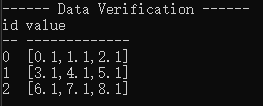
创建包含 array vector 列的表对象并写入数据。
#include "DolphinDB.h"
#include "Util.h"
#include <iostream>
#include <vector>

using namespace dolphindb;
using namespace std;

int main() {
    try {
        // 1. 定义表结构
        int rowNum = 3;
        int elementsPerRow = 3;
        vector<string> colNames = { "id", "value" };
        vector<DATA_TYPE> colTypes = { DT_INT, DT_DOUBLE_ARRAY };

        // 2. 创建索引向量
        VectorSP indexVector = Util::createVector(DT_INDEX, rowNum, rowNum);
        INDEX* pindex = indexVector->getIndexArray();

        int cumulative = 0;
        for (int i = 0; i < rowNum; ++i) {
            cumulative += elementsPerRow;
            pindex[i] = cumulative;
        }

        // 3. 创建值向量
        VectorSP valueVector = Util::createVector(DT_DOUBLE, rowNum * elementsPerRow, rowNum * elementsPerRow);

        int valueIndex = 0;
        for (int i = 0; i < rowNum; ++i) {
            for (int j = 0; j < elementsPerRow; ++j) {
                valueVector->setDouble(valueIndex++, i * 3 + j + 0.1);
            }
        }

        // 4. 创建Array Vector
        VectorSP arrayVectorCol = Util::createArrayVector(indexVector, valueVector);

        // 5. 创建id列
        VectorSP idCol = Util::createVector(DT_INT, rowNum, rowNum);
        for (int i = 0; i < rowNum; ++i) {
            idCol->setInt(i, i);
        }

        // 6. 创建表
        vector<ConstantSP> cols = { idCol, arrayVectorCol };
        ConstantSP table = Util::createTable(colNames, cols);

        // 7. 连接并上传
        DBConnection conn;
        conn.connect("127.0.0.1", 8848);
        conn.login("admin", "123456", false);
        conn.upload("myArrayVectorTable", table);

        // 8. 验证
        ConstantSP result = conn.run("select * from myArrayVectorTable;");
        cout << "------ Data Verification ------" << endl;
        cout << result->getString() << endl;

        conn.close();

    }
    catch (const std::exception& e) {
        cout << "Error: " << e.what() << endl;
        return -1;
    }

    return 0;
}